
Understanding Facebook Followers: A Comprehensive Guide
Are you curious about how to see your followers on Facebook? Look no further! In this article, we will guide you through the process of viewing your own followers on Facebook, as well as those of other users.
Why Do You Want to See Your Followers?
Before we dive into the steps, let’s understand why you might want to see your followers. Perhaps you’re curious about who is interested in your profile, or maybe you want to check if someone has started following you. Whatever your reason, knowing how to see your followers can be a valuable tool for understanding your online presence.
Seeing Followers on Facebook: A Step-by-step Guide
From Smartphone And Tablet
To see your followers on Facebook using your smartphone or tablet:
- Access The Facebook App: First, make sure you have the latest version of the Facebook app installed on your device.
- Log In to Your Account: If you’re not already logged in, enter your credentials to access your account.
- Navigate to Your Profile: Tap on your profile picture or name at the top right corner of the screen.
- Tap on ‘See Your Profile’: Select ‘See Your Profile’ from the menu that appears.
- Look For The Follower Count: Scroll down to the bottom of your profile page and look for the ‘Follower’ section.
Seeing Followers of Other Users
To see the followers of another user:
- Access Their Profile: Tap on the profile picture or name of the user you’re interested in.
- Look For The Follower Count: Scroll down to the bottom of their profile page and look for the ‘Follower’ section.
From Computer
To see your followers on Facebook using a computer:
- Access Your Profile: Click on your profile picture or name at the top right corner of the screen.
- Click on ‘See Your Profile’: Select ‘See Your Profile’ from the dropdown menu that appears.
- Look For The Follower Count: Scroll down to the bottom of your profile page and look for the ‘Follower’ section.
Seeing Followers of Other Users (Computer)
To see the followers of another user:
- Access Their Profile: Click on the profile picture or name of the user you’re interested in.
- Look For The Follower Count: Scroll down to the bottom of their profile page and look for the ‘Follower’ section.
Activating The Follower Feature
If you can’t see the follower count on your profile, it might be because the feature is not activated. Don’t worry! Here’s how to activate it:
From Smartphone And Tablet
- Access Settings: Tap on the three horizontal lines at the top right corner of the screen.
- Select ‘Settings And Privacy’: Scroll down and select ‘Settings and Privacy’.
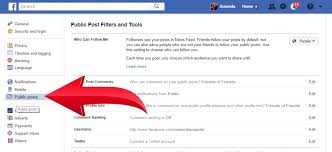
- Tap on ‘Follower And Public’: Select ‘Follower and Public’ from the menu that appears.
- Choose ‘Friends’ For Who Can Follow Me: Select ‘Friends’ from the dropdown menu.
From Computer
- Access Settings: Click on the three horizontal lines at the top right corner of the screen.
- Select ‘Settings And Privacy’: Scroll down and select ‘Settings and Privacy’.
- Click on ‘Follower And Public’: Select ‘Follower and Public’ from the menu that appears.
- Choose ‘Friends’ For Who Can Follow Me: Select ‘Friends’ from the dropdown menu.
Removing Followers
If you want to remove followers, here’s how:
From Smartphone And Tablet
- Access Settings: Tap on the three horizontal lines at the top right corner of the screen.
- Select ‘Settings And Privacy’: Scroll down and select ‘Settings and Privacy’.
- Tap on ‘Follower And Public’: Select ‘Follower and Public’ from the menu that appears.
- Choose ‘Friends’ For Who Can See My Follower: Select ‘Friends’ from the dropdown menu.
From Computer
- Access Settings: Click on the three horizontal lines at the top right corner of the screen.
- Select ‘Settings And Privacy’: Scroll down and select ‘Settings and Privacy’.
- Click on ‘Follower And Public’: Select ‘Follower and Public’ from the menu that appears.
- Choose ‘Friends’ For Who Can See My Follower: Select ‘Friends’ from the dropdown menu.
Conclusion
Now you know how to see your followers on Facebook, as well as those of other users. Remember to activate the follower feature if it’s not already enabled, and don’t hesitate to remove followers if needed.
Frequently Asked Questions
- Q: Why Can’t I See my Followers?
A: It might be because the follower feature is not activated. - Q: How do I Remove Followers?
A: Follow the steps above to deactivate the follower feature. - Q: Can I See Who’s Following me on Facebook?
A: Yes, follow the steps above to view your followers.


