
How to Contact a Private Number on Iphone: A Step-by-step Guide
Are you tired of giving out your personal phone number to everyone who asks? Do you want to keep your number private, but still be able to communicate with friends and family without revealing your identity? Look no further! In this article, we will guide you through the process of contacting a private number on iPhone.
What is a Private Number on Iphone?
A private number on iPhone refers to the ability to conceal your phone number when making calls. This feature allows you to maintain your anonymity while still being able to communicate with others. With a private number, your phone number will not be displayed on the recipient’s phone or in their call logs.
Why Use a Private Number on Iphone?
There are several reasons why you might want to use a private number on iPhone:
- To protect your personal safety and security
- To maintain your anonymity while making calls
- To avoid unwanted calls or messages from telemarketers or spam callers
- To keep your phone number private for business or professional purposes
How to Contact a Private Number on Iphone: Step-by-step Guide
To contact a private number on iPhone, follow these steps:
- Open The Phone App: Go to your home screen and find the Phone app.
- Tap on The Keypad Icon: Tap on the keypad icon to access the dialing pad.
- Enter The Prefix #31#: Enter the prefix #31# before the phone number you want to call (e.G., #31#123456789).
- Tap on The Call Button: Tap on the green Call button to initiate the call.
- Your Private Number Will be Displayed as Unknown: When the recipient answers, your private number will be displayed as “unknown” instead of your actual phone number.
Alternative Method: Using The Settings App
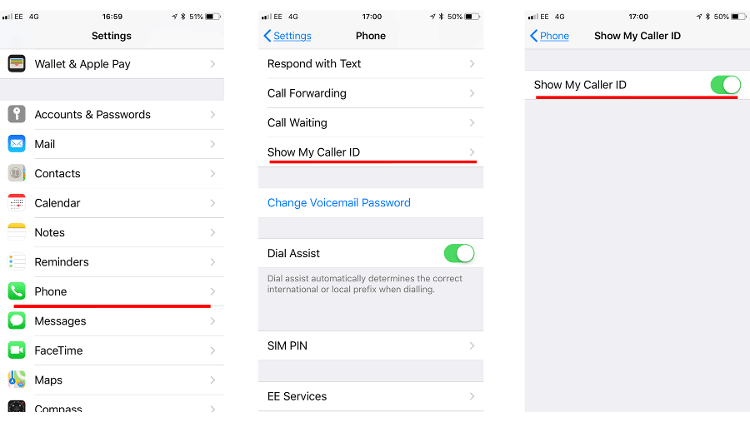
Alternatively, you can also use the Settings app to conceal your phone number for all outgoing calls:
- Go to Settings > Phone: Go to the Settings app and tap on the Phone option.
- Tap on Show My Caller ID: Tap on the toggle switch next to “Show My Caller ID” to turn it off.
- Your Phone Number Will be Hidden For All Outgoing Calls: From now on, your phone number will not be displayed when making calls.
Reverting Back to Displaying Your Phone Number
If you want to revert back to displaying your phone number, simply follow the same steps above and toggle the switch next to “Show My Caller ID” back on.
Conclusion
Contacting a private number on iPhone is a simple process that can be done using either of two methods. By following these steps, you can maintain your anonymity while still being able to communicate with others. Remember to always use caution when sharing your personal information online, and consider using a private number to protect your safety and security.
Frequently Asked Questions (FAQs)
- Q: What is The Purpose of Using a Private Number on Iphone?
A: The primary purpose of using a private number on iPhone is to conceal your phone number when making calls, thereby maintaining your anonymity. - Q: How do I Contact a Private Number on Iphone?
A: To contact a private number on iPhone, you can use either the prefix #31# or turn off the “Show My Caller ID” feature in the Settings app. - Q: Will my Phone Number be Hidden For All Outgoing Calls if I Use The Prefix #31#?
A: Yes, when using the prefix #31#, your phone number will not be displayed on the recipient’s phone or in their call logs. - Q: Can I Revert Back to Displaying my Phone Number?
A: Yes, simply toggle the switch next to “Show My Caller ID” back on in the Settings app to display your phone number again. - Q: Is Using a Private Number on Iphone Secure?
A: Using a private number on iPhone can help maintain your anonymity and protect your safety and security by concealing your phone number when making calls.
We hope this guide has been helpful in answering any questions you may have had about contacting a private number on iPhone.


