
How to Properly Restart Your Iphone 13: A Step-by-step Guide
Are you among the millions of people who have recently acquired an iPhone 13? If so, you might be wondering how to properly restart your device. In this article, we will guide you through three easy methods to shut down and restart your iPhone 13, as well as troubleshoot any issues that may arise.
Method 1: The Fastest Way to Restart Your Iphone 13
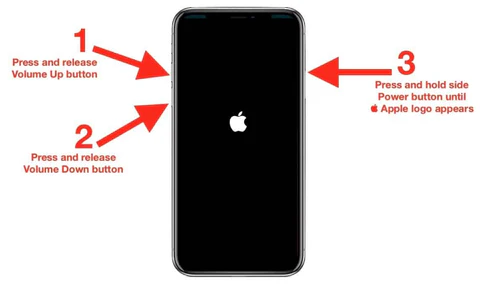
The first method is the fastest and most straightforward way to restart your iPhone 13. To do this:
- Press and hold the Side button (or Power button) on the right side of your iPhone 13.
- While holding the Side button, press and hold the Volume down button on the left side of your iPhone 13.
- Hold both buttons for at least 10 seconds until you see the Apple logo appear on the screen.
This method is the same as restarting an iPhone from a previous generation. If you’re having trouble finding the buttons, take a look at our guide on how to identify them.
Method 2: Restarting Your Iphone 13 Using The Settings App
If you’re not comfortable with holding down multiple buttons, don’t worry! You can also restart your iPhone 13 using the Settings app. To do this:
- Open the Settings app on your iPhone 13.
- Scroll down and select “General”.
- Tap on “Shut Down” to turn off your iPhone 13.
- Wait for a few seconds until you see the Apple logo appear on the screen.
- Press and hold the Side button to restart your iPhone 13.
This method is slightly more involved than the first one, but it’s still easy peasy!
Method 3: Using Assistivetouch to Restart Your Iphone 13
If you’re having trouble accessing the Settings app or need assistance with restarting your iPhone 13, don’t worry! You can use AssistiveTouch to restart your device. To do this:
- Open the Settings app on your iPhone 13.
- Scroll down and select “General”.
- Tap on “Accessibility” and then toggle on “AssistiveTouch”.
- A small virtual Home button will appear on your screen. Tap on it to access a menu of options.
- Select “Device” and then tap on “Restart” to restart your iPhone 13.
This method is ideal for people with disabilities or those who need assistance with using their device.
Troubleshooting: Restarting Your Iphone 13 That Won’t Turn Off
Sometimes, you might encounter issues where your iPhone 13 won’t turn off. If this happens:
- Try the first method of pressing and holding the Side button and Volume down button for at least 10 seconds.
- If that doesn’t work, try a hard reset by pressing and holding the Side button and Volume down button simultaneously until you see the Apple logo appear on the screen.
If none of these methods work, it’s possible that your iPhone 13 has a software issue or is experiencing hardware problems. In this case, we recommend contacting Apple support for further assistance.
How to Restart Your Iphone 13 Pro
The process of restarting an iPhone 13 Pro is identical to that of the standard iPhone 13 model. Simply follow the methods outlined above, and you’ll be good to go!
How to Restart Your Iphone 13 Mini
Similarly, restarting your iPhone 13 mini is also a breeze! Just use the same methods as for the standard iPhone 13 model.
Conclusion
Restarting your iPhone 13 is an essential skill that can help resolve many issues with your device. By following these simple steps and troubleshooting tips, you’ll be able to properly restart your iPhone 13 in no time.
Do you have any questions or concerns about restarting your iPhone 13? Let us know in the comments below!


