
Android Car Apps: Boosting Your Driving Experience
Are you tired of using your old car’s infotainment system? Do you want to upgrade to a more modern and convenient way of navigating, listening to music, and staying connected on the go? Look no further than Android Car apps! With these innovative tools, you can transform your driving experience into a seamless and enjoyable journey.
What Are Android Car Apps?
Android Car apps are specialized software designed for use with Android smartphones in vehicles. These apps provide users with a range of features, including navigation, music streaming, messaging, and more. By connecting your smartphone to the car’s infotainment system using a compatible adapter or cable, you can access these apps directly from the dashboard.
Benefits of Using Android Car Apps
- Improved Navigation: With Android Car apps like Google Maps and Waze, you’ll have access to turn-by-turn directions, real-time traffic updates, and alerts for potential hazards on the road.
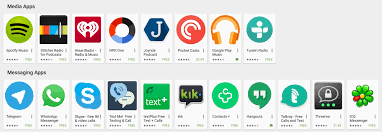
- Enhanced Music Experience: Enjoy your favorite music, podcasts, and radio stations with streaming services like Spotify and TuneIn Radio.
- Staying Connected: Stay in touch with friends and family using messaging apps like WhatsApp and Telegram.
- Increased Convenience: With Android Car apps, you can control your phone’s functions without needing to physically interact with it while driving.
Top Android Car Apps
- Google Maps
- The most popular navigation app on the market, providing accurate directions and real-time traffic updates.
- Waze
- A community-driven navigation app that offers real-time traffic information and hazard alerts.
- Spotify
- A music streaming service with a vast library of songs, podcasts, and radio stations.
- Whatsapp
- A popular messaging app that allows you to stay in touch with friends and family while on the go.
Other Android Car Apps
- Amazon Music
- A streaming service with access to millions of songs, podcasts, and audiobooks.
- Audible
- An audiobook platform offering a vast selection of titles read by professional narrators.
- Telegram
- A messaging app that allows group chats and file sharing.
- Tunein Radio
- A radio streaming service with access to thousands of stations worldwide.
Getting Started With Android Car Apps
To use Android Car apps, you’ll need:
- A Compatible Smartphone: Make sure your phone is running on the latest version of Android.
- An Infotainment System Adapter or Cable: Connect your phone to the car’s system using a compatible adapter or cable.
- The Relevant App Installed on Your Smartphone: Download and install the desired app from the Google Play Store.
Tips For Using Android Car Apps
- Use Voice Commands: Utilize voice commands to interact with apps like Google Maps, Waze, and Spotify while driving.
- Keep Distractions Minimal: Avoid using apps that require physical interaction or visual attention while driving.
- Stay Updated: Regularly update your smartphone’s software and apps to ensure you have the latest features and security patches.
Conclusion
Android Car apps offer a wealth of benefits for drivers, from improved navigation to enhanced music experiences. With these innovative tools, you can upgrade your car’s infotainment system and enjoy a more convenient, connected driving experience. By following the tips and guidelines outlined above, you’ll be well on your way to maximizing the potential of Android Car apps in your vehicle.
Frequently Asked Questions (FAQs)
- Q: Do I Need a Rooted Phone to Use Android Car Apps?
A: No, most Android Car apps can be used without rooting your phone. - Q: Can I Use Multiple Apps at Once on my Car’s Infotainment System?
A: Yes, many modern cars allow you to run multiple apps simultaneously. - Q: How do I Access Google Maps or Waze in my Car?
A: Simply connect your smartphone to the car’s system using a compatible adapter or cable and launch the app from the dashboard. - Q: Can I Use Spotify on my Car’s Infotainment System?
A: Yes, you can use Spotify by connecting your phone to the car’s system and launching the app from the dashboard. - Q: Are Android Car Apps Compatible With All Cars?
A: Most modern cars have infotainment systems that support Android Car apps, but compatibility may vary depending on the make and model of your vehicle. - Q: Can I Use Whatsapp or Telegram in my Car?
A: Yes, you can use these messaging apps by connecting your phone to the car’s system and launching them from the dashboard. - Q: How do I Keep my Android Car Apps Updated?
A: Regularly update your smartphone’s software and apps to ensure you have the latest features and security patches.
I hope this information helps!


