
How to Check if Contacts Are on a Sim Card
Are you wondering how to check if contacts are saved on your SIM card? Look no further! In this article, we will guide you through the process of checking your SIM card for contacts, regardless of whether you have an Android or iPhone device.
Why is it Important to Check Your Sim Card Contacts?
Before diving into the process, let’s quickly discuss why it’s essential to check your SIM card contacts. Sometimes, when you switch phones or update your operating system, some contacts might get lost in translation. Checking your SIM card can help you recover these important numbers.
Step 1: Check Compatibility
Before starting, ensure that your SIM card is compatible with your device. The most common formats are Nano-SIM (4FF), Micro-SIM (3FF), and Mini-SIM (2FF). If you’re unsure about the type of SIM card you have, check the dimensions of the slot or consult your device’s manual.
Step 2: Backup Your Contacts
To prevent any unwanted changes to your contacts, create a backup before proceeding. This can be done using the Google Contacts app on Android devices or the Contacts app on iPhone devices.
How to Check Contacts on an Android Device
On Android devices, you can use a third-party app called “Copy to SIM Card” to check and manage your SIM card contacts. Here’s how:
- Insert Your Sim Card: Insert your SIM card into your Android device.
- Download The App: Download the “Copy to SIM Card” app from the Google Play Store.
- Open The App: Open the app and grant it permission to access your contacts.
- View Contacts on Sim: Tap on the “Contacts on SIM” tab to view all the contacts saved on your SIM card.
How to Check Contacts on a Samsung Device
On Samsung devices, you can check your SIM card contacts using the built-in Contacts app. Here’s how:
- Open The Contacts App: Open the Contacts app and tap on the three dots in the top right corner.
- Tap on Sim 1/2: Tap on “SIM 1/2” to view all the contacts saved on your SIM card.
How to Check Contacts on a Xiaomi Device
On Xiaomi devices, you can check your SIM card contacts using the built-in Contacts app. Here’s how:
- Open The Contacts App: Open the Contacts app and tap on the three dots in the top right corner.
- Tap on Scheda Sim: Tap on “Scheda SIM” to view all the contacts saved on your SIM card.
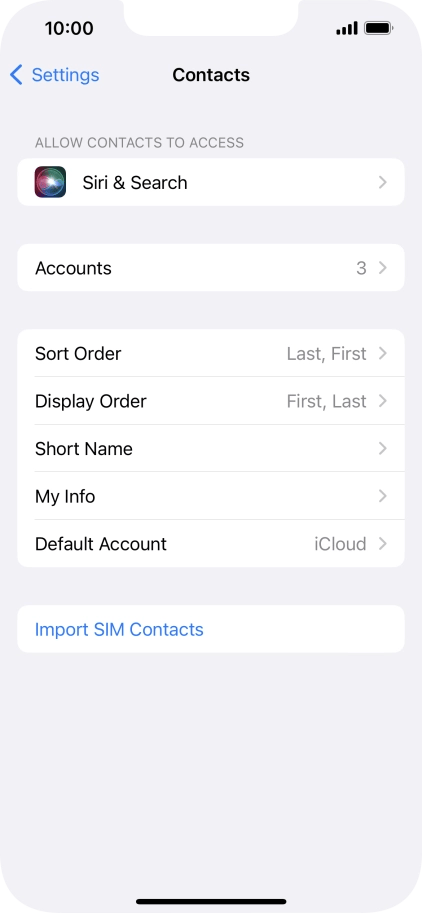
How to Check Contacts on an Iphone Device
On iPhone devices, you can check your SIM card contacts using the built-in Settings app. Here’s how:
- Open The Settings App: Open the Settings app and tap on “Contacts”.
- Tap on Matter Contacts: Tap on “Matter Contacts” and select your SIM card as the source.
- Choose Destination: Choose where you want to save the contacts (e.G., ICloud, Google, or Phone).
How to Check Contacts on a PC
If you need to access your SIM card contacts on a PC, it’s not recommended to use a SIM card reader for this purpose. Instead, export your contacts from your Android device using a CSV file and import them into your PC.
Conclusion
Checking your SIM card contacts is an essential step in ensuring that all your important numbers are safe and accessible. By following the steps outlined above, you can easily check your SIM card contacts on various devices, including Android, Samsung, Xiaomi, iPhone, and PC.
Frequently Asked Questions (FAQs)
- Q: Can I Transfer Contacts From my Sim Card to my Phone?
A: Yes, it is possible to transfer contacts from your SIM card to your phone using the methods outlined above. - Q: How do I Backup my Contacts Before Transferring Them to my Phone?
A: To backup your contacts, create a copy of them on your device or use a third-party app like Google Contacts or Apple’s Contacts app. - Q: Can I Use a Sim Card Reader For This Purpose?
A: No, it is not recommended to use a SIM card reader to access and transfer contacts from your SIM card. - Q: What if my Phone Doesn’t Have a Compatible Sim Card Slot?
A: If your phone has an incompatible SIM card slot, you can use a SIM card adapter to convert the format of your SIM card. - Q: Can I Transfer Contacts From One Phone to Another Using a Csv File?
A: Yes, it is possible to export contacts from your old device and import them into your new device using a CSV file. - Q: How do I Update my Operating System Without Losing Important Contacts?
A: To avoid losing contacts when updating your operating system, create a backup of your contacts before proceeding with the update. - Q: Can I Recover Lost Contacts From my Sim Card?
A: Yes, it is possible to recover lost contacts from your SIM card using a third-party app or by restoring your device from a backup. - Q: How do I Prevent Duplicate Contacts From Appearing on my Phone?
A: To avoid duplicate contacts, ensure that you are transferring the correct contacts from your SIM card to your phone.
Note: This article is intended for educational purposes only and may not be applicable in all situations.


