
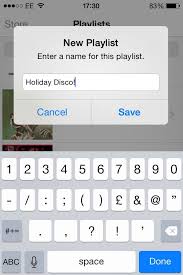
How to Create a Playlist on Your Phone
Are you tired of searching for your favorite songs every time you want to listen to them? Creating a playlist on your phone can be a great way to organize your music library and save time. In this guide, we will show you how to create a playlist on various platforms, including Spotify, Apple Music, Amazon Music, YouTube, SoundCloud, and more.
Why Create a Playlist?
Creating a playlist allows you to group similar songs together based on their theme, genre, or mood. This can be especially useful when trying to find the perfect song for a workout, relaxation, or a specific occasion. With a playlist, you can easily access your favorite songs without having to search through your entire music library.
How to Create a Playlist on Spotify
Spotify is one of the most popular music streaming services available today. To create a playlist on Spotify:
- Open the Spotify app on your Android or iOS device.
- Tap on the “New” button at the bottom right corner of the screen.
- Select “Playlist” from the menu.
- Choose a name for your playlist and add a description (optional).
- Tap on the “Save” button to create your playlist.
How to Create a Playlist on Apple Music
Apple Music is another popular music streaming service that allows you to create playlists. To create a playlist on Apple Music:
- Open the Apple Music app on your iOS device.
- Tap on the “Bookshop” icon at the bottom left corner of the screen.
- Select “Playlist” from the menu.
- Choose a name for your playlist and add a description (optional).
- Tap on the “Save” button to create your playlist.
How to Create a Playlist on Amazon Music
Amazon Music is a music streaming service that offers two plans: Prime Music and Amazon Music Unlimited. To create a playlist on Amazon Music:
- Open the Amazon Music app on your Android or iOS device.
- Tap on the “Music” icon at the bottom left corner of the screen.
- Select “Playlist” from the menu.
- Choose a name for your playlist and add a description (optional).
- Tap on the “Save” button to create your playlist.
How to Create a Playlist on Youtube
YouTube is a video-sharing platform that also allows you to create playlists of music videos or audio tracks. To create a playlist on YouTube:
- Open the YouTube app on your Android or iOS device.
- Tap on the “Search” icon at the top right corner of the screen.
- Search for the song you want to add to your playlist.
- Tap on the three dots next to the video title and select “Save in a playlist”.
- Choose an existing playlist or create a new one.
How to Create a Playlist on Soundcloud
SoundCloud is a music streaming service that allows users to upload, share, and discover new music. To create a playlist on SoundCloud:
- Open the SoundCloud app on your Android or iOS device.
- Tap on the “Search” icon at the top right corner of the screen.
- Search for the song you want to add to your playlist.
- Tap on the three dots next to the track title and select “Add to a new playlist”.
- Choose an existing playlist or create a new one.
How to Create a Playlist on Your Android Phone
If you don’t have a music streaming service subscription, you can still create a playlist on your Android phone using the Google Play Music app.
- Open the Google Play Music app on your Android device.
- Tap on the “☰” icon at the top left corner of the screen.
- Select “Collected media” from the menu.
- Choose an existing song or album to add to your playlist.
- Tap on the “+” button next to the track title and select “Add to a new playlist”.
- Choose an existing playlist or create a new one.
How to Create a Playlist on Your Iphone
To create a playlist on your iPhone:
- Open the Music app on your iOS device.
- Tap on the “Bookshop” icon at the bottom left corner of the screen.
- Select “Playlist” from the menu.
- Choose a name for your playlist and add a description (optional).
- Tap on the “Save” button to create your playlist.
Tips And Variations
- You can also create collaborative playlists with friends or family members by sharing the link with them.
- To make a public playlist, tap on the three dots next to the playlist title and select “Make public”.
- To add music from another service, such as Spotify or Apple Music, to your playlist, tap on the “Add” button and select the desired service.
Conclusion
Creating a playlist on your phone can be a great way to organize your music library and save time. Whether you use Spotify, Apple Music, Amazon Music, YouTube, SoundCloud, or another platform, creating a playlist is a simple process that can be completed in just a few steps. By following the steps outlined above, you can create a personalized playlist that reflects your musical tastes and preferences.
Frequently Asked Questions (FAQs)
- Q: How do I Add Music to my Playlist?
A: You can add music to your playlist by tapping on the “Add” button and selecting the desired song or album. - Q: Can I Create a Collaborative Playlist With Friends or Family Members?
A: Yes, you can create a collaborative playlist with others by sharing the link with them. - Q: How do I Make my Playlist Public?
A: To make your playlist public, tap on the three dots next to the playlist title and select “Make public”. - Q: Can I Add Music From Another Service to my Playlist?
A: Yes, you can add music from another service, such as Spotify or Apple Music, to your playlist by tapping on the “Add” button and selecting the desired service. - Q: How do I Access my Playlist on Multiple Devices?
A: You can access your playlist on multiple devices by logging in with the same account credentials.
I hope this helps! Let me know if you have any other questions or need further clarification on anything.


