
How to Download Serious TV on Android: A Guide
Are you looking for a way to download your favorite serious TV shows on your Android device? Look no further! In this article, we will guide you through the process of downloading serious TV on Android, using various platforms and applications.
Why Download Serious TV on Android?
Downloading serious TV on Android allows you to watch your favorite shows anywhere, anytime, without an internet connection. Whether you’re commuting, traveling, or simply want to enjoy some quality time at home, having access to downloaded content can be a game-changer.
Platforms For Downloading Serious TV on Android
Several platforms and applications offer the ability to download serious TV on Android. Here are some of the most popular options:
1. Netflix
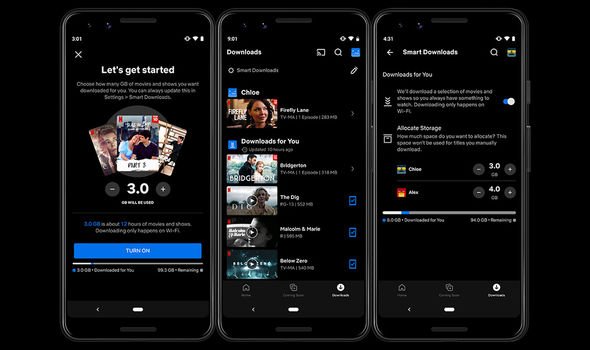
Netflix is one of the most well-known streaming services that offers a wide range of serious TV shows, including exclusive content. To download Netflix on your Android device, follow these steps:
- Open the Google Play Store and search for “Netflix”.
- Download and install the app.
- Sign up or log in to your existing account.
- Browse through the available series and find the one you want to download.
2. Infinity
Infinity is another streaming service that offers a variety of serious TV shows, including exclusive content from Mediaset and Premium channels. To download Infinity on your Android device, follow these steps:
- Open the Google Play Store and search for “Infinity”.
- Download and install the app.
- Sign up or log in to your existing account.
- Browse through the available series and find the one you want to download.
3. Amazon Prime Video
Amazon Prime Video is a popular streaming service that offers a wide range of serious TV shows, including exclusive content from Amazon Studios. To download Amazon Prime Video on your Android device, follow these steps:
- Open the Google Play Store and search for “Amazon Prime Video”.
- Download and install the app.
- Sign up or log in to your existing account.
- Browse through the available series and find the one you want to download.
4. Chili
Chili is a streaming service that offers a wide range of serious TV shows, including exclusive content from various networks. To download Chili on your Android device, follow these steps:
- Open the Google Play Store and search for “Chili”.
- Download and install the app.
- Sign up or log in to your existing account.
- Browse through the available series and find the one you want to download.
5. Timvision
TIMVision is a streaming service that offers a wide range of serious TV shows, including exclusive content from Mediaset channels. To download TIMVision on your Android device, follow these steps:
- Open the Google Play Store and search for “TIMVision”.
- Download and install the app.
- Sign up or log in to your existing account.
- Browse through the available series and find the one you want to download.
6. Raiplay
RaiPlay is a streaming service that offers a wide range of serious TV shows, including exclusive content from Rai channels. To download RaiPlay on your Android device, follow these steps:
- Open the Google Play Store and search for “RaiPlay”.
- Download and install the app.
- Sign up or log in to your existing account.
- Browse through the available series and find the one you want to download.
Other Solutions
If none of the above platforms meet your needs, there are other solutions available. Here are a few options:
Flud
Flud is a free application that allows you to download serious TV shows from various platforms. To use Flud, follow these steps:
- Download and install the app from the Google Play Store.
- Sign up or log in to your existing account.
- Browse through the available series and find the one you want to download.
Veezie
Veezie is a free application that allows you to stream and download serious TV shows. To use Veezie, follow these steps:
- Download and install the app from the Google Play Store.
- Sign up or log in to your existing account.
- Browse through the available series and find the one you want to download.
Ponydroid
Ponydroid is a paid application that allows you to manage downloads of serious TV shows. To use Ponydroid, follow these steps:
- Download and install the app from the Google Play Store.
- Sign up or log in to your existing account.
- Browse through the available series and find the one you want to download.
GetThemAll
GetThemAll is a free application that allows you to manage downloads of serious TV shows. To use GetThemAll, follow these steps:
- Download and install the app from the Google Play Store.
- Sign up or log in to your existing account.
- Browse through the available series and find the one you want to download.
Conclusion
Downloading serious TV on Android can be a great way to enjoy your favorite shows anywhere, anytime. With various platforms and applications available, finding the right solution for your needs is easier than ever. Just remember to always use reputable sources and follow the necessary steps to ensure a smooth downloading experience.
Frequently Asked Questions
Here are some frequently asked questions about downloading serious TV on Android:
Q: Which platform is best for downloading serious TV shows?
A: The best platform for downloading serious TV shows depends on your personal preferences. Some popular options include Netflix, Infinity, Amazon Prime Video, Chili, TIMVision, and RaiPlay.
Q: How do I download serious TV shows using a streaming service?
A: To download serious TV shows using a streaming service, follow these steps:
- Sign up or log in to your existing account.
- Browse through the available series and find the one you want to download.
- Select the episode or season you want to download.
- Wait for the download process to complete.
Q: What are some other solutions for downloading serious TV shows on Android?
A: Some other solutions for downloading serious TV shows on Android include Flud, Veezie, Ponydroid, and GetThemAll.


