
How to Capsize Expression of Face in Photos: A Step-by-step Guide
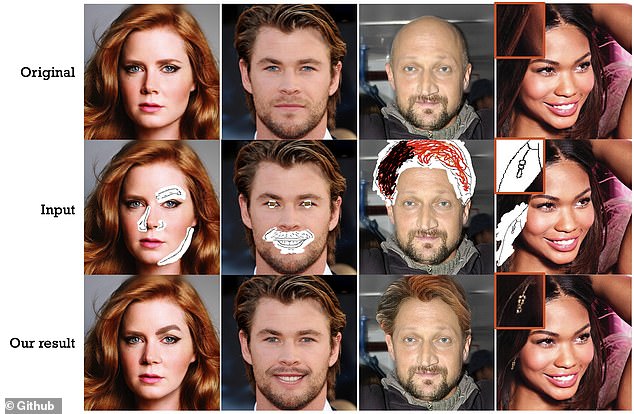
Are you tired of smiling subjects in your photos? Do you want to add some humor or creativity to your images? Look no further! In this article, we will show you how to capsize expression of face in photos using various software and online tools.
Why Capsize Expression of Face?
Capising expression of face can be a fun and creative way to add humor or emotion to your photos. It’s also a useful technique for photo editing, especially when working with portraits. By altering the expression of a subject, you can convey different emotions or moods, making your images more engaging and interesting.
Method 1: Using Photoshop
The first method we’ll explore is using Adobe Photoshop. This industry-standard software offers a range of tools and features for photo editing, including face manipulation.
Step 1: Open Photoshop
To get started, open Adobe Photoshop on your computer. If you don’t have the software installed, you can download a free trial version or purchase a subscription.
Step 2: Select The Image
Select the image you want to edit and click “Open” in Photoshop. Choose the file from your computer’s memory or select it from a cloud storage service like Google Drive or Dropbox.
Step 3: Create a Copy of The Image
Create a copy of the selected image by using the keyboard shortcut Ctrl+J (Windows) or Command+J (Mac).
Step 4: Select The Marquee Tool
Select the Marquee tool from the toolbar on the left side of the screen. This tool will allow you to select specific areas of the image.
Step 5: Create Anchors
Click and drag the Marquee tool around the mouth or any other area you want to modify. Release the mouse button to create anchors. These anchors will serve as reference points for further modifications.
Step 6: Modify The Expression
Using the anchors, you can now manipulate the expression of the subject. Click and drag the anchors to move them into position, adjusting the shape and appearance of the mouth and other facial features.
Step 7: Export The Image
Once you’re satisfied with the modified image, click “File” > “Export” to save it in a suitable format.
Method 2: Using Gimp
The next method we’ll explore is using GIMP (GNU Image Manipulation Program), a free and open-source software for photo editing.
Step 1: Open Gimp
To get started, open GIMP on your computer. If you don’t have the software installed, you can download it from the official website.
Step 2: Select The Image
Select the image you want to edit and click “Open” in GIMP. Choose the file from your computer’s memory or select it from a cloud storage service like Google Drive or Dropbox.
Step 3: Access The Transformation Tools
Access the transformation tools by going to “Filters” > “Tools” > “Transformation”. Select the “Warping” option and adjust the settings as needed.
Step 4: Modify The Expression
Using the transformation tools, you can now manipulate the expression of the subject. Click and drag the handles to move them into position, adjusting the shape and appearance of the mouth and other facial features.
Step 5: Export The Image
Once you’re satisfied with the modified image, click “File” > “Save As” to export it in a suitable format.
Method 3: Using Online Tools
If you don’t have access to Adobe Photoshop or GIMP, there are online tools available that can help you capsize expression of face in photos.
Step 1: Choose an Online Tool
Select one of the online tools mentioned below (Photopea, Cartoon Photo, Sketch Your Face, LunaPic) and follow the instructions provided.
Step 2: Upload The Image
Upload your image to the chosen online tool. This will vary depending on the specific service you’re using.
Step 3: Modify The Expression
Using the online tool’s interface, select the area of the image you want to modify (usually by clicking and dragging a marquee around it). Adjust the settings as needed to manipulate the expression of the subject.
Step 4: Export The Image
Once you’re satisfied with the modified image, click “Export” or “Save” to download it in a suitable format.
Conclusion
Capising expression of face in photos can be a fun and creative way to add humor or emotion to your images. With these methods, you can easily manipulate the expression of a subject using software like Photoshop and GIMP, as well as online tools available for free. Remember to follow the instructions carefully to achieve the desired outcome.
Faqs
- What is Capising Expression of Face?
Capising expression of face refers to modifying or manipulating the facial features of a person in a photograph. - How do I Use Photoshop to Capsize Expression of Face?
To capise expression of face using Photoshop, follow the steps outlined above: Create a copy of the image, select the Marquee tool, create anchors, modify the expression, and export the image. - Can I Use Gimp to Capsize Expression of Face?
Yes, you can use GIMP (GNU Image Manipulation Program) to capise expression of face in photos by following the steps outlined above: Access the transformation tools, select the Warping option, modify the expression, and export the image. - What Online Tools Can I Use to Capsize Expression of Face?
Some popular online tools for capising expression of face include Photopea, Cartoon Photo, Sketch Your Face, LunaPic, Snapseed (for mobile devices), FaceApp (for mobile devices), and Effects modify photo face (for iOS and iPadOS). - Can I Use These Methods to Capsize Expression of Face in Videos?
While the methods outlined above work for photos, they may not be directly applicable to video editing. For video editing, you can try using software like Adobe Premiere Pro or Final Cut Pro X.


