
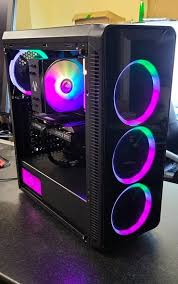
Assembling a Gaming PC With 500 Euros: A Step-by-step Guide
Are you tired of playing games on an outdated computer? Do you want to experience the thrill of gaming without breaking the bank? Look no further! Assembling a gaming PC with 500 euros is possible, and in this guide, we’ll show you how to do it.
Components: What You Need to Know
Before we dive into the nitty-gritty of assembling your gaming PC, let’s talk about the components you’ll need. Don’t worry; we’ll break them down for you:
- Case: The outer casing of your computer that holds all the other components together.
- Motherboard: The main circuit board that connects all the hardware components together.
- Cpu (Processor): The brain of your computer that executes instructions and performs calculations.
- Ram (Memory): Temporary storage for data, which is used by the CPU to perform tasks.
- Gpu (Graphics Card): A dedicated graphics processing unit that handles graphics rendering and other graphical tasks.
Choosing Your Components
Now that we’ve covered what you need to know about each component, let’s talk about choosing them. Here are some tips:
- Case: Look for a case with good airflow, enough room for all your components, and a pleasant design.
- Motherboard: Choose a motherboard that supports your CPU, has enough RAM slots, and features like USB ports and SATA connectors.
- Cpu (Processor): Select a processor that suits your gaming needs. If you’re on a tight budget, consider an Intel Core i3 or AMD Ryzen 3.
- Ram (Memory): Get at least 8GB of DDR4 RAM to ensure smooth performance.
- Gpu (Graphics Card): Opt for a mid-range GPU like the NVIDIA GeForce GTX 1660 or AMD Radeon RX 560.
Step-by-step Assembly Guide
Now that we’ve covered the components and choosing them, let’s get down to business. Here’s a step-by-step guide on how to assemble your gaming PC:
- Unpack And Prepare All Components: Unbox each component, and make sure you have all the necessary cables and accessories.
- Install The Motherboard Stand-offs: Use screws to secure the motherboard stand-offs to the case.
- Install The Cpu: Carefully remove the processor from its packaging and install it onto the motherboard, ensuring it’s securely fastened with a screw.
- Add The Ram: Insert the RAM sticks into the motherboard’s RAM slots, making sure they’re properly seated and secured.
- Install The Storage Drive: Connect your storage drive (hard drive or SSD) to the motherboard using a SATA cable.
- Install The Power Supply Unit (PSU): Place the PSU in its designated spot, ensuring it’s securely fastened with screws.
- Connect The Fans And Other Peripherals: Connect any additional fans, LED strips, or other peripherals you’ve installed.
- Assemble The Case: Carefully assemble the case, making sure all cables are properly secured.
Final Touches
Congratulations! You’ve successfully assembled your gaming PC. Now, let’s take care of the final touches:
- Install an Operating System: Insert a bootable USB drive with your preferred operating system (Windows or Linux).
- Configure Your Settings: Set up your display settings, audio settings, and any other preferences you have.
- Test Your System: Run some benchmarking tests to ensure everything is working smoothly.
Conclusion
Assembling a gaming PC with 500 euros may seem daunting, but with this guide, you’ll be able to create a capable machine that can handle modern games. Remember to choose your components carefully and follow the steps outlined above. Happy gaming!
Frequently Asked Questions (FAQs)
- Q: What is The Minimum Budget I Need For Assembling a Gaming Pc?
A: The minimum budget you’ll need is around 500 euros, depending on the components you choose. - Q: Can I Use an Old Computer Case For This Project?
A: While it’s possible to reuse an old case, we recommend getting a new one specifically designed for gaming PCs. - Q: How Much Ram Should I Get For my Gaming Pc?
A: A minimum of 8GB of DDR4 RAM is recommended, but you can opt for more if budget allows. - Q: Can I Install Windows on an Ssd Instead of a Hard Drive?
A: Yes! Installing Windows on an SSD will significantly improve your system’s performance and responsiveness. - Q: How do I Ensure my Gaming PC Stays Cool During Long Gaming Sessions?
A: Make sure to choose a case with good airflow, and consider adding additional fans or liquid cooling systems if needed.
Additional Resources
If you’re still unsure about assembling your gaming PC or need more guidance, we recommend checking out the following resources:
- Our in-depth guide on choosing the best components for your gaming PC
- A YouTube video tutorial on how to assemble a gaming PC with 500 euros
- A forum discussion on optimal gaming PC configurations
Remember to always follow proper safety precautions when working with electronics and consult professionals if you’re unsure about any aspect of the assembly process.


