
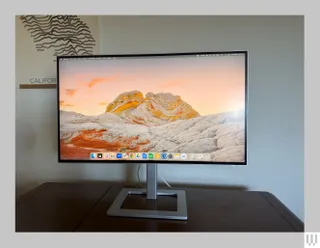
Better Monitor For Photography: A Guide to Choosing The Right One (2024)
As a passionate photographer, you want to ensure that your monitor does justice to the moments, colors, and subjects immortalized in your photos. With so many monitors on the market, it can be overwhelming to choose one that meets your requirements. In this guide, we’ll help you navigate the world of monitors for photography and find the perfect one for your needs.
What Makes a Good Monitor For Photography?
Not all monitors are created equal when it comes to photography. While some may seem appealing due to their price or features, they might not be suitable for capturing high-quality images. A good monitor for photography should have:
- High Resolution: A resolution of at least 2560 x 1440 pixels (QHD) is recommended for sharp and detailed images.
- Wide Color Gamut: Look for monitors with a wide color gamut, such as Adobe RGB or DCI-P3, to ensure accurate color representation.
- High Contrast Ratio: A high contrast ratio (e.G., 1000:1) Helps to create deep blacks and vibrant colors.
- Fast Response Time: A fast response time (usually measured in milliseconds) ensures smooth motion and reduced ghosting or blurring.
Philips 271V8L – A Top-notch Monitor For Photography
The Philips 271V8L is a 27″ monitor with a QHD resolution, LED backlight, and a high contrast ratio. It features:
- Led Backlight: Provides excellent color accuracy and a wide viewing angle.
- Qhd Resolution: Offers sharp and detailed images with a pixel density of 108 ppi.
- High Contrast Ratio: Delivers deep blacks and vibrant colors for stunning visual representation.
Other Notable Monitors For Photography
- LG 27GR75Q Ultragear Gaming Monitor: A 27″ QHD monitor with a fast response time, HDR10 support, and NVIDIA G-Sync technology.
- Gawfolk 27 Inches Curvo Gaming Monitor: A 27″ monitor with a Full HD resolution, 100Hz refresh rate, and curved design for an immersive experience.
- Samsung Odyssey G5 (S32CG554): A 32″ QHD monitor with a fast response time, HDR10 support, and NVIDIA G-Sync technology.
Choosing The Right Monitor For Your Needs
When selecting a monitor for photography, consider the following factors:
- Screen Size: Choose a monitor with a screen size that fits your workspace comfortably.
- Resolution: Opt for a resolution of at least QHD (2560 x 1440) for sharp and detailed images.
- Color Gamut: Ensure the monitor has a wide color gamut, such as Adobe RGB or DCI-P3, to capture accurate colors.
- Response Time: Select a monitor with a fast response time to prevent ghosting or blurring.
Additional Features to Consider
- Hdr Support: Look for monitors with HDR (High Dynamic Range) support to expand the color gamut and contrast ratio.
- Wide Viewing Angle: Choose a monitor with a wide viewing angle to ensure accurate color representation from any position.
- Connectivity Options: Ensure the monitor has multiple connectivity options, such as HDMI, DisplayPort, and USB ports.
Conclusion
Choosing the right monitor for photography can be overwhelming, but by considering the factors mentioned in this guide, you’ll be able to find a monitor that meets your requirements. Remember to look for high resolution, wide color gamut, high contrast ratio, fast response time, HDR support, and wide viewing angle. Happy shopping!
Frequently Asked Questions (FAQs)
- What is The Best Monitor Size For Photography?
A: A screen size of at least 27 inches is recommended for comfortable working. - What Resolution is Suitable For Photography?
A: A minimum QHD resolution (2560 x 1440) is required for sharp and detailed images. - How Important is Color Gamut in a Monitor For Photography?
A: Color gamut is crucial, as it affects the accuracy of color representation in your photos. - What is Hdr Support, And Why is it Essential For Photography?
A: HDR (High Dynamic Range) support expands the color gamut and contrast ratio, enhancing image quality. - How do I Choose a Monitor With Good Connectivity Options?
A: Look for monitors with multiple HDMI, DisplayPort, and USB ports to ensure flexibility in connecting devices.
Hope this comprehensive guide helps you make an informed decision when choosing the perfect monitor for your photography needs!


