
Mastering With Windows 10: A Complete Tutorial
Pre-mastering Operations
Before starting to master with Windows 10, some pre-mastering operations need to be performed. These operations include:
- Ensuring You Have a Burner: If the computer does not have an integrated burner, it is necessary to purchase and install an external one.
- Installing Windows Media Player: This program is required for creating CD audio and video.
Mastering With Windows 10
Once these pre-mastering operations are performed, you can proceed with mastering your data. There are several options for mastering:
- Creating a Data CD: To create a data CD, select the “USB Flash Drive” or “CD/DVD Reader” option.
- Creating an Audio CD: To create an audio CD, use Windows Media Player.
- Mastering Iso: To master an ISO file, use the Disk Image Mastering feature.
Mastering an Audio CD With Windows 10
To master an audio CD with Windows 10, follow these steps:
- Insert a blank disc into the burner connected to your computer.
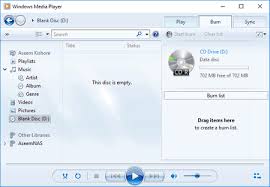
- Have access to Windows Media Player and select the Burn option.
- Choose “Audio CD” from the dropdown menu.
- Select the music files you want to master in the right-hand sidebar.
Mastering an Iso File With Windows 10
To master an ISO file with Windows 10, follow these steps:
- Insert a blank disc into the burner connected to your computer.
- Select the ISO file you want to master and select the “Burn Image” option from the context menu.
- Set the writing speed and start the mastering process.
Mastering Video With Windows 10
To master video with Windows 10, use third-party software like CDBurnerXP. This software allows you to create DVD videos and other file types.
Conclusion
Mastering data with Windows 10 is a simple and intuitive process. You can perform various mastering options, including creating audio CDs and videos, ISO files, and other file types. Make sure you have an external burner and install Windows Media Player to use some of the mastering features.
Frequently Asked Questions
- What’s The Difference Between The Built-in Burner And The External One?
The built-in burner is a device provided with the computer, while the external burner is a separate device that must be connected to the computer for use. - How Can I Create an Audio CD With Windows 10?
To create an audio CD with Windows 10, you need to use Windows Media Player and select the Burn option. - What’s The Difference Between The Iso Burner And The Audio CD Burner?
The ISO burner allows you to create ISO files, while the audio CD burner allows you to create audio CDs. - How Can I Use Cdburnerxp to Master a Video?
To use CDBurnerXP to master a video, download and install the software, then select the DVD Video option and follow the instructions for creating the file. - What Are The Minimum Hardware Requirements For Using Windows 10 For Mastering?
The minimum hardware requirements for using Windows 10 for mastering include an Intel Core 2 Duo processor or equivalent, 4 GB of RAM, and at least 20 GB of free disk space.


