
Unlocking The Secrets: Bypassing Icloud Lock on Your Device
Are you tired of being locked out of your iPhone, iPad, or Mac due to an iCloud lock? Do you feel frustrated when you’re unable to regain access to your device? Well, you’re not alone! Many users face this issue, but there’s good news – we’ll guide you through the process of bypassing iCloud lock and regaining control over your device.
Understanding Icloud Lock
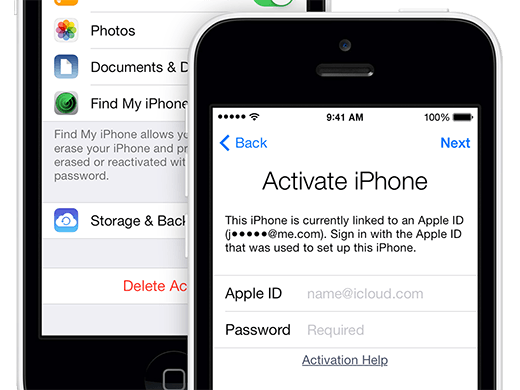
ICloud lock is a security feature designed by Apple to prevent unauthorized use of an iPhone, iPad, or Mac. When a device is locked due to iCloud restrictions, it can’t be used until the lock is removed. This is usually done by entering the correct Apple ID and password associated with the device.
Why Bypassing Icloud Lock Might Be Necessary
There are several reasons why you might need to bypass iCloud lock:
- You’ve purchased a second-hand iPhone or iPad that’s locked due to an old owner’s iCloud account.
- Your device has been blocked by a previous owner, and you can’t access it.
- You’re trying to recover your device from a friend or family member who’s no longer using it.
Method 1: Bypassing Icloud Lock Using a Second Device
If you have another Apple device associated with the same Apple ID, you can use that device to bypass the lock. Here’s how:
- Go to the Apple website and sign in with your Apple ID.
- Click on “Recover Password” and follow the instructions to reset your password.
- On your locked device, tap on “Unblock this iPhone/iPad” and select “Use a second device.”
- Enter the verification code sent to your second device, and follow the prompts to complete the process.
Method 2: Bypassing Icloud Lock Using Recovery Mode
If you don’t have access to another Apple device, you can try bypassing the lock using recovery mode:
- Connect your locked device to a computer using a USB cable.
- Put your device in recovery mode by holding down the sleep/wake button and the home button simultaneously (for iPhone) or the power button and volume up/down buttons (for iPad).
- Open iTunes on your computer and select your device from the list of connected devices.
- Click on “Restore iPhone/iPad” and follow the prompts to complete the process.
Method 3: Bypassing Icloud Lock Using a Third-party Service
There are some third-party services that claim to help bypass iCloud lock, but be cautious! These services may not work as promised, and you risk damaging your device or losing your data. It’s essential to exercise extreme caution when dealing with these types of services.
Conclusion
Bypassing iCloud lock can seem daunting, but it’s not impossible. By following the steps outlined above, you should be able to regain access to your device. However, if you’re unsure about any aspect of the process, it’s always best to consult Apple support or a professional for assistance.
Frequently Asked Questions (FAQs)
-
What is Icloud Lock?
ICloud lock is a security feature designed by Apple to prevent unauthorized use of an iPhone, iPad, or Mac.
* How do I Bypass Icloud Lock on my Device?There are several methods to bypass iCloud lock, including using a second device, recovery mode, or seeking help from a third-party service. However, be cautious when dealing with third-party services!
* Can I Use a Third-party Service to Bypass Icloud Lock?While some third-party services claim to help bypass iCloud lock, it’s essential to exercise caution and ensure that the service you choose is reputable and reliable.
* What Are The Risks Associated With Bypassing Icloud Lock?The risks of bypassing iCloud lock include damaging your device or losing your data. It’s crucial to be aware of these potential risks and take necessary precautions to avoid them.
Conclusion (Again)
Bypassing iCloud lock can be a challenging process, but it’s not impossible. By understanding the reasons behind this security feature and following the steps outlined above, you should be able to regain access to your device. However, if you’re unsure about any aspect of the process, please don’t hesitate to seek help from Apple support or a professional for assistance.


