
Unblocking Duolingo: A Step-by-step Guide
Are you tired of being stuck on a particular level in Duolingo? Do you want to access more advanced lessons without having to complete each individual course? Look no further! In this article, we’ll guide you through the process of unblocking Duolingo, both on your smartphone and tablet, as well as on your PC.
Why Unblock Duolingo?
Unblocking Duolingo allows you to access more advanced lessons without having to complete each individual course. This is especially helpful if you already know the basics of a language and want to jump straight into more complex topics. Additionally, unblocking Duolingo can also be beneficial if you’re trying to learn a language quickly or need to access specific courses for work or school.
Unblocking Duolingo on Smartphone And Tablet
To unblock Duolingo on your smartphone or tablet, follow these steps:
- Download The Duolingo App: First, make sure you have the latest version of the Duolingo app installed on your device.
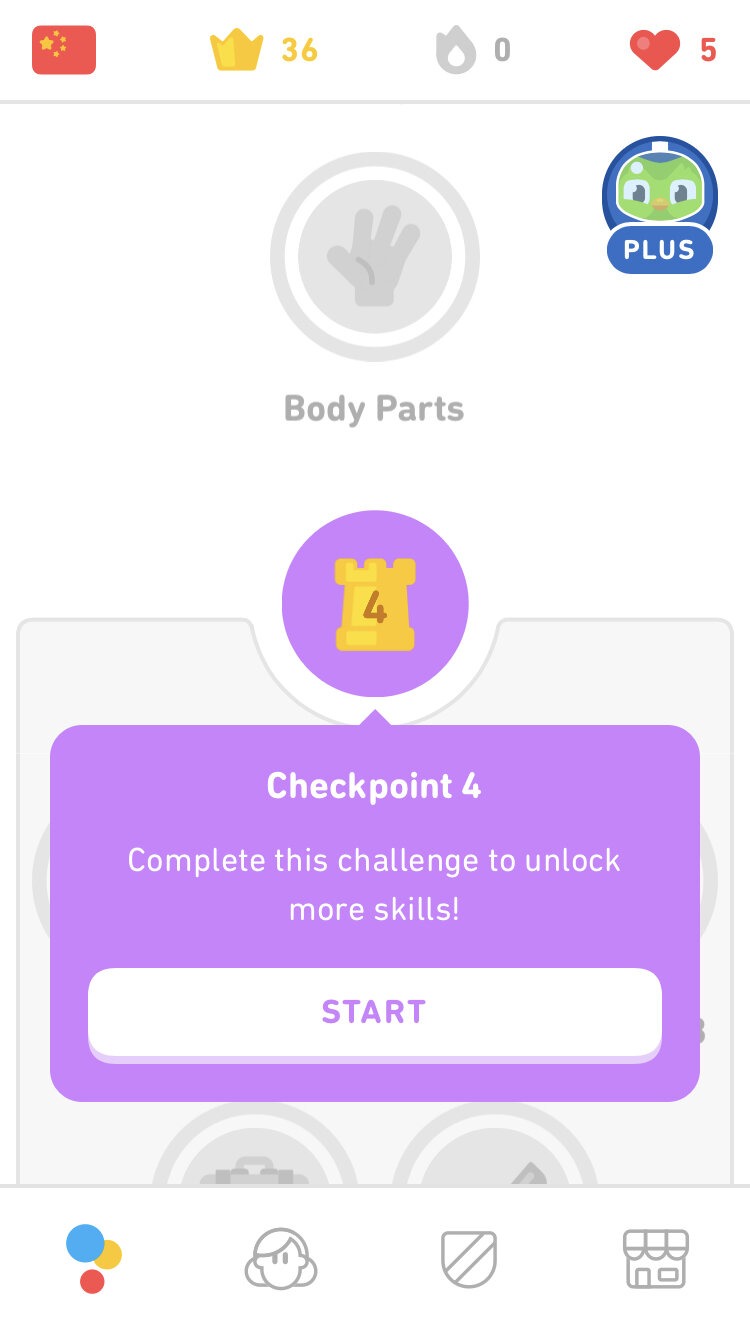
- Scroll Down to Checkpoint: Scroll down to the bottom of the screen until you find a course indicated with the name “Checkpoint.”
- Tap on Checkpoint: Tap on the Checkpoint course to begin the test.
- Complete The Test: Complete the test by answering all the questions correctly. You can make up to three mistakes before the test is discontinued.
- Unlock The Course: Once you’ve completed the test, the course will be unlocked.
Tips And Tricks
- Completing the Checkpoint course will unlock not only that particular course but also all other courses in the same chapter.
- If you’re struggling with a particular course, try completing the Checkpoint course to get a better understanding of the material before moving on.
- Don’t forget to earn crowns by completing levels and lessons. You’ll need 10 crowns to access the histories feature.
Unblocking Duolingo on PC
To unblock Duolingo on your PC, follow these steps:
- Launch The Duolingo Website: Launch the Duolingo website on your PC.
- Scroll Down to The Course: Scroll down until you find a course indicated with an icon of a book.
- Click on The Course: Click on the course to begin the test.
- Complete The Test: Complete the test by answering all the questions correctly. You can make up to three mistakes before the test is discontinued.
- Unlock The Course: Once you’ve completed the test, the course will be unlocked.
Unblocking Histories in Duolingo
To unblock histories in Duolingo, follow these steps:
- Earn 10 Crowns: Earn 10 crowns by completing levels and lessons.
- Access The Histories Feature: Access the histories feature by clicking on the icon of an open book.
- Unlock Histories: Unlock the histories by completing a limited number of histories.
Tips For Unblocking Duolingo
- Make sure you have a good understanding of the material before attempting to unblock a course or history.
- Don’t be discouraged if you make mistakes – it’s all part of the learning process!
- Try using the Checkpoint feature to get a better understanding of the material before moving on.
Conclusion
Unblocking Duolingo is a simple and straightforward process that allows you to access more advanced lessons without having to complete each individual course. By following these steps, you can unlock courses and histories and continue your language learning journey with ease.
Frequently Asked Questions (FAQs)
- Q: What is The Checkpoint Feature in Duolingo?
A: The Checkpoint feature is a test that allows you to access more advanced lessons without having to complete each individual course. - Q: How do I Earn Crowns in Duolingo?
A: You can earn crowns by completing levels and lessons. - Q: What is The Histories Feature in Duolingo?
A: The histories feature allows you to access stories and conversations in the language you’re learning. - Q: Can I Unblock Multiple Courses at Once?
A: No, each course must be unlocked individually. - Q: Will I Still Have Access to Previous Lessons After Unblocking a New Course?
A: Yes, you’ll still have access to all previous lessons and courses. - Q: Is The Checkpoint Feature Available For All Languages?
A: The Checkpoint feature is currently only available for certain languages, but more are being added regularly. - Q: Can I Unblock a Course if I’ve Already Completed It?
A: No, each course can only be unlocked once per user account. - Q: What Happens if I Make Mistakes During The Checkpoint Test?
A: You’ll have three chances to answer correctly before the test is discontinued.
Sources
- Duolingo Official Website
- Duolingo Mobile App
- PC Duolingo Website


