
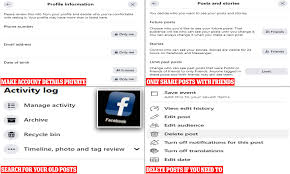
Concealing Your Date of Birth on Facebook: A Step-by-step Guide
As a digital native, you’re likely no stranger to the world of social media. With billions of users worldwide, platforms like Facebook have become an integral part of our online lives. However, with great power comes great responsibility – especially when it comes to sharing personal information.
In this article, we’ll take a closer look at concealing your date of birth on Facebook, exploring why you might want to do so and how to achieve it across various devices, including smartphones, tablets, and PCs.
Concealing Your Date of Birth on Facebook: A Step-by-step Guide
Now that we’ve covered the whys, let’s get to the hows! Here’s a step-by-step guide to concealing your date of birth on Facebook across various devices:
From Android And Ios Devices
If you’re accessing Facebook from your smartphone or tablet, follow these steps:
- Open the Facebook app.
- Access your account (if required).
- Tap on the three horizontal lines (≡) in the top-left corner of the screen.
- Select “See Your Information” from the dropdown menu.
- Find and tap on the “Edit” button next to your date of birth.
- Choose the “Only Me” option from the privacy settings menu.
That’s it! By following these simple steps, you’ll successfully conceal your date of birth on Facebook from Android and iOS devices.
From Pc
If you’re accessing Facebook from a PC, follow these steps:
- Log in to your account (if you haven’t already).
- Click on your name in the top-right corner of the screen.
- Select “About” from the dropdown menu.
- Find and click on the pencil icon next to your date of birth.
- Choose the “Only Me” option from the privacy settings menu.
That’s it! By following these simple steps, you’ll successfully conceal your date of birth on Facebook from a PC.
How to Check If Your Date of Birth Was Concealed
After modifying the privacy settings for your date of birth, it’s essential to verify that it was concealed correctly. Here’s how:
- Click on the three dots (…) in the top-right corner of your profile.
- Select “View As” from the dropdown menu.
- Choose a friend’s name or another user’s name to view your profile as they would.
If your date of birth is not visible, you’ve successfully concealed it!
Conclusion
Concealing your date of birth on Facebook can be an effective way to maintain control over what others see and know about you online. By following the simple steps outlined above, you can easily conceal this information from various devices, including smartphones, tablets, and PCs.
If you’re concerned about sharing your personal details with the world, consider taking a proactive approach towards maintaining your online privacy.
Frequently Asked Questions
Here are some frequently asked questions related to concealing your date of birth on Facebook:
Q: Why Would I Want to Conceal my Date of Birth on Facebook?
A: Concealing your date of birth can help preserve your online privacy by hiding this personal information from others.
Q: How do I Check if my Date of Birth Was Concealed Correctly?
A: You can verify that your date of birth was concealed by viewing your profile as a friend or another user would, using the “View As” feature.
Q: Can I Conceal Other Personal Details on Facebook Besides my Date of Birth?
A: Yes, you can modify the privacy settings for various information on Facebook, including your contact information and account type.
By following these simple steps and staying informed about online safety best practices, you can maintain control over what others see and know about you online.


