
Elevating Your Music Experience: Boosting Song Volume Made Easy
Are you tired of struggling to hear your favorite songs due to low volume? Look no further! In this article, we’ll explore the easiest ways to boost song volume on various devices and platforms.
Why Boost Song Volume?
Boosting song volume can be a game-changer for music lovers. Whether you’re exercising, cooking, or simply relaxing, louder music can enhance your overall experience. However, finding the right tools and techniques to amplify song volume without compromising quality can be daunting. Fear not! Our guide will walk you through the most effective ways to boost song volume on computers, smartphones, and online platforms.
Using Audacity: The Ultimate Audio Editing Tool
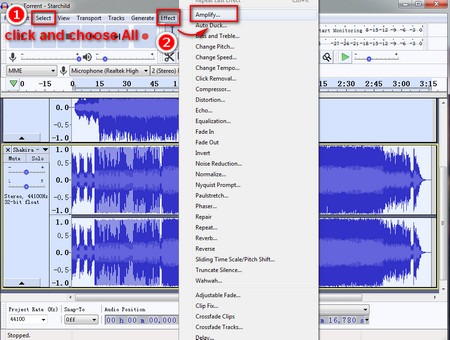
Audacity is a free, open-source audio editing software that’s available for Windows, macOS, and Linux. It’s an ideal tool for boosting song volume without compromising quality. Here’s how to use it:
- Download and install Audacity on your computer.
- Open the software and click on “File” > “Open” to select the song you want to edit.
- Click on the audio track in the timeline and move the cursor to the desired position.
- Adjust the volume using the gain slider located at the bottom of the screen.
- Preview your changes by clicking on the “Play” button.
Other Programs to Boost Song Volume
If Audacity isn’t your cup of tea, don’t worry! There are plenty of other programs that can help you boost song volume. Here are a few alternatives:
- Wavepad: A user-friendly audio editing software for Windows and macOS.
- Mptrim: A free program specifically designed for modifying MP3 files.
- Mp3gain Express: A free, open-source software for macOS users.
Boosting Song Volume Online
If you don’t want to download any software or apps, boosting song volume online is also an option. Here are a few services that can help:
- Mp3louder: A simple and effective service that allows you to boost song volume without compromising quality.
- 123Apps: A free service that supports various audio formats and has no file size limitations.
- Audiotrimmer: A user-friendly online tool that lets you trim, cut, and boost song volume with ease.
Boosting Song Volume on Mobile Devices
If you’re using a smartphone or tablet, there are apps specifically designed for boosting song volume. Here are two popular options:
- Editor of Music And Sounds (Android): A comprehensive audio editing app that allows you to trim, cut, and boost song volume.
- Hokusai Audio Editor (iOS/iPadOS): A user-friendly app specifically designed for iOS devices.
Conclusion
Boosting song volume doesn’t have to be a daunting task. With the right tools and techniques, you can enhance your music experience without compromising quality. Whether you’re using Audacity, other software programs, online services, or mobile apps, we’ve got you covered. So go ahead, give these methods a try, and enjoy your favorite songs at the perfect volume!
Frequently Asked Questions
- What is The Best Way to Boost Song Volume?
- The best way to boost song volume depends on your device and preferences. Audacity, WavePad, and MP3Louder are popular options.
- Can I Boost Song Volume Online?
- Yes! Services like MP3Louder, 123apps, and AudioTrimmer allow you to boost song volume without downloading any software or apps.
- Is it Safe to Use Online Services to Boost Song Volume?
- Most online services are secure and don’t compromise the quality of your audio files.
- Can I Use Mobile Apps to Boost Song Volume?
- Yes! Apps like Editor of Music and Sounds (Android) and Hokusai Audio Editor (iOS/iPadOS) can help you boost song volume on-the-go.
- Will Boosting Song Volume Compromise The Quality of my Audio Files?
- If done correctly, boosting song volume shouldn’t compromise the quality of your audio files. However, it’s essential to use reputable software or services to ensure optimal results.
- Can I Boost Song Volume on Multiple Devices?
- Yes! With Audacity and other software programs, you can edit and boost song volume on various devices, including computers, smartphones, and tablets.
- Are There Any Limitations to Boosting Song Volume?
- Some online services or mobile apps may have file size or format limitations. Be sure to check the specifications before using these tools.
- Can I Share my Boosted Audio Files With Others?
- Yes! Once you’ve boosted your song volume, you can export and share your modified audio files with friends and family.
Additional Resources
For more information on boosting song volume, check out our other articles:
- “How to Edit Audio Files: A Comprehensive Guide”
- “The Best Audio Editing Software for Windows, macOS, and Linux”
- “Boosting Song Volume: Tips and Tricks”
Stay tuned for more updates and tutorials!


