
How to Use Trello: A Guide to Organizing Your Workflows
As a content writer proficient in SEO writing, I’m excited to share with you the benefits of using Trello, a powerful project management tool that can help you streamline your workflows and boost productivity.
What is Trello?
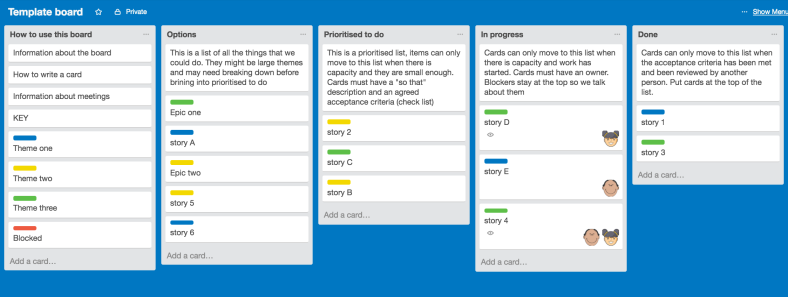
Trello is an online platform that allows you to create boards, lists, and cards to organize and track your tasks, projects, and ideas. It’s like a digital corkboard where you can pin down your thoughts, assign tasks to team members, and set deadlines.
Benefits of Using Trello
- Improved Organization: Trello helps you visualize your tasks and projects in a clear and concise manner, making it easier to prioritize and manage your work.
- Increased Productivity: By breaking down large projects into smaller, manageable tasks, you can focus on what needs to be done and avoid procrastination.
- Enhanced Collaboration: Trello enables you to assign tasks to team members, track progress, and communicate effectively, making it an ideal tool for remote teams or project management.
Getting Started With Trello
- Sign Up: Create a free account on Trello.Com or download the mobile app.
- Create a Board: Set up a new board by clicking on the “Create” button. Choose a name and add some lists to get started.
- Add Cards: Create cards for each task or project by adding a title, description, due date, and labels.
How to Use Trello Effectively
Understanding Trello’s Core Features
The Three Main Components of Trello
- Boards: The main hub where you create lists and cards.
- Lists: Vertical columns that contain related tasks or projects.
- Cards: Individual tasks or projects represented by a card.
Using Trello on Your Computer
Installing The Desktop App
You can install the Trello desktop app on your Windows or macOS computer to access your boards, lists, and cards directly from your device.
Using Trello on Your Smartphone or Tablet
Downloading The Mobile App
Download the Trello mobile app for Android or iOS devices to access your boards, lists, and cards on-the-go.
Advanced Features of Trello
- Power-ups: Integrate third-party apps like Google Drive, Slack, or GitHub to enhance your workflow.
- Automations: Set up automated workflows that trigger actions based on specific events or conditions.
- Calendar View: Get a bird’s-eye view of your tasks and deadlines in calendar format.
Pricing Plans For Trello
- Free: Create an unlimited number of boards, lists, and cards with limited Power-Ups and Automations.
- Standard: Upgrade to the Standard plan at $5/month for more features and support.
- Premium: Get the Premium plan at $10/month for advanced features and customization options.
Tips For Using Trello Effectively
- Keep it Simple: Start with a simple board structure and add complexity as needed.
- Prioritize Tasks: Use labels, due dates, and priority levels to focus on what’s important.
- Communicate With Team Members: Assign tasks, track progress, and communicate regularly to ensure everyone is on the same page.
Conclusion
Trello is a versatile tool that can help you streamline your workflows, boost productivity, and enhance collaboration. By understanding its core features, using it effectively, and leveraging advanced features like Power-Ups and Automations, you can take your project management skills to the next level.
Frequently Asked Questions (FAQs)
- Q: What is Trello?
A: Trello is a digital platform for organizing and tracking tasks, projects, and ideas. - Q: How do I Get Started With Trello?
A: Sign up on Trello.Com or download the mobile app to create a new account. - Q: Can I Use Trello on my Computer?
A: Yes, you can install the Trello desktop app on Windows or macOS computers. - Q: How do I Assign Tasks to Team Members in Trello?
A: Create cards for each task and assign them to team members by adding their names or email addresses. - Q: Can I Integrate Other Apps With Trello?
A: Yes, you can integrate third-party apps like Google Drive, Slack, or GitHub using Power-Ups. - Q: How Much Does Trello Cost?
A: The free plan is available, and paid plans start at $5/month for the Standard plan. - Q: Can I Use Trello on my Smartphone or Tablet?
A: Yes, you can download the Trello mobile app for Android or iOS devices. - Q: How do I Track Progress in Trello?
A: Use cards with due dates and labels to keep track of tasks and deadlines.


