
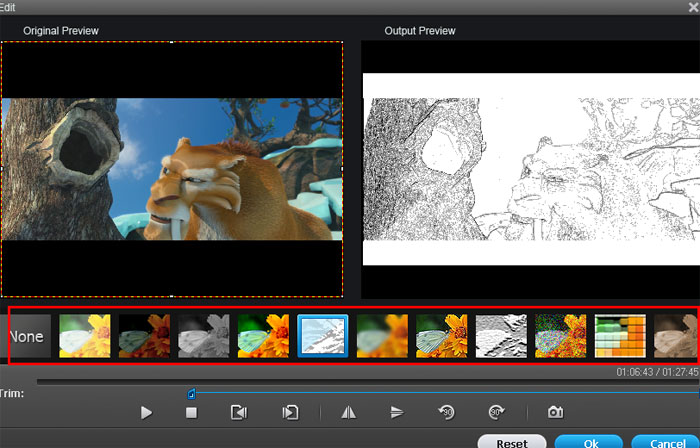
How to Add Special Effects to Your Videos
Are you tired of boring videos? Do you want to make your videos stand out from the crowd? If so, then adding special effects is a great way to do it! But, have you ever wondered how to add these cool effects to your videos without having to learn complicated editing software?
Well, wonder no more! In this article, we will explore the world of video editing and show you some easy-to-use programs that can help you add special effects to your videos. We’ll also provide tips and tricks for using these programs, so you can create stunning videos like a pro!
What Are Special Effects?
Special effects are visual or audio elements that are added to a video to make it more engaging and interesting. These effects can include things like transitions between scenes, animations, color filters, and even 3D graphics.
Why Use Special Effects in Your Videos?
There are many reasons why you might want to use special effects in your videos:
- To make them more visually appealing
- To add emotional depth or mood
- To make them more engaging and entertaining
- To enhance the storytelling or educational value of your video
Programs For Adding Special Effects
There are many programs available that can help you add special effects to your videos. Here are a few popular options:
- Clipchamp: A free online video editor that allows you to create and edit videos from scratch.
- Imovie: A user-friendly video editing software for Mac computers, that includes a range of features such as filters, transitions, and color effects.
- Davinci Resolve: A professional-level video editing software that offers advanced features like color grading and audio editing.
- Adobe After Effects: A powerful animation and visual effects software used in the film and TV industry.
Mobile Apps For Adding Special Effects
If you’re looking to add special effects to your videos on-the-go, then mobile apps are a great option! Here are a few popular apps:
- Youcut: A free video editing app that allows you to trim, cut, and merge videos.
- Capcut: A user-friendly video editing app that includes features like filters, transitions, and color effects.
- Videoshow: A fun and easy-to-use app that lets you add special effects, text overlays, and more.
Tips For Using Special Effects
Here are a few tips to keep in mind when using special effects:
- Use them sparingly – too many effects can make your video look cheesy or over-the-top.
- Choose effects that match the tone and style of your video.
- Experiment with different combinations of effects to find what works best for you.
Conclusion
Adding special effects to your videos is a great way to make them more engaging, entertaining, and memorable. With the right programs and mobile apps, you can easily add cool filters, transitions, animations, and even 3D graphics to your videos. Remember to use these effects sparingly, choose ones that match your video’s tone and style, and experiment with different combinations to find what works best for you.
Faqs
Q: What Are Special Effects in Videos?
A: Special effects are visual or audio elements that are added to a video to make it more engaging and interesting.
Q: Why Use Special Effects in my Videos?
A: There are many reasons why you might want to use special effects, including making them more visually appealing, adding emotional depth or mood, making them more engaging and entertaining, and enhancing the storytelling or educational value of your video.
Q: What Programs Can I Use to Add Special Effects?
A: Some popular programs for adding special effects include Clipchamp, iMovie, DaVinci Resolve, and Adobe After Effects.
Q: Are There Mobile Apps That Let me Add Special Effects?
A: Yes! You can also use mobile apps like YouCut, CapCut, and VideoShow to add special effects to your videos on-the-go.
Q: What Are Some Tips For Using Special Effects in my Videos?
A: Use them sparingly, choose ones that match the tone and style of your video, and experiment with different combinations of effects to find what works best for you.


