
How to Create a New Email Address: A Comprehensive Guide
Are you looking to create a new email address? Maybe you want to switch from an existing service or simply need a fresh start. Whatever your reason, this guide will walk you through the process of creating a new email address on various platforms.
Choosing The Right Service
Before we dive into the step-by-step instructions, let’s take a look at some popular email services that offer free and paid plans:
- Gmail (Google)
- Outlook.Com
- Infomaniak Mail
- ICloud (Apple)
- Yahoo!
- Libero
- TIM (formerly Alice)
- Fastweb
- Aruba
- Tiscali
Each service has its unique features, storage capacity, and pricing plans. Take some time to research and choose the one that suits your needs.
Step-by-step Guide
Here’s a detailed guide on how to create a new email address on each of these services:
Gmail (Google)
- Go to the Gmail website (www.Gmail.Com).
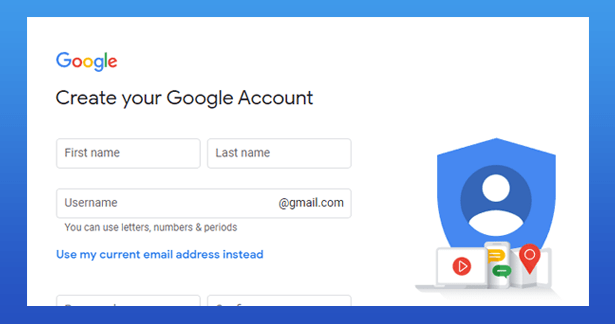
- Click on “Create account” and fill out the registration form with your name, surname, username, password, and other required information.
- Verify your phone number by entering the code sent via SMS.
- Confirm your email address by clicking on the link sent to you.
Outlook.com
- Go to the Outlook website (www.Outlook.Com).
- Click on “Create account” and fill out the registration form with your name, surname, username, password, and other required information.
- Verify your phone number by entering the code sent via SMS.
- Confirm your email address by clicking on the link sent to you.
Infomaniak Mail
- Go to the Infomaniak website (www.Infomaniak.Com).
- Click on “Create account” and fill out the registration form with your name, surname, username, password, and other required information.
- Verify your phone number by entering the code sent via SMS.
- Confirm your email address by clicking on the link sent to you.
Icloud
- Go to the iCloud website (www.Icloud.Com).
- Click on “Create account” and fill out the registration form with your name, surname, username, password, and other required information.
- Verify your phone number by entering the code sent via SMS.
- Confirm your email address by clicking on the link sent to you.
Yahoo!
- Go to the Yahoo website (www.Yahoo.Com).
- Click on “Create account” and fill out the registration form with your name, surname, username, password, and other required information.
- Verify your phone number by entering the code sent via SMS.
- Confirm your email address by clicking on the link sent to you.
Libero
- Go to the Libero website (www.Libero.It).
- Click on “Create account” and fill out the registration form with your name, surname, username, password, and other required information.
- Verify your phone number by entering the code sent via SMS.
- Confirm your email address by clicking on the link sent to you.
Tim (formerly Alice)
- Go to the TIM website (www.Tim.It).
- Click on “Create account” and fill out the registration form with your name, surname, username, password, and other required information.
- Verify your phone number by entering the code sent via SMS.
- Confirm your email address by clicking on the link sent to you.
Fastweb
- Go to the Fastweb website (www.Fastweb.It).
- Click on “Create account” and fill out the registration form with your name, surname, username, password, and other required information.
- Verify your phone number by entering the code sent via SMS.
- Confirm your email address by clicking on the link sent to you.
Aruba
- Go to the Aruba website (www.Aruba.It).
- Click on “Create account” and fill out the registration form with your name, surname, username, password, and other required information.
- Verify your phone number by entering the code sent via SMS.
- Confirm your email address by clicking on the link sent to you.
Tiscali
- Go to the Tiscali website (www.Tiscali.It).
- Click on “Create account” and fill out the registration form with your name, surname, username, password, and other required information.
- Verify your phone number by entering the code sent via SMS.
- Confirm your email address by clicking on the link sent to you.
Conclusion
Creating a new email address is a straightforward process that requires some basic information about yourself. By following these step-by-step guides, you can set up a new email account on various platforms and enjoy the benefits of having a dedicated email service.
Frequently Asked Questions (FAQs)
- What Are The Differences Between Free And Paid Email Services?
Free email services usually have limited storage capacity and features compared to paid plans. - Can I Use my Existing Phone Number For Email Verification?
Yes, you can use your existing phone number for email verification on most platforms. - How do I Secure my Email Account From Spam And Phishing Attacks?
Use a strong password, enable two-factor authentication (2FA), and be cautious when clicking on links or downloading attachments from unknown senders. - Can I Switch to a Different Email Service if I’m Not Satisfied With The Current One?
Yes, you can usually transfer your email account to another provider, but it may require some configuration on your end. - How do I Report Spam or Phishing Emails to my Email Service Provider?
Check your email service’s website for instructions on reporting spam or phishing emails. - Can I Use my New Email Address to Receive Sms Notifications From Services Like Google Voice or Skype?
Yes, you can usually configure your email account to receive SMS notifications from these services. - How do I Recover my Forgotten Password or Email Verification Code?
Check with your email service provider for instructions on recovering your password or verification code. - Can I Use my New Email Address to Send And Receive Emails on my Smartphone or Tablet?
Yes, most email services offer mobile apps that allow you to access your email account from your device.
Best Practices
- Use a strong and unique password for each of your email accounts.
- Enable 2FA whenever possible to add an extra layer of security.
- Be cautious when clicking on links or downloading attachments from unknown senders.
- Regularly update your operating system, browser, and other software to ensure you have the latest security patches.
- Use a reputable antivirus program to protect your device from malware.
By following these best practices and using a reliable email service, you can enjoy a safe and secure online experience.


