
How to Link a Credit Card to Paypal: A Step-by-step Guide
Are you tired of using your credit card or debit card for online payments? Do you want to explore the ease and convenience of using PayPal for your transactions? Look no further! In this article, we will guide you through the process of linking a credit card to PayPal, making it easy and hassle-free.
What is Paypal?
PayPal is an online payment system that allows users to send and receive payments easily and securely. With PayPal, you can make purchases, pay bills, and transfer funds without revealing your financial information.
Why Link a Credit Card to Paypal?
Linking a credit card to PayPal offers numerous benefits, including:
- Convenience: Pay for transactions using your credit card without having to enter your payment details every time.
- Security: PayPal’s secure system protects your financial information from unauthorized access.
- Flexibility: Use your credit card with PayPal on various websites and platforms.
Step-by-step Guide to Linking a Credit Card to Paypal
- Open a Paypal Account
Begin by opening a PayPal account if you haven’t already done so. Follow the instructions provided in our tutorial on creating a PayPal account. - Check Your Eligibility
Verify that your credit card is compatible with PayPal’s system. Most international cards, including Visa, Mastercard, American Express, and Discover, are accepted. - Add Your Credit Card to Paypal
To add a new credit card to your PayPal account:
A. Log in to your PayPal account on your computer or mobile device.
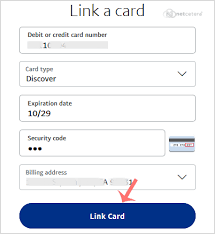
B. Click on the “Wallet” tab and select “Link a debit or credit card.”
C. Enter the required information, including the card number, expiration date, and security code.
D. Follow the prompts to complete the process.
What Happens After You Add Your Credit Card?
After adding your credit card to PayPal:
- PayPal will forward a request for payment authorization of $1 or equivalent in other currencies to verify that your card is active.
- The charge will be canceled, and the funds will be recredited to your account within a few days.
How Many Credit Cards Can I Add to My Paypal Account?
You can add up to 24 credit cards to your PayPal account after verifying your eligibility. If you need to exceed this limit, simply perform a check on your account to increase it.
Can I Use a Prepaid Card With Paypal?
Yes! You can link a prepaid card to PayPal. Most prepaid cards are connected to the Mastercard or Visa network, making them compatible with PayPal’s system. However, keep in mind that some features may be limited when using a prepaid card.
How Do I Link a New Credit Card to My Existing Paypal Account?
To add a new credit card to your existing account:
A. Follow the same steps as adding a new card, but select “Link a debit or credit card” from the Wallet tab.
B. Enter the required information and complete the process.
Can I Use Paypal With My Business Account?
Yes! If you have a business PayPal account, follow the same procedures for linking a credit card to your account.
How Do I Link My Credit Card to My Bank Account Using Paypal?
You can link your credit card to your bank account using PayPal. To do so:
A. Access your PayPal account and navigate to the Wallet tab.
B. Click on “Link a debit or credit card” and select the option for linking a credit card to your bank account.
C. Follow the prompts to complete the process.
Tips And Reminders
- Make sure to enter your credit card details correctly to avoid any issues.
- Keep in mind that some features may be limited when using a prepaid card.
- If you have any problems, refer to PayPal’s assistance page for guidance.
Conclusion
Linking a credit card to PayPal offers numerous benefits, including convenience, security, and flexibility. By following the step-by-step guide outlined above, you can easily add your credit card to your PayPal account and start enjoying the advantages of using PayPal for your transactions.
Frequently Asked Questions (FAQs)
- Q: How Many Credit Cards Can I Add to my Paypal Account?
A: Up to 24 credit cards can be added after verifying eligibility.
- Q: Can I Use a Prepaid Card With Paypal?
A: Yes, most prepaid cards are compatible with PayPal’s system.
- Q: How do I Link a New Credit Card to my Existing Paypal Account?
A: Follow the same steps as adding a new card, selecting “Link a debit or credit card” from the Wallet tab.
- Q: Can I Use Paypal With my Business Account?
A: Yes, follow the same procedures for linking a credit card to your business account.
- Q: How do I Link my Credit Card to my Bank Account Using Paypal?
A: Access your PayPal account and navigate to the Wallet tab, then click on “Link a debit or credit card” and select the option for linking a credit card to your bank account.


