
How to Properly Masterize Your Cds And Dvds: Tips And Tricks
Are you tired of creating CDs and DVDs that don’t meet your expectations? Do you struggle with the speed of masterization, resulting in poor quality or even unusable discs? Look no further! In this article, we will delve into the world of CD and DVD mastering, providing you with expert tips and tricks to ensure your creations are top-notch.
Understanding Masterization Speed
Before we dive into the nitty-gritty, let’s first understand what masterization speed is. Masterization speed refers to the rate at which data is written onto a CD or DVD. It’s usually measured in multiples of the standard speed (1x), with higher speeds resulting in faster write times and potentially improved quality.
Why Speed Matters
While it may seem obvious, using the maximum possible speed can actually lead to poor-quality discs. Higher speeds can cause data errors, inconsistencies, and even physical damage to the disc. So, what’s the sweet spot? For most applications, a masterization speed of 4x or lower is recommended.
Software And Tools
Fortunately, there are many software options available that allow you to fine-tune your masterization speed. Here are some of our top picks:
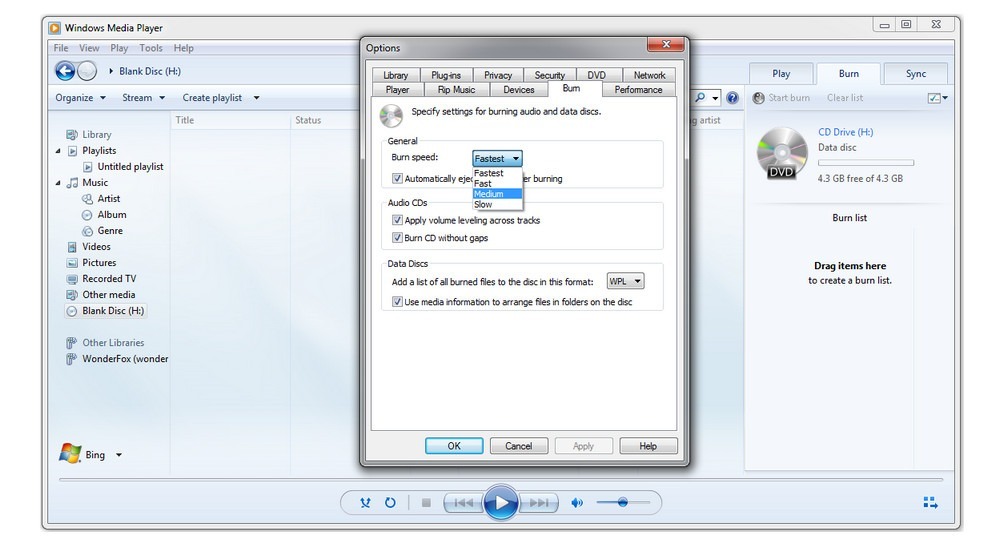
- Windows Media Player (Windows): This free software allows you to create CDs and DVDs with ease. Simply insert an empty disc, choose the “Burn” option, and select the desired speed.
- Itunes (macOS/Windows): This popular music player also allows you to create CDs and DVDs. Open iTunes, click on the “File” menu, and select “Create CD or DVD.”
- Cdburnerxp (Windows): This free software is specifically designed for creating CDs and DVDs. Insert an empty disc, choose the desired speed, and start burning.
- Burn (macOS): This free application allows you to create CDs and DVDs with ease. Simply insert an empty disc, choose the desired speed, and start burning.
Tips And Tricks
Here are some additional tips and tricks to keep in mind when mastering your CDs and DVDs:
- Use a Good Quality Masterizer: Invest in a reliable masterizer that can handle high-quality data transfer.
- Choose The Right CD or Dvd Type: Make sure you’re using the correct type of disc for your project. For example, use DVD-5 for standard definition video or Blu-ray for high-definition video.
- Masterize at 4x or Lower: As mentioned earlier, a masterization speed of 4x or lower is recommended to avoid data errors and physical damage.
- Use The Right Software: Choose software that’s specifically designed for CD and DVD mastering, such as CDBurnerXP or Burn.
Conclusion
Mastering CDs and DVDs can seem intimidating, but with these expert tips and tricks, you’ll be well on your way to creating top-notch discs. Remember to choose the right speed, use a good quality masterizer, and select the correct CD or DVD type for your project. By following these guidelines, you’ll ensure that your creations are of the highest quality and will last for years to come.
Frequently Asked Questions
Here are some frequently asked questions about masterizing CDs and DVDs:
- Q: What is Masterization Speed?
A: Masterization speed refers to the rate at which data is written onto a CD or DVD. - Q: Why Does Speed Matter in Mastering?
A: Higher speeds can cause data errors, inconsistencies, and even physical damage to the disc. - Q: What is The Recommended Masterization Speed For Most Applications?
A: A masterization speed of 4x or lower is recommended for most applications. - Q: Can I Use Any Software to Master my Cds And Dvds?
A: No, it’s recommended to use software specifically designed for CD and DVD mastering, such as CDBurnerXP or Burn. - Q: What Type of CD or Dvd Should I Use For my Project?
A: Choose the correct type of disc based on your project requirements. For example, use DVD-5 for standard definition video or Blu-ray for high-definition video. - Q: Can I Masterize Cds And Dvds at Home?
A: Yes, with the right software and equipment, you can masterize CDs and DVDs at home. - Q: How do I Choose The Right Speed For my Project?
A: Consider the type of data being written (audio or video), the quality required, and the equipment available to determine the optimal masterization speed.
Bonus Tips
Here are some additional tips to keep in mind:
- Always use a good quality masterizer.
- Choose the correct CD or DVD type for your project.
- Masterize at 4x or lower to avoid data errors and physical damage.
- Use software specifically designed for CD and DVD mastering.
- Consider using a Blu-ray writer for high-quality video projects.


