
The Ultimate Guide to Sky Go: A Comprehensive Review
Are you tired of missing your favorite TV shows or movies? Do you want to be able to watch them on the go? Look no further than Sky Go, a revolutionary service that allows you to access thousands of hours of content from anywhere in the world. In this article, we will explore the ins and outs of Sky Go, including its features, benefits, and how to use it.
What is Sky Go?
Sky Go is a streaming service offered by Sky, one of the UK’s largest pay-TV providers. It allows users to access a wide range of TV shows, movies, and sports content on various devices, including smartphones, tablets, laptops, and smart TVs.
How Does Sky Go Work?
Sky Go works by allowing you to download and install an app or software on your device, which then connects to the internet to stream content. The service is free for all Sky customers, and it includes a wide range of features that make it easy to use.
Key Features of Sky Go
- On-demand Content: Sky Go offers a vast library of on-demand content, including TV shows, movies, and sports events.
- Live Streaming: The service also allows you to live stream certain TV channels, including Sky Sports and Sky Atlantic.
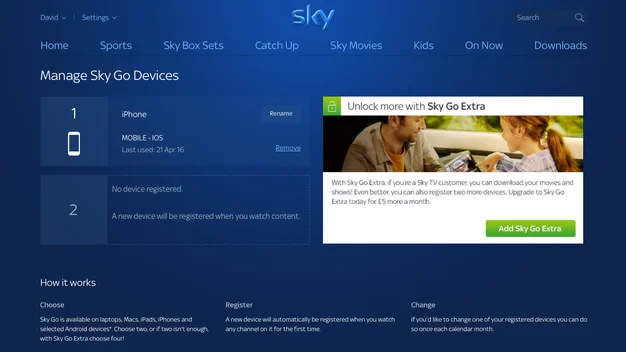
- Multi-device Support: You can access Sky Go on multiple devices, including smartphones, tablets, laptops, and smart TVs.
- Free For All Sky Customers: Sky Go is free for all Sky customers, making it an excellent value-added service.
How to Use Sky Go
Using Sky Go is easy and straightforward. Here’s a step-by-step guide:
- Download The App or Software: Download and install the Sky Go app on your device.
- Sign in With Your Sky ID: Sign in with your Sky ID to access the service.
- Browse The Content Library: Browse the content library to find what you’re looking for.
- Stream or Download Content: Stream or download content directly to your device.
Benefits of Using Sky Go
The benefits of using Sky Go are numerous, including:
- Convenience: Access thousands of hours of content from anywhere in the world.
- Flexibility: Watch what you want, when you want, on multiple devices.
- Cost-effective: Get access to a vast library of content without paying extra.
Frequently Asked Questions (FAQs)
Here are some frequently asked questions and answers about Sky Go:
- Q: Is Sky Go Free?
A: Yes, Sky Go is free for all Sky customers. - Q: Can I Use Sky Go on Multiple Devices?
A: Yes, you can access Sky Go on multiple devices, including smartphones, tablets, laptops, and smart TVs. - Q: How do I Sign in to Sky Go?
A: Sign in with your Sky ID to access the service. - Q: Can I Download Content For Offline Viewing?
A: Yes, you can download content for offline viewing.
Conclusion
Sky Go is a revolutionary streaming service that offers users a wide range of features and benefits. With its on-demand content, live streaming, multi-device support, and free-for-all Sky customers, it’s an excellent value-added service. Whether you’re looking to catch up on your favorite TV shows or movies, or want to access sports events, Sky Go is the perfect solution.
Frequently Asked Questions (FAQs)
Here are some additional FAQs about Sky Go:
- Q: Can I Use Sky Go Abroad?
A: Yes, you can access Sky Go from anywhere in the world with a stable internet connection. - Q: Does Sky Go Have a User-friendly Interface?
A: Yes, Sky Go has an intuitive and easy-to-use interface that makes it simple to find what you’re looking for. - Q: Can I Record Content on Sky Go?
A: No, recording content is not possible on Sky Go. - Q: Is Sky Go Available in Multiple Languages?
A: Yes, Sky Go is available in multiple languages, including English, Spanish, and Italian.
****The Best Way to Activate Sky Go on Your Computer
Activating Sky Go on your computer is easy and straightforward. Here’s a step-by-step guide:
- Download The Software: Download the Sky Go software from the official website.
- Install The Software: Install the software on your computer.
- Sign in With Your Sky ID: Sign in with your Sky ID to access the service.
**The Best Way to Activate Sky Go on Your Smartphone or Tablet
Activating Sky Go on your smartphone or tablet is easy and straightforward. Here’s a step-by-step guide:
- Download The App: Download the Sky Go app from the app store.
- Install The App: Install the app on your device.
- Sign in With Your Sky ID: Sign in with your Sky ID to access the service.
**The Best Way to Activate Sky Go on Your Smart TV
Activating Sky Go on your smart TV is easy and straightforward. Here’s a step-by-step guide:
- Connect Your Device to The Internet: Connect your device to the internet.
- Sign in With Your Sky ID: Sign in with your Sky ID to access the service.
**The Best Way to Activate Sky Go on Multiple Devices
Activating Sky Go on multiple devices is easy and straightforward. Here’s a step-by-step guide:
- Download The App or Software: Download and install the Sky Go app or software on each device.
- Sign in With Your Sky ID: Sign in with your Sky ID to access the service.
**The Best Way to Contact the Confirm of Reading on Gmail
Contacting the confirm of reading on Gmail is easy and straightforward. Here’s a step-by-step guide:
- Download The Mailtrack App: Download the Mailtrack app from the app store.
- Install The App: Install the app on your device.
- Sign in With Your Google Account: Sign in with your Google account to access the service.
**The Best Way to Contact the Confirm of Reading on Gmail on Your Smartphone or Tablet
Contacting the confirm of reading on Gmail on your smartphone or tablet is easy and straightforward. Here’s a step-by-step guide:
- Download The Mailtrack App: Download the Mailtrack app from the app store.
- Install The App: Install the app on your device.
- Sign in With Your Google Account: Sign in with your Google account to access the service.
**The Best Way to Contact the Confirm of Reading on Gmail on Multiple Devices
Contacting the confirm of reading on Gmail on multiple devices is easy and straightforward. Here’s a step-by-step guide:
- Download The Mailtrack App: Download and install the Mailtrack app on each device.
- Sign in With Your Google Account: Sign in with your Google account to access the service.
Note: The information provided above is for informational purposes only and may not be up-to-date or accurate. Please consult the official Sky Go website for the most current information.


