
How to Open Ports on Your Vodafone Router
Are you tired of wondering how to access your Vodafone router’s settings and open ports for your favorite programs? Look no further! In this article, we’ll guide you through the simple process of opening ports on your Vodafone router.
Understanding Your Vodafone Router
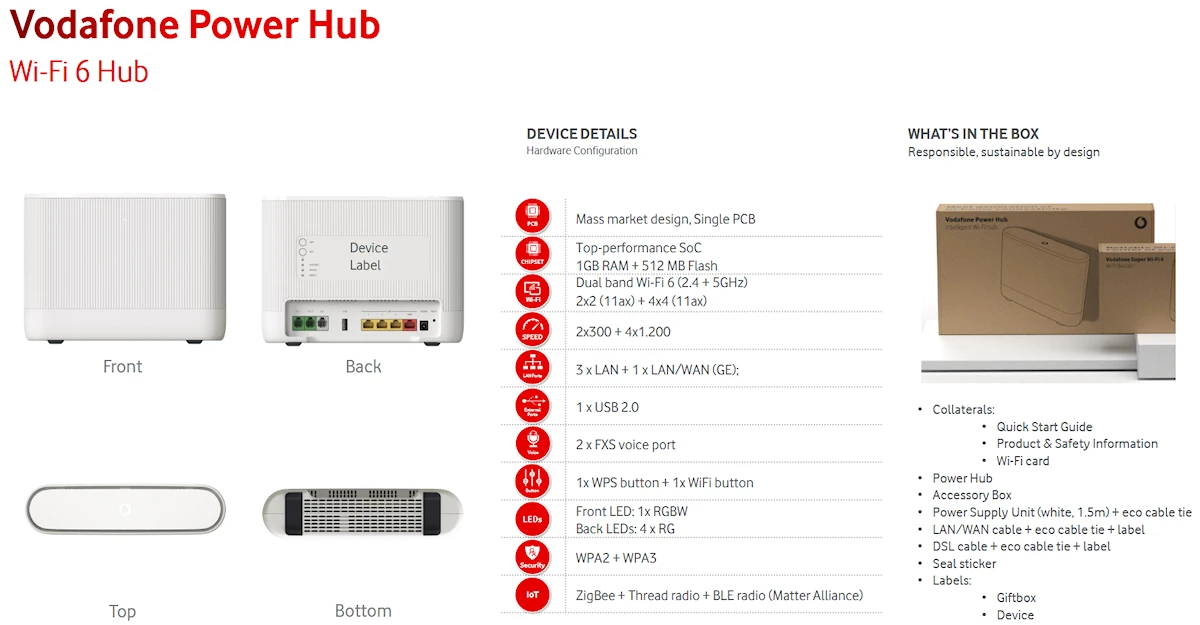
Before we dive into the instructions, let’s quickly discuss what a Vodafone router is. A Vodafone router is a device that connects your home network to the internet. It’s usually provided by your internet service provider (ISP) and is used to manage your internet connection.
What Are Ports on a Router?
Ports on a router refer to specific communication channels between devices on your local network and external devices on the internet. Think of ports like doors that allow data to flow in and out of your network.
Why Open Ports on My Vodafone Router?
You might want to open ports on your Vodafone router for various reasons:
- To access online services or applications that require specific port openings
- To enable remote access to devices on your local network
- To configure port forwarding for gaming, video conferencing, or other bandwidth-intensive activities
Step-by-step Guide to Opening Ports on Your Vodafone Router
Now that we’ve covered the basics, let’s move on to the steps:
1. Access Your Vodafone Router Settings
To open ports on your Vodafone router, you’ll need to access its settings page. The process varies depending on your router model and firmware version. Here are some general steps:
- Log in to your Vodafone router using a web browser (usually by typing
http://Vodafone.Station/or192.168.1.1Into the address bar). - Enter your admin username and password (default credentials can be found on the router’s documentation or packaging).
Once you’re logged in, navigate to the port forwarding section of your Vodafone router settings:
- Look for a tab labeled “Advanced,” “Settings,” or “Port Forwarding.”
- Click on this tab to access the port forward page.
3. Create a New Rule
Create a new rule by clicking the “+” button (usually located at the top-right corner of the page):
- Enter the name of your service (e.G., “Gaming” or “File Sharing”).
- Select the protocol you want to use (TCP, UDP, or Both).
- Choose the local and external ports for this rule.
4. Save Your Changes
Save your new rule by clicking the “Save” button:
- Confirm that the changes have been applied.
- Restart your router if prompted.
Troubleshooting Tips
If you’re experiencing issues while trying to open ports on your Vodafone router, here are some troubleshooting tips:
- Ensure that your internet connection is stable and working properly.
- Verify that the port numbers you entered match the ones required by your service or application.
- Check for any firmware updates available for your Vodafone router.
Conclusion
Opening ports on your Vodafone router can be a straightforward process once you understand the basics. Follow these steps, and you’ll be able to access online services, enable remote access, or configure port forwarding for gaming and video conferencing in no time!
Here are some additional tips:
- Use strong passwords for your admin account.
- Regularly update your router’s firmware to ensure security patches.
Frequently Asked Questions
Q: Why do I Need to Open Ports on my Vodafone Router?
A: You might need to open ports to access online services, enable remote access, or configure port forwarding for gaming and video conferencing.
Q: How do I Access my Vodafone Router Settings?
A: Log in using a web browser (usually http://Vodafone.Station/ or 192.168.1.1). Enter your admin username and password (default credentials can be found on the documentation or packaging).
Q: What’s Port Forwarding, And Why is it Important?
A: Port forwarding allows data to flow in and out of specific ports on your local network, enabling remote access, gaming, video conferencing, and other bandwidth-intensive activities.
Q: Can I Open Ports on my Vodafone Router For Free?
A: Yes, opening ports on your Vodafone router is usually a standard feature that comes with your internet subscription.


