
The Ultimate Guide to Wechat: The Revolutionary Communication App
Are you curious about the fascinating world of WeChat, one of China’s most popular communication apps? Look no further! In this article, we will delve into the features, functions, and benefits of using WeChat on your Android or iOS device.
What is Wechat?
WeChat, also known as Weixin in Chinese, is a free messaging app developed by Tencent Holdings Limited. It was launched in 2011 and has since become one of the most widely used social media platforms in China, with over a billion active users worldwide.
How to Download Wechat
To get started with WeChat, you’ll need to download the app from your device’s store. Here’s how:
- On Android devices:
- Open the Google Play Store or an alternative app store.
- Type “WeChat” in the search bar and select the app from the results.
- Tap on the “Install” button and wait for the installation to complete.
- On iOS devices (iPhone/iPad):
- Open the App Store.
- Search for “WeChat” in the search bar.
- Tap on the “Get” button next to WeChat, then tap on the “Update” button if prompted.
How to Use Wechat
Now that you have WeChat installed, let’s dive into its features and functions:
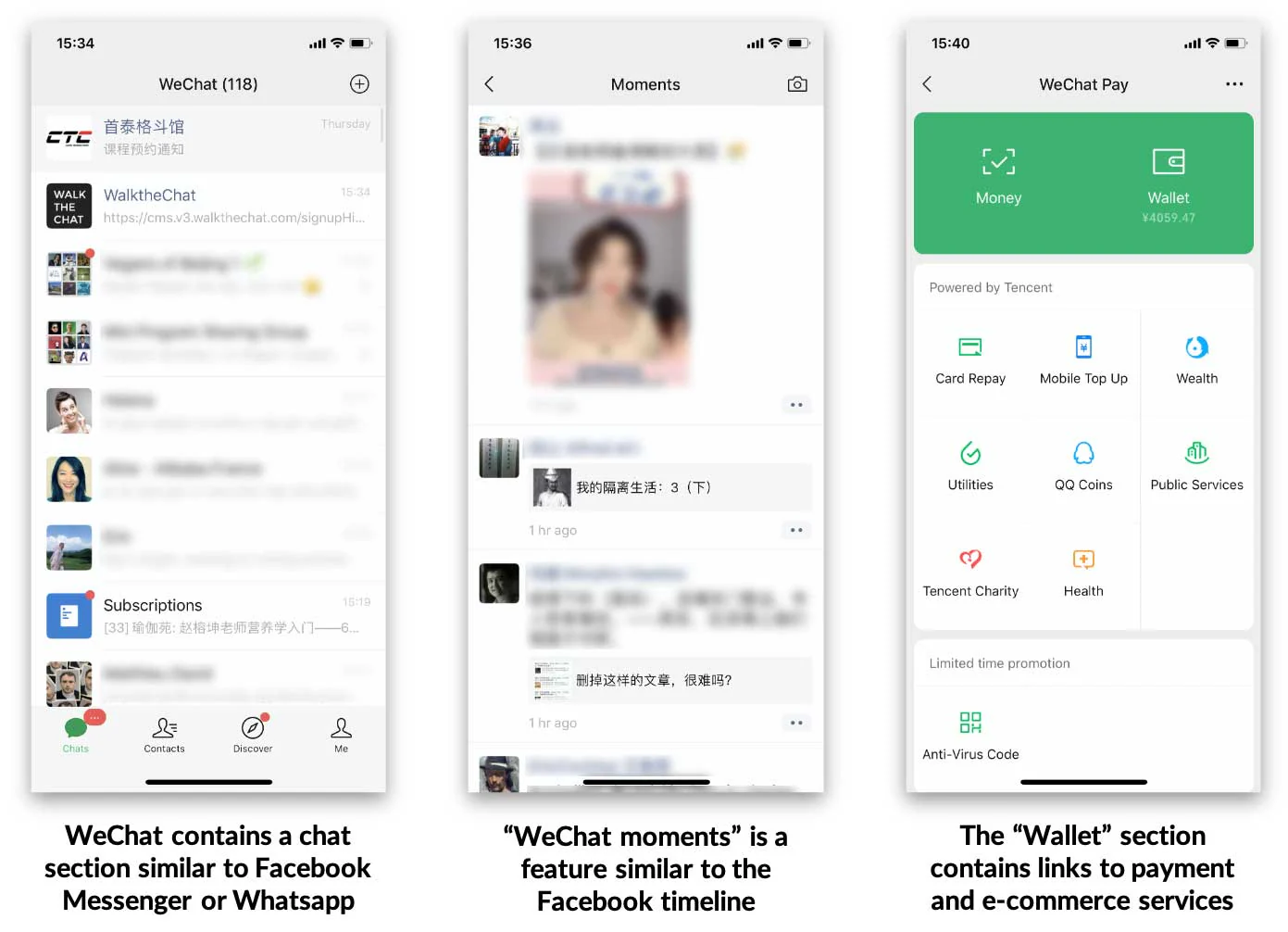
- Registration: To use WeChat, you’ll need to register an account. This is a straightforward process that involves providing basic information such as your name, region, and password.
- Contacts: Once registered, you can add friends by scanning their QR code or searching for them in the app’s contact list.
- Chats: To initiate a new chat, tap on the “+” icon and select “New Chat.” You can then search for contacts to add to your chat group.
- Moments: WeChat also features a social media-like aspect called Moments. This allows you to share photos and updates with friends and see what they’ve shared in return.
Wechat Functions
WeChat offers a wide range of functions, including:
- Group Chats: Create groups for up to 500 people and engage in group conversations.
- File Sharing: Send files of various types, such as images, videos, and documents.
- Voice Messages: Record and send voice messages to friends and family.
- Video Calls: Make video calls with friends and family using the app’s built-in camera.
Wechat Pay
WeChat also offers a payment feature called WeChat Pay. This allows you to make payments directly within the app, eliminating the need for cash or credit cards. To use WeChat Pay:
- Open WeChat on your device.
- Tap on the “+” icon and select “Money.”
- Accept the terms of service and associate a credit card (or prepaid card) with your account.
Using Wechat on PC
Yes, you can also use WeChat on your computer! Here’s how:
- Access the official WeChat website using your preferred browser.
- Click on the “Scan QR code” button to access the app.
- Open WeChat on your mobile device and scan the QR code displayed on the screen.
Using Wechat on Android And Ios
The PC version of WeChat is similar to its mobile counterpart, with some notable differences:
- Discover: This feature allows you to find friends who are nearby or sharing similar interests. To use Discover:
- Tap on the “Discover” icon in the top-right corner.
- Select either “Agitate” (to find nearby friends) or “Close Persons” (to see who’s online).
- Favorite Contacts: Pin your most frequently contacted friends for easy access.
Conclusion
WeChat is an incredibly versatile communication app that offers a wide range of features and functions. Whether you’re looking to connect with friends, family, or colleagues, WeChat has something to offer. By following the steps outlined in this article, you can get started with WeChat today!
Frequently Asked Questions (FAQs)
- What is Wechat?
WeChat is a free messaging app developed by Tencent Holdings Limited.
- How do I Download Wechat?
To download WeChat, visit the Google Play Store or App Store on your device and search for “WeChat.”
- How do I Register an Account?
Open WeChat on your mobile device, tap on the “+” icon, select “Record with num. Telef.,” And follow the registration process.
- What Are Moments in Wechat?
Moments is a social media-like feature that allows you to share photos and updates with friends.
- Can I Use Wechat Pay?
Yes, WeChat offers a payment feature called WeChat Pay. To use it, tap on the “+” icon, select “Money,” and follow the setup process.
- How do I Make Video Calls on Wechat?
Open WeChat, tap on the person you want to call, and select “Video Call” from the options menu.
- Can I Access Wechat on Pc?
Yes, you can use WeChat on your computer by accessing the official WeChat website or downloading the mobile app on your device.
- Are There Any Fees Associated With Using Wechat?
There are no fees for using WeChat itself, but some features like WeChat Pay may incur charges depending on usage and location.


