
What is Quora? A Comprehensive Guide
Are you curious about the world’s largest social Q&A platform, Quora? If so, you’ve come to the right place! In this article, we’ll delve into the depths of Quora, exploring its features, functions, and benefits.
The Birth of Quora
Quora was founded in 2009 by Adam D’Angelo and Charlie Cheever. Initially, it was designed as a platform for sharing knowledge and expertise, with the goal of making it easier to find answers to complex questions.
How Does Quora Work?
Quora is a social Q&A platform where users can ask questions and share their knowledge with others. The platform uses a simple and intuitive interface, making it easy to navigate and use.
Registering on Quora
To start using Quora, you need to register for an account. You can do this by visiting the Quora website or downloading the mobile app. Once you’ve created your account, you’ll be asked to provide some basic information, such as your name and email address.
Logging In And Exploring Quora
Once you’ve registered, you can log in to your Quora account and start exploring the platform. You’ll see a feed of questions and answers from other users, which will help you get started with using Quora.
The Interface: A Guide to Quora’s Features
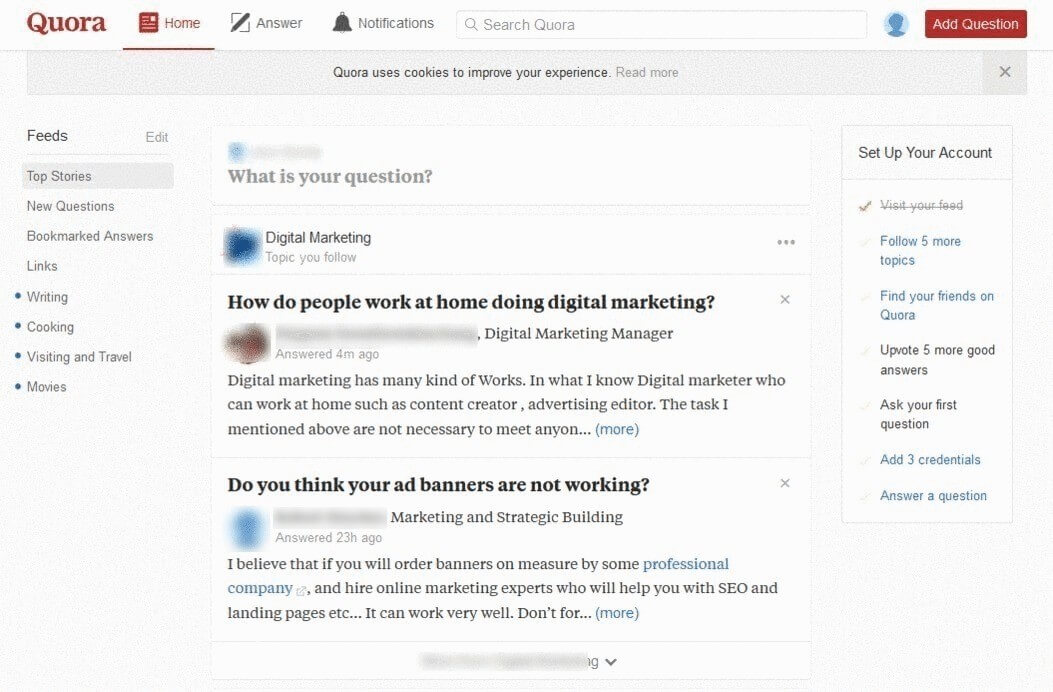
Quora’s interface is simple and intuitive, making it easy to use for both beginners and experienced users. Here are some key features to explore:
- Feed: This is the main section of Quora where you’ll find a feed of questions and answers from other users.
- Discover: Use this feature to discover new questions and topics that interest you.
- Followed/to: View a second feed based on your interests and followed users.
- Answer: Answer questions posed by others.
- Post: Share your own knowledge and expertise with the Quora community.
Asking Questions And Getting Answers
One of the core features of Quora is asking questions and getting answers. Here’s how to do it:
- Log in to your Quora account.
- Click on the “Add demand” button.
- Type your question in the search bar.
- Choose whether you want to make the question public or limited.
- Add any relevant tags or keywords.
- Click on the “Post” button.
Answering Questions
If you see a question that interests you, you can answer it by clicking on the “Answer” button. This will open up an editor where you can type your response.
Quora’s Community And Reputation System
Quora has a strong focus on community engagement and reputation-building. Here are some key aspects of Quora’s community system:
- Upvotes And Downvotes: Users can vote for answers they like or dislike.
- Reputation Points: Users earn reputation points based on their contributions to the community.
- Badges: Earn badges by achieving certain milestones, such as answering a certain number of questions.
Why Use Quora?
So why should you use Quora? Here are some benefits of using this social Q&A platform:
- Access to Knowledge And Expertise: Quora offers access to a vast repository of knowledge and expertise from users around the world.
- Community Engagement: Participate in discussions, ask questions, and share your own knowledge with others.
- Improved Reputation: Build your reputation by contributing to the community and earning reputation points.
Common Faqs
Here are some common FAQs about Quora:
-
What is Quora?
Quora is a social Q&A platform where users can ask questions and share their knowledge with others. -
How do I Register For an Account?
To register, visit the Quora website or download the mobile app and follow the registration process. -
Can I Use Quora on my Smartphone or Tablet?
Yes, Quora has a mobile app that you can use to access the platform on your smartphone or tablet. -
How do I Ask a Question on Quora?
To ask a question, click on the “Add demand” button and follow the prompts. -
Can I Answer Questions on Quora?
Yes, users can answer questions posed by others by clicking on the “Answer” button. -
Is Quora Free to Use?
Yes, Quora is free to use, with no costs or subscriptions required. -
Can I Delete my Account?
Yes, you can delete your account if you wish to do so. -
How do I Contact Quora’s Support Team?
To get in touch with Quora’s support team, click on the “Help” button at the bottom of any page.
Conclusion
Quora is a unique social Q&A platform that offers access to knowledge and expertise from users around the world. With its simple interface, robust community features, and reputation-building system, Quora is an excellent resource for anyone looking to learn or share their knowledge.
Whether you’re a student, professional, or simply curious about various topics, Quora has something for everyone. By using this guide, we hope to have provided you with the necessary information to get started on your Quora journey!


