
Reset Iphone on Duty: Simply
We’ve All Been There: Our dear smartphone, our trusted sidekick, our Iphone (in this case), has decided to no longer work. It’s possible that it was lost or stolen, or maybe it’s just stuck on your home screen with the slogan “apple” written all over it.
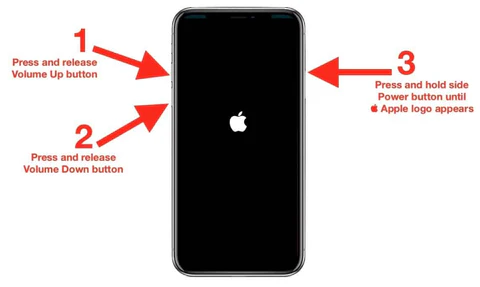
Let’s Hope The Situation Can be Resolved: Fortunately, there are different ways to reset your iPhone, depending on the circumstances. Here are some options:
1. Connection to The User
-
If your iPhone is connected to a Wi-Fi or cable network, it may be possible to reset it using Recovery Mode.
-
To do this, you need to connect the device to the computer via a USB cable and follow the instructions in the Apple Devices program for Windows 10 or later or Finder on Mac.
2. Edit Dfu
- If recovery mode doesn’t work, you can use DFU (Device Firmware Update) change to reset iPhone.
*This option requires you to connect your device to your computer and press some specific keys to activate dfu editing.
3. Remote Formatting
-
If you have been the victim of theft or your iPhone no longer works, you can reset it using remote formatting.
-
This option requires you to log in to your Apple account and follow the instructions to reset your device.
So What to Do?
If you find yourself in the situation where your iPhone no longer works, it’s important to stay calm and follow the correct steps. First, you need to check whether the device is connected to a wi-fi or cable network.
Connection to User
If your iPhone is connected to a Wi-Fi or cable network, it may be possible to reset it using Recovery Mode. To do this, you need to connect the device to the computer via a USB cable and follow the instructions in the Apple Devices program for Windows 10 or later or Finder on Mac.
Connection to User
If your iPhone no longer works, you can use the DFU (Device Firmware Update) change to reset your device. This option requires you to connect your device to your computer and press some specific keys to activate dfu editing.
Connection to User
If you have been the victim of theft or your iPhone no longer works, you can reset it using remote formatting. This option requires you to log in to your Apple account and follow the instructions to reset your device.
Conclusion
Resetting an iPhone can be a simple or complex procedure depending on the circumstances. It’s important to stay calm, follow the correct steps and log in to your Apple account if necessary. If you have any doubts or problems, you can consult the official Apple documentation for further information.
Frequently Asked Questions
-
What Are The Main Causes of The Problem?
-
How do I Reset Iphone Using Recovery Mode?
-
What is Dfu Editing And How Can I Use it to Reset Iphone?
-
Can I Reset my Iphone if it Has Been Stolen or if The Device no Longer Works?
-
How Can I Access my Apple Account to Reset my Iphone?
-
What Are The Differences Between Recovery Mode And Dfu Editing?
-
Can I Use Remote Formatting to Reset my Iphone if it Has Been Stolen or if The Device no Longer Works?
Answers
-
The main causes of the problem may be due to an initial screen freeze, a loss or theft of the device or other technical reasons.
-
To reset the iPhone using recovery mode, you need to connect it to the computer via a USB cable and follow the instructions of the Apple Devices programs for Windows 10 or later or Finder on Mac.
-
The dfu change (device firmware update) is a procedure that allows you to reset the iPhone in case of persistent technical problems. You can use it by connecting your device to your computer and pressing some specific keys to activate dfu editing.
-
Yes, if you have been the victim of theft or if your iPhone no longer works, you can reset it using remote formatting. This option requires you to log in to your Apple account and follow the instructions to reset your device.
-
Yes, you can log in to your Apple account to reset your iPhone. You must follow the instructions to access your account and reset it using remote formatting.
-
The main difference between recovery mode and dfu editing is that the former requires a wi-fi or cable connection, while the latter only requires connecting your device to your computer.
-
Yes, if you have been the victim of theft or your iPhone no longer works, you can use remote formatting to reset it. This option requires you to log in to your Apple account and follow the instructions to reset it.


