
The Ultimate Guide to Captcha: Understanding And Implementing This Essential Security Measure
As we navigate the vast expanse of the internet, it’s essential to ensure that our online interactions remain secure and private. One crucial measure that websites use to prevent digital intrusion is called CAPTCHA (Completely Automated Public Turing test to tell Computers and Humans Apart). In this article, we’ll delve into the world of CAPTCHA, exploring what it is, how it works, and why it’s a vital tool for website owners.
What is Captcha?
CAPTCHA is an automated test designed to determine whether a user is human or a computer program (bot) attempting to access a website. This security measure has been around since the 1990s, initially developed by AltaVista in 1997 and later improved upon by Luis von Ahn, Manuel Blum, Nicholas J. Hopper, and John Langford in 2000.
Types of Captcha
There are various types of CAPTCHAs that serve different purposes:
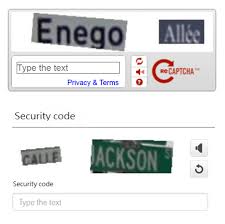
- Image-based Captcha: A distorted image containing a sequence of letters and/or numbers that the user must reproduce.
- Audio Captcha: An audio file containing a numerical code or phrase that the user must type in response.
- Behavioral Captcha: Analyzes the user’s behavior to determine whether they are human or not, such as detecting mouse movements or keyboard interactions.
How Does Captcha Work?
Here’s a step-by-step explanation of how CAPTCHA works:
- A user attempts to access a website that has implemented CAPTCHA.
- The website generates a CAPTCHA test based on the chosen type (e.G., Image-based, audio, etc.).
- The user is presented with the CAPTCHA test and must complete it successfully.
- If the user passes the test, they are deemed human and can proceed to access the website.
- If the user fails or attempts to use a bot to bypass the CAPTCHA, they are blocked from accessing the website.
Why is Captcha Essential?
CAPTCHA serves as an effective barrier against digital intrusion, protecting websites from:
- Spam: Preventing automated programs from posting unwanted content or links.
- Password Cracking: Blocking attempts to guess or crack passwords using brute-force methods.
- Malware: Protecting users from downloading malicious software.
Implementing Captcha on Your Website
If you’re interested in implementing CAPTCHA on your website, here’s a step-by-step guide:
- Choose a Captcha Service: Select a reputable CAPTCHA provider like Google reCAPTCHA or any other suitable option.
- Register For an Account: Sign up for an account with the chosen CAPTCHA service.
- Configure The Captcha Settings: Set up the CAPTCHA settings on your website, including the type of CAPTCHA and any specific requirements.
- Test The Implementation: Verify that the CAPTCHA is working correctly by testing it in incognito mode.
Benefits of Using Google Recaptcha
Google reCAPTCHA offers several benefits, including:
- Invisible Captchas: The reCAPTCHA v3 version provides an invisible CAPTCHA experience for users.
- Improved Accuracy: ReCAPTCHA’s advanced algorithms provide a high level of accuracy in identifying human users.
- Enhanced Security: Google reCAPTCHA is designed to prevent bots and other malicious programs from accessing your website.
Conclusion
In conclusion, CAPTCHA is an essential security measure that websites use to protect against digital intrusion. By understanding how CAPTCHA works and implementing it on your website, you can enhance the safety and privacy of your users’ sensitive data. Remember to stay up-to-date with the latest developments in CAPTCHA technology and explore other security measures to further secure your online presence.
Frequently Asked Questions
- What is The Purpose of Captcha?
CAPTCHA serves as a barrier against digital intrusion, protecting websites from spam, password cracking, and malware. - How Does Captcha Work?
CAPTCHA generates a test based on the chosen type (e.G., Image-based, audio) that users must complete successfully to access a website. - Why is Google Recaptcha a Popular Choice?
Google reCAPTCHA offers invisible CAPTCHAs, improved accuracy, and enhanced security features, making it an attractive option for website owners.
Recommended Resources
- Google Recaptcha Documentation: Explore the official reCAPTCHA documentation to learn more about implementing this essential security measure.
- Captcha Wikipedia Page: Delve into the world of CAPTCHA by reading the comprehensive Wikipedia article.
- Security Best Practices: Stay informed about the latest security best practices and guidelines for protecting your online presence.


