
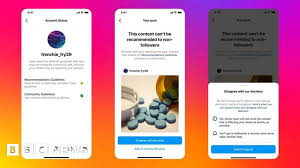
Understanding Instagram Banning: A Guide to Reversing Shadow Ban And Restrictions
As a social media enthusiast, you’ve likely encountered the frustration of having your Instagram account banned or restricted without knowing why. This guide is designed to help you understand the reasons behind an Instagram ban and provide tips on how to reverse it.
What is an Instagram Ban?
An Instagram ban occurs when your account is temporarily or permanently blocked from accessing the platform’s features, such as posting, commenting, or liking content. There are several types of bans, including:
- Shadow Ban: A temporary restriction that reduces the visibility of your posts and interactions.
- Restriction Actions: A limit on the number of consecutive actions you can perform, such as liking or commenting.
- Post Removal: The deletion of a specific post due to violating Instagram’s community guidelines.
- Permanent Ban: A complete block from accessing your account.
Why Am I Banned?
Before we dive into reversing an Instagram ban, it’s essential to understand why you might be banned in the first place. Some common reasons include:
- Posting copyrighted content without permission
- Sharing hate speech or discriminatory content
- Engaging in spammy behavior, such as repeatedly liking or commenting on posts
- Using bots or automated tools to manipulate interactions
How Do I Reverse an Instagram Ban?
Reversing an Instagram ban requires patience and persistence. Here are some steps you can take:
- Wait it Out: If your ban is temporary, waiting a day or two might resolve the issue.
- Review Instagram’s Community Guidelines: Ensure that your content complies with Instagram’s rules and regulations.
- Remove Offending Posts: If you’ve posted something that violates Instagram’s guidelines, remove it to avoid further action.
- Contact Instagram Support: Reach out to Instagram’s support team to report the issue and request assistance in resolving it.
- Take a Break: Consider taking a break from social media for a while to clear your head and reflect on your online behavior.
Tips to Prevent an Instagram Ban
To avoid getting banned in the first place, follow these tips:
- Post High-quality Content: Share engaging, informative, and visually appealing content that adds value to your audience.
- Engage With Others: Interact with other users by commenting, liking, and responding to comments on your posts and others’.
- Use Instagram’s Built-in Features: Utilize Instagram’s features, such as polls, quizzes, and stories, to create engaging content.
- Monitor Your Account Activity: Keep an eye on your account activity to prevent spammy behavior or automated tool usage.
Conclusion
Reversing an Instagram ban requires understanding the reasons behind it and taking proactive steps to resolve the issue. By following this guide and implementing the tips provided, you can minimize the risk of getting banned and maintain a healthy online presence.
Frequently Asked Questions (FAQs)
- What is a Shadow Ban?
A shadow ban is a temporary restriction that reduces the visibility of your posts and interactions on Instagram. - Why am I Being Shadow Banned?
Shadow banning can occur due to various reasons, including posting copyrighted content without permission or engaging in spammy behavior. - How do I Reverse an Instagram Ban?
Reversing an Instagram ban requires patience and persistence. Wait it out, review Instagram’s community guidelines, remove offending posts, contact Instagram support, or take a break from social media. - What Can I do to Prevent an Instagram Ban?
To avoid getting banned in the first place, post high-quality content, engage with others, use Instagram’s built-in features, and monitor your account activity.
Sources:


