
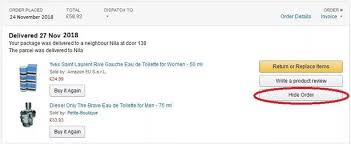
Concealing Amazon Orders: A Step-by-step Guide
As a content writer proficient in SEO writing, I will guide you through the process of concealing Amazon orders on both computer and app platforms.
Why Conceal Amazon Orders?
Are you worried that your brother or other family members might see the gift you’ve ordered for them on Amazon? Do you want to surprise them with a special present without giving away the secret? If so, this article is perfect for you!
Understanding Amazon’s Filing System
Before we dive into the process of concealing orders, it’s essential to understand how Amazon’s filing system works. You can file up to 500 commands on Amazon, which will remain hidden until you decide to display them again. This means that you can conceal a recent order or an old one, and access them whenever you want.
Concealing Orders on Computer
To conceal orders on your computer, follow these simple steps:
- Access Your Account: Log in to your Amazon account using the official website.
- Go to My Commands: Click on “Account & Lists” and select “My commands”.
- Select The Order: Find the order you want to conceal and click on it.
- File The Order: Select the option to file the command by clicking on “File visible command” in the bottom left box.
- Confirm Filing: Confirm that you want to file the order by clicking on “File command”.
Concealing Orders on App
Unfortunately, Amazon’s app does not have a built-in feature to conceal orders like the computer platform does. However, you can use the browser on your smartphone or tablet to access the desktop version of Amazon and follow the same steps as above.
Tips And Tricks
- You can only file up to 500 commands on Amazon.
- Filing an order will not delete it entirely; instead, it will move it to a separate section called “Commands filed”.
- If you share your account with family members and use the “File command” feature to conceal orders from them, be aware that they might still see the concealed orders in the “Commands filed” section.
- If you change your mind about concealing an order, simply go back to the “My commands” section and select the option to unfile it.
Common Faqs
- What Happens if I Conceal an Order?
Concealing an order will move it from the main command list to a separate section called “Commands filed”. - Can I See All my Concealed Orders?
Yes, you can access all your concealed orders by going to the “My commands” section and selecting “Commands filed”. - Will Concealing an Order Affect my Shopping History?
No, concealing an order will not delete it from your shopping history. - Can I Conceal Multiple Orders at Once?
Yes, you can select multiple orders and file them simultaneously.
Conclusion
Concealing Amazon orders is a straightforward process that can be completed on both computer and app platforms. Remember to follow the steps outlined in this article and take advantage of Amazon’s built-in features to keep your shopping history private. Happy shopping!


