
Understanding If an Email is a Virus: A Comprehensive Guide
Are you tired of receiving suspicious emails that may contain viruses or malware? Do you want to know how to check if an email is safe or not? Look no further! In this article, we will guide you through the process of understanding if an email is a virus, and provide you with tips on how to stay safe online.
The Risks of Email Viruses
Email viruses are programs that can damage your computer or steal sensitive information. They can be spread through emails, attachments, or links. Once a virus infects your device, it can cause serious problems, including data loss, system crashes, and even identity theft.
Preventive Controls to Check if an Email is a Virus
Before we dive into the details of checking if an email is a virus, let’s talk about some preventive controls you can take:
- Be Cautious With Attachments: Don’t open attachments from unknown sources, as they may contain viruses.
- Avoid Clicking on Links: Be wary of links in emails, especially those that ask for sensitive information or want you to download something.
- Use Antivirus Software: Install and regularly update your antivirus software to protect yourself against various types of malware.
Checking The Nature of an Email
To check if an email is a virus, follow these steps:
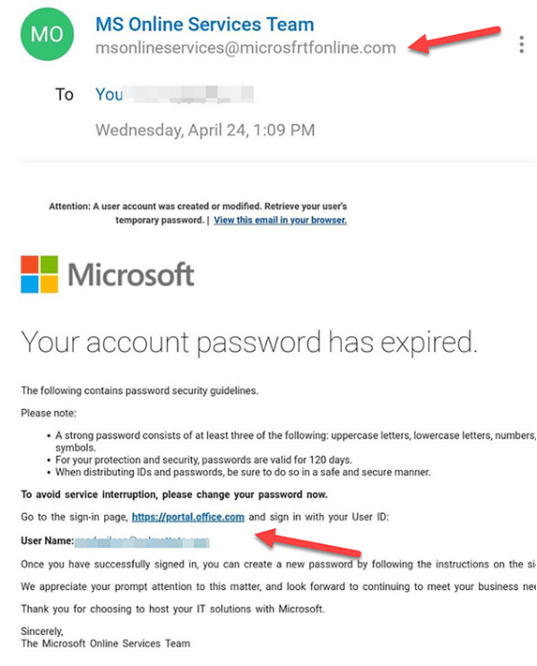
- Check The Sender’s Address: Make sure the sender’s address is legitimate and not suspicious.
- Look For Spelling or Grammatical Errors: Emails from viruses often contain mistakes in grammar or spelling.
- Be Wary of Unusual Subject Lines: If the subject line seems too good (or bad) to be true, it might be a scam.
- Check The Content: Read the email carefully and look for any suspicious links or attachments.
Types of Emails That May Contain Viruses
Here are some types of emails that may contain viruses:
- Phishing Emails: These emails aim to steal your sensitive information by pretending to be from a legitimate source.
- Malware Emails: These emails contain malware that can damage your device.
- Spam Emails: While not necessarily malicious, spam emails can still be annoying and potentially contain viruses.
How to Check if an Email is Phishing
Phishing emails are designed to trick you into revealing sensitive information. Here’s how to check if an email is phishing:
- Check The Sender’s Address: Make sure the sender’s address is legitimate and not suspicious.
- Look For Spelling or Grammatical Errors: Emails from scammers often contain mistakes in grammar or spelling.
- Be Wary of Unusual Subject Lines: If the subject line seems too good (or bad) to be true, it might be a scam.
How to Check if an Email is Malware
Malware emails can damage your device and steal sensitive information. Here’s how to check if an email is malware:
- Check The Attachment: Don’t open attachments from unknown sources, as they may contain viruses.
- Look For Suspicious Links: Be wary of links in emails, especially those that ask for sensitive information or want you to download something.
How to Check if an Email is a Hacker
Hacker emails are designed to steal your sensitive information. Here’s how to check if an email is a hacker:
- Check The Sender’s Address: Make sure the sender’s address is legitimate and not suspicious.
- Look For Spelling or Grammatical Errors: Emails from scammers often contain mistakes in grammar or spelling.
- Be Wary of Unusual Subject Lines: If the subject line seems too good (or bad) to be true, it might be a scam.
Conclusion
In conclusion, checking if an email is a virus requires attention to detail and knowledge of common tactics used by scammers. By following these tips, you can protect yourself against various types of malware and stay safe online.
Faqs
- Q: What Are The Most Common Types of Emails That Contain Viruses?
A: The most common types of emails that contain viruses are phishing emails, malware emails, and spam emails. - Q: How Can I Check if an Email is a Virus?
A: To check if an email is a virus, look for spelling or grammatical errors, be wary of unusual subject lines, and check the content carefully. - Q: What Are The Preventive Controls to Take Against Email Viruses?
A: The preventive controls to take against email viruses include using antivirus software, being cautious with attachments, and avoiding clicking on links. - Q: How Can I Protect Myself Against Phishing Emails?
A: To protect yourself against phishing emails, check the sender’s address, look for spelling or grammatical errors, and be wary of unusual subject lines. - Q: What Are The Types of Malware That Can Damage my Device?
A: The types of malware that can damage your device include viruses, worms, trojans, and ransomware. - Q: How Can I Stay Safe Online?
A: To stay safe online, use antivirus software, be cautious with attachments, avoid clicking on links, and report any suspicious activity to the authorities. - Q: What Are Some Common Tactics Used by Scammers to Steal Sensitive Information?
A: Some common tactics used by scammers to steal sensitive information include phishing emails, malware emails, and social engineering attacks. - Q: How Can I Protect my Device Against Viruses And Malware?
A: To protect your device against viruses and malware, use antivirus software, keep your operating system up-to-date, and avoid downloading unknown attachments or clicking on suspicious links.
Recommended Solutions
If you’re looking for a comprehensive solution to protect yourself against email viruses and malware, consider the following:
- Surfshark: A VPN that offers advanced protection against threats online.
- Privadovpn: A VPN that provides complete protection against various types of malware.
- Cleanmymac X: A program that offers a range of features to clean your device and protect it against viruses and malware.
- Malwarebytes: A free solution that can help you detect and remove malware from your device.
Remember, staying safe online requires attention to detail and knowledge of common tactics used by scammers. By following these tips and using the recommended solutions, you can protect yourself against email viruses and malware.


