
How to Disable Facetime on Iphone, Ipad, Mac, Apple Tv, And Android
Are you tired of using FaceTime on your Apple devices? Do you want to disable the service but can’t find a straightforward way to do it? Look no further! In this article, we’ll guide you through the process of disabling FaceTime on various Apple devices, including iPhone, iPad, Mac, Apple TV, and even Android.
What Happens When You Disable Facetime?
Before we dive into the step-by-step instructions, let’s quickly cover what happens when you disable FaceTime. Disabling FaceTime means you won’t be able to make or receive video calls using the service on your device. This also affects other services like iMessage and Facetime Audio.
Disabling Facetime on Iphone And Ipad
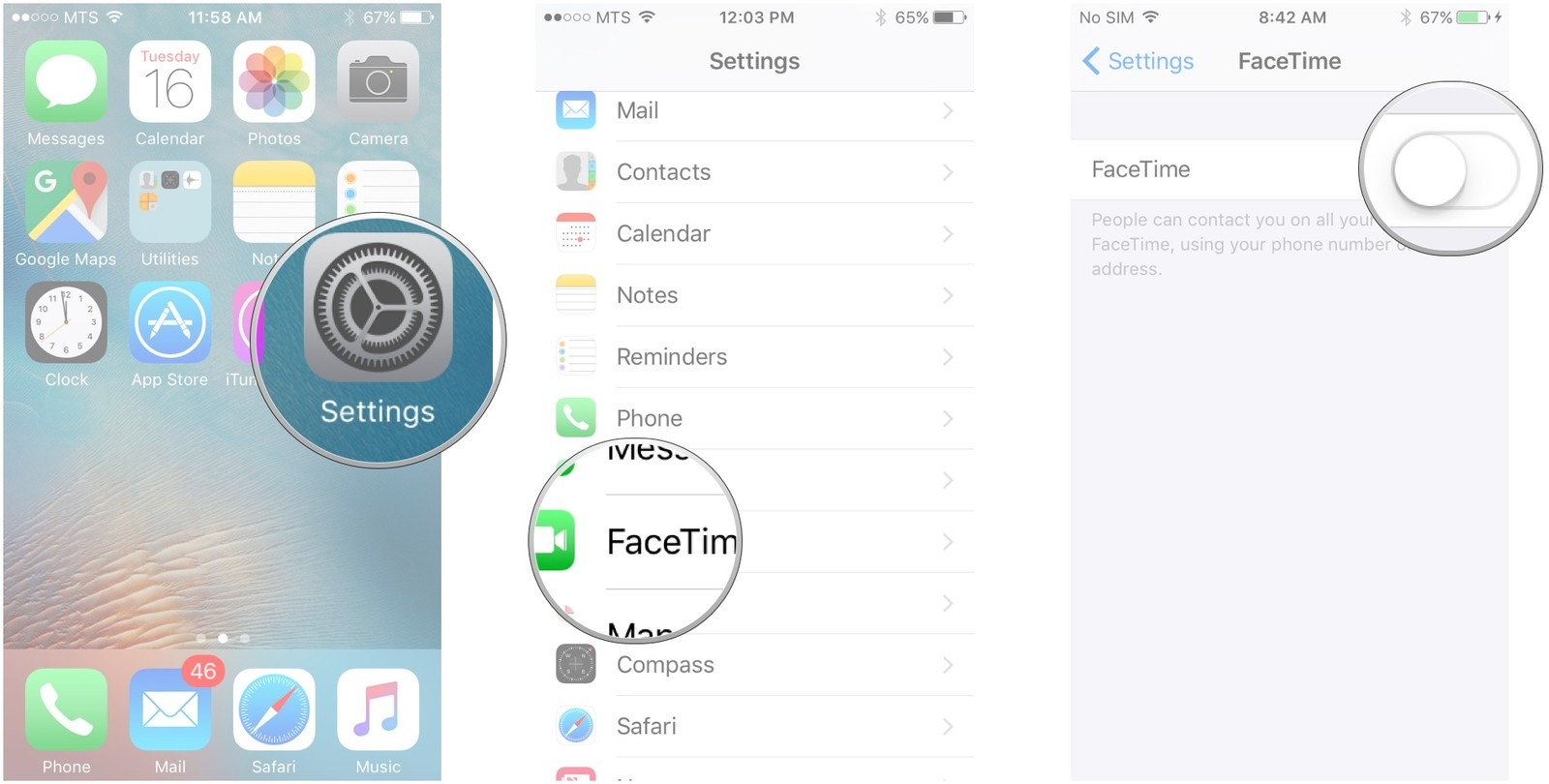
To disable FaceTime on your iPhone or iPad, follow these simple steps:
- Access Settings: Open the Settings app on your device.
- Facetime Option: Select the “FaceTime” option from the list of available settings.
- Toggle Off: Slide the toggle switch next to “FaceTime” from the “ON” position to the “OFF” position.
That’s it! You’ve successfully disabled FaceTime on your iPhone or iPad.
Disabling Facetime on Mac
To disable FaceTime on your Mac, follow these steps:
- Launch Facetime: Open the FaceTime app on your Mac.
- Facetime Menu: Select “FaceTime” from the menu bar at the top of the screen.
- Disable Facetime: Choose “Preferences” and then click on the “Settings” tab.
- Toggle Off: Uncheck the box next to “Enable FaceTime.”
Alternatively, you can use the keyboard shortcut Cmd + K to disable FaceTime.
Disabling Facetime on Apple TV
To disable FaceTime on your Apple TV, follow these steps:
- Access Settings: Open the Settings app on your Apple TV.
- General: Select “General” from the list of available settings.
- Turn Off Camera Continuity: Turn off the switch next to “Camera Continuity.”
This will disable FaceTime on your Apple TV.
Disabling Facetime on Android
FaceTime is not natively available on Android devices, but if you’ve used an iPhone in the past and have FaceTime set up with your phone number, you might be able to access it on your Android device. However, this can cause some issues with SMS messages and other notifications.
If you want to disable FaceTime on Android, follow these steps:
- Access Settings: Open the Settings app on your Android device.
- Imessage And Facetime: Select “iMessage and FaceTime” from the list of available settings.
- Disable Imessage And Facetime: Uncheck the box next to “Enable iMessage and FaceTime.”
Alternatively, you can visit Apple’s official website to disable FaceTime and iMessage on your Android device.
What to Do If You Change Your Mind
If you decide to re-enable FaceTime at a later time, don’t worry! The process is similar to disabling it in the first place. Simply follow the steps above to reactivate FaceTime on your Apple devices.
Disabling Facetime While Keeping Some Contacts Accessible
What if you want to keep some contacts accessible while still disabling FaceTime? You can achieve this by following these steps:
- Access Settings: Open the Settings app on your device.
- Facetime Option: Select the “FaceTime” option from the list of available settings.
- Toggle Off: Slide the toggle switch next to “FaceTime” from the “ON” position to the “OFF” position.
Alternatively, you can limit FaceTime calls to only those contacts that have your phone number or email address.
Conclusion
Disabling FaceTime on your Apple devices is a straightforward process. Whether you’re looking to disable it completely or just want to limit access to certain contacts, we’ve got you covered. Remember to follow the steps above and enjoy peace of mind knowing you can easily re-enable FaceTime if needed.
Q&a Section
Q: What Happens When I Disable Facetime?
A: Disabling FaceTime means you won’t be able to make or receive video calls using the service on your device.
Q: Can I Still Use Imessage And Facetime Audio With Facetime Disabled?
A: No, disabling FaceTime will also affect other services like iMessage and Facetime Audio.
Q: How do I Disable Facetime on my Apple Tv?
A: To disable FaceTime on your Apple TV, turn off the switch next to “Camera Continuity” in Settings > General.
Q: Can I Still Use Facetime With Android Devices?
A: FaceTime is not natively available on Android devices. However, you might be able to access it if you’ve used an iPhone in the past and have FaceTime set up with your phone number.


