
How to Type The Hashtag Symbol on Your Keyboard
Are you tired of not being able to type the hashtag symbol (#) on your keyboard? Do you use social media platforms and want to learn how to easily access this character? Look no further! In this article, we will guide you through the steps to type the hashtag symbol on your Windows or Mac computer, smartphone, or tablet.
Why Is It Important to Know How to Type The Hashtag Symbol?
The hashtag symbol is an essential character in today’s digital age. It allows users to categorize and search for content more easily on social media platforms. By knowing how to type this symbol, you can quickly access and share information with others.
How to Type The Hashtag Symbol on Your Windows Computer
If you’re using a Windows computer, you can type the hashtag symbol by pressing the combination of keys Alt Gr+#. This will insert the # character into your document or text field. Alternatively, you can use the combination Alt+Ctrl+#.
Tips For Using The Hashtag Symbol on Windows
- If you have a non-Italian keyboard layout, you may need to press Shift+3 instead.
- You can also use the Alt Gr+3 combination for the hashtag symbol on French and Spanish keyboards.
- To change your keyboard layout to Italian, go to Settings > Time & Language > Language > Keyboard, select “Italian (Italy)” and click Apply.
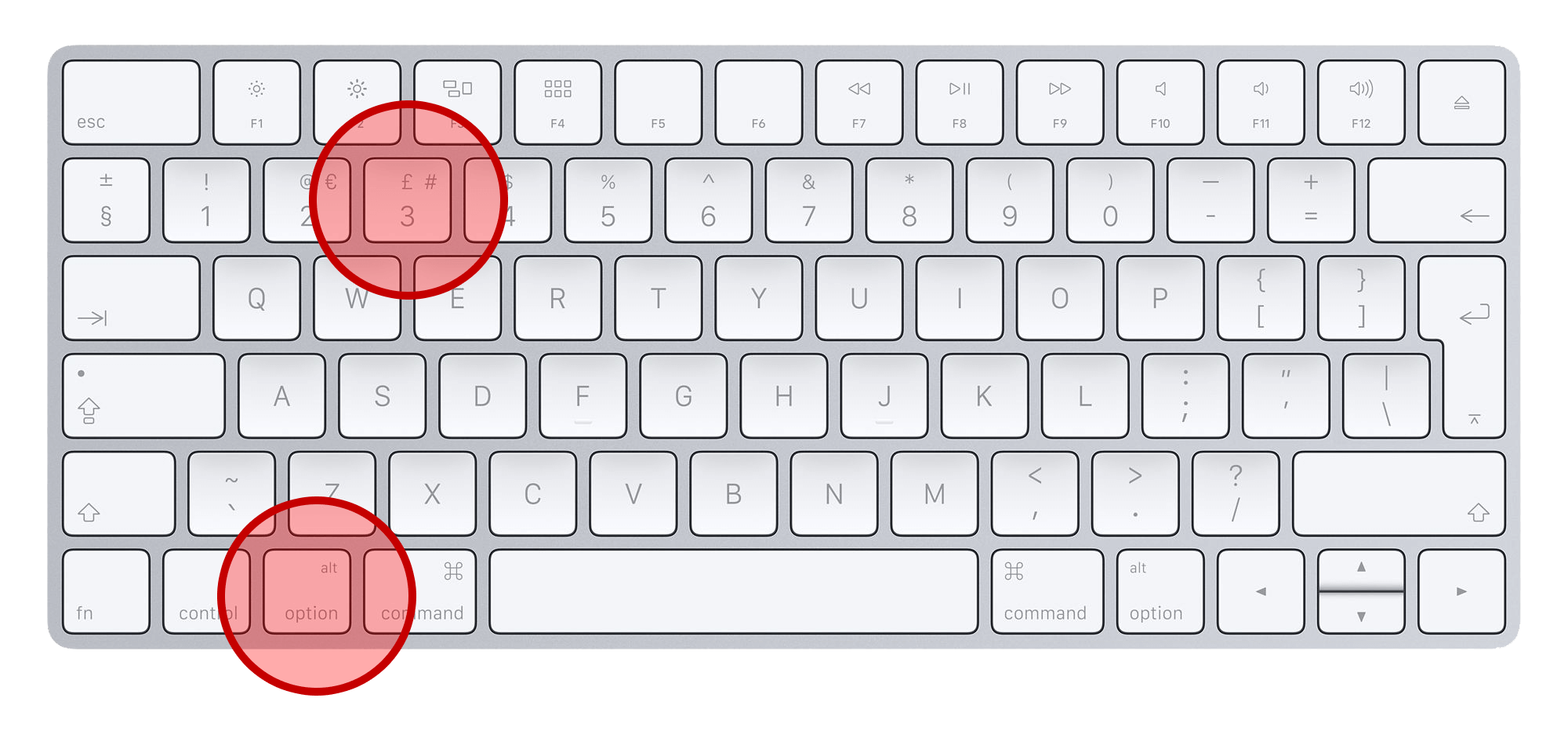
How to Type The Hashtag Symbol on Your Mac Computer
If you’re using a Mac computer, you can type the hashtag symbol by pressing the combination of keys Option+a. Alternatively, you can use the Character Viewer app to insert the # character into your document or text field.
Tips For Using The Hashtag Symbol on Mac
- If you have an English keyboard layout, you may need to press Shift+3 instead.
- To change your keyboard layout to Italian, go to System Preferences > Keyboard > Input Sources, select “Italian” and click Apply.
How to Type The Hashtag Symbol on Your Smartphone or Tablet
If you’re using a smartphone or tablet, typing the hashtag symbol is even easier! On an Android device, simply long-press the 3 key to access special characters, including the # symbol. On an iPhone or iPad, tap and hold the 123 key to access special characters, then tap the # symbol.
Tips For Using The Hashtag Symbol on Your Smartphone or Tablet
- If you have a non-standard keyboard layout, check your device’s settings to see if there are any additional steps required.
- To change your keyboard layout to Italian, go to Settings > Keyboard > Keyboards and select “Italian” from the list.
Conclusion
In conclusion, typing the hashtag symbol on your keyboard is easy! Whether you’re using a Windows or Mac computer, smartphone, or tablet, we’ve provided step-by-step guides to help you access this essential character. By following these tips, you’ll be able to easily type the hashtag symbol and share information with others.
Frequently Asked Questions
Q: Why can’t I find the hashtag symbol on my keyboard?
A: Check your device’s settings or keyboard layout to ensure that it is enabled.
Q: How do I change my keyboard layout to Italian?
A: Go to Settings > Keyboard > Input Sources (Windows) or System Preferences > Keyboard > Input Sources (Mac).
Q: Can I use the hashtag symbol on social media platforms?
A: Yes! The hashtag symbol is widely used on social media platforms such as Twitter, Instagram, and Facebook.
Q: How do I access special characters on my smartphone or tablet?
A: Check your device’s settings to see if there are any additional steps required.


