
Better Dns: Unlocking Faster Internet Speeds
As we navigate the vast expanse of the internet, we often find ourselves bogged down by slow loading times, buffering videos, and frustratingly long wait times. But what if I told you that there’s a simple solution to these problems? Enter: Better DNS.
In this article, we’ll delve into the world of Domain Name Systems (DNS) and explore how they work, why they’re essential for a smooth internet experience, and which are the best DNS services available today.
What is Dns?
Think of DNS like an address book for the internet. When you type in a website’s URL or domain name, your device needs to translate it into a numerical IP address that can be understood by computers. That’s where DNS comes in – it acts as a middleman, translating human-readable domain names into machine-readable IP addresses.
Why is Dns Important?
A fast and reliable DNS service is crucial for several reasons:
- Speed: A good DNS server can significantly reduce the time it takes to load websites, stream videos, or engage in online gaming.
- Reliability: A reliable DNS service ensures that you’re always connected to a stable and efficient network, minimizing dropped connections and errors.
- Security: Some DNS services offer additional security features, such as ad-blocking, malware protection, and parental controls.
Best Dns Services
So, which are the best DNS services available? Here’s our rundown:
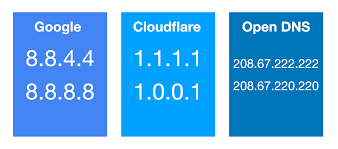
Google Public Dns
Google’s public DNS service is a popular choice among internet users. Its servers are known for their speed and efficiency, making it an ideal option for those who want to optimize their online experience.
- Preferred IPv4: 8.8.8.8
- Alternative IPv4: 8.8.4.4
Cloudflare Dns
Cloudflare’s DNS service is another top contender in the market. Its servers are optimized for speed and security, making it an excellent choice for those who value a fast and reliable online experience.
- Preferred IPv4: 1.1.1.1
- Alternative IPv4: 1.0.0.1
Opendns
OpenDNS is another well-established DNS service that offers a range of features, including parental controls and ad-blocking. Its servers are known for their speed and efficiency.
- Preferred IPv4: 208.67.222.222
- Alternative IPv4: 208.67.220.220
Other Solutions
Of course, there are many other DNS services available, each with its unique features and benefits. Some popular alternatives include:
- Dns Jumper: A free software that helps you find the fastest DNS servers for your connection.
- Nextdns: A DNS service that offers advanced security features and a user-friendly interface.
How to Set Up Better Dns
So, how do you set up better DNS on your devices? Here’s a step-by-step guide:
Windows
- Click on the Start button and search for “Control Panel.”
- Open the Control Panel and click on “Network and Internet” or “Internet Options.”
- Click on “Change adapter settings” or “Manage network connections.”
- Right-click on your active internet connection and select “Properties.”
- Click on the “Advanced” tab and select “Edit” next to “DNS.”
- Enter the preferred DNS server address (e.G., 8.8.8.8) And click “OK.”
Macos
- Click on the Apple menu and select “System Preferences.”
- Click on “Network” and select your active internet connection.
- Click on the “Advanced” tab and select “DNS.”
- Click the “+” button to add a new DNS server address (e.G., 8.8.8.8).
- Enter the primary and secondary DNS server addresses and click “OK.”
Android
- Go to Settings > Wi-Fi or Mobile Network.
- Long-press on your active internet connection and select “Modify network.”
- Select “Advanced options” and then “DNS.”
- Tap on “Add server” and enter the primary and secondary DNS server addresses.
Ios/ipados
- Go to Settings > Wi-Fi or Mobile Network.
- Long-press on your active internet connection and select “Edit.”
- Tap on “Configure DNS” and then “Manual.”
- Enter the primary and secondary DNS server addresses.
Conclusion
In conclusion, a better DNS service can significantly improve your online experience by providing faster loading times, reduced buffering, and enhanced security features. By understanding how DNS works and setting up a reliable DNS service on your devices, you can unlock the full potential of the internet and enjoy a smoother online experience.
Frequently Asked Questions (FAQs)
- What is Dns?
DNS stands for Domain Name System, which acts as an address book for the internet by translating human-readable domain names into machine-readable IP addresses.
- Why is Dns Important?
A fast and reliable DNS service ensures a smooth online experience, reducing loading times, buffering, and errors.
- Which Are The Best Dns Services?
Some of the top DNS services include Google Public DNS, Cloudflare DNS, and OpenDNS.
- How do I Set up Better Dns on my Device?
You can set up better DNS on your Windows, macOS, Android, or iOS/iPadOS device by following the step-by-step guides provided above.
- Can I Use Multiple Dns Services at Once?
Yes, you can use multiple DNS services simultaneously by configuring them in your device’s settings.
- Will Using a Better Dns Service Improve my Online Security?
Some DNS services offer additional security features, such as ad-blocking and malware protection, which can enhance your online security.
- Can I Change my Dns Server Addresses on my Router?
Yes, you can modify your DNS server addresses on your modem/router by accessing its settings panel.
- Will Using a Better Dns Service Affect my Internet Speed?
A reliable DNS service should not significantly impact your internet speed, but an unstable or slow DNS service might cause performance issues.


