
How to Turn Off Your Redmi Smartphone: A Step-by-step Guide
Are you one of the millions of people who have recently purchased a Redmi smartphone? Congratulations on making an excellent choice! However, as with any new device, there might be some initial confusion about how to turn it off. Don’t worry; we’ve got you covered. In this article, we’ll provide a detailed guide on how to shut down your Redmi smartphone using various methods.
Why Is It Important to Turn Off Your Smartphone?
Before we dive into the step-by-step instructions, let’s quickly discuss why turning off your smartphone is essential:
- Battery conservation: Turning off your phone helps conserve battery life, especially if you’re not using it for an extended period.
- Security: Shutting down your device can help prevent unauthorized access to your personal data and apps.
- Maintenance: Regularly shutting down your phone can help maintain its overall performance and extend its lifespan.
Method 1: Turning Off Your Redmi Smartphone Using The Standard Procedure
To turn off your Redmi smartphone using the standard procedure:
- Hold the power button until you see the shutdown menu appear on the screen.
- Tap the “Turn off” option to shut down your device.
- Confirm the action by tapping the “OK” button.
Method 2: Turning Off Your Redmi Smartphone Automatically
If you want to set up an automatic shutdown feature, follow these steps:
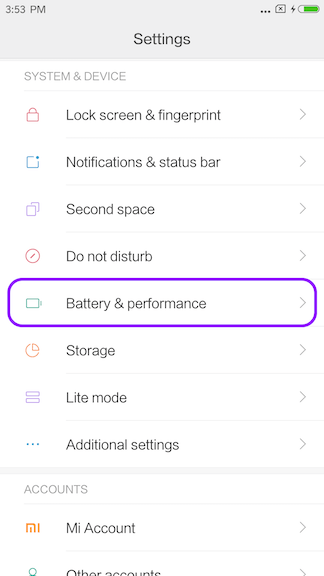
- Open the Settings app on your phone.
- Look for the “Power management” or “Battery saver” section.
- Tap on it and select the desired shutdown time.
- Choose how often you want your phone to shut down (e.G., Every day, weekly, etc.).
Method 3: Turning Off Your Redmi Smartphone When It’s Frozen or Unresponsive
If your phone is frozen or unresponsive:
- Press and hold the power button and volume down button simultaneously for about 10 seconds.
- Release both buttons when you see the shutdown menu appear on the screen.
- Tap the “Turn off” option to shut down your device.
Method 4: Turning Off Your Redmi Smartphone Without Using Touch Screen
If your touch screen is not functioning properly:
- Connect a mouse to your phone using an OTG cable and adapter.
- Open the Settings app on your phone using the mouse.
- Select the “Power management” or “Battery saver” section using the mouse.
- Tap on it and select the desired shutdown time using the mouse.
Conclusion
Turning off your Redmi smartphone is a straightforward process, but it’s essential to understand all the available methods in case you encounter any issues with your device. By following these step-by-step guides, you’ll be able to shut down your phone efficiently and safely.
Frequently Asked Questions (FAQs)
- Q: How do I Turn Off my Redmi Smartphone if It’s Frozen or Unresponsive?
A: Press and hold the power button and volume down button simultaneously for about 10 seconds. - Q: Can I Set up an Automatic Shutdown Feature on my Redmi Smartphone?
A: Yes, you can set up an automatic shutdown feature in the Settings app under the “Power management” or “Battery saver” section. - Q: How do I Turn Off my Redmi Smartphone Without Using The Touch Screen?
A: You can connect a mouse to your phone using an OTG cable and adapter, then open the Settings app and select the desired shutdown time. - Q: Why is it Essential to Turn Off my Redmi Smartphone Regularly?
A: Regularly shutting down your device helps conserve battery life, maintain security, and extend its overall performance.
Hope this guide was helpful!


