
The Ultimate Guide to Pdf Printers: Unlocking Seamless Document Sharing
Introduction
In today’s digital age, sharing documents has become an essential part of our daily lives. Among the numerous formats available, Portable Document Format (PDF) stands out as a preferred choice for its versatility and wide compatibility. A PDF printer is a software tool that allows you to convert any printable document into a PDF file, ensuring seamless sharing across various platforms.
What is a Pdf Printer?
A PDF printer, also known as a virtual printer, is a software application that enables you to create a PDF file from any printable content. It works like a physical printer, but instead of printing the document on paper, it saves it as a PDF file. This means you can easily share documents with others, regardless of their operating system or device.
Benefits of Using a Pdf Printer
- Easy Document Sharing: Convert any printable document into a PDF file and share it effortlessly.
- Wide Compatibility: PDF files are compatible with most devices, including Windows, macOS, Android, and iOS.
- Space-saving: PDFs are compact files that take up less storage space compared to other formats.
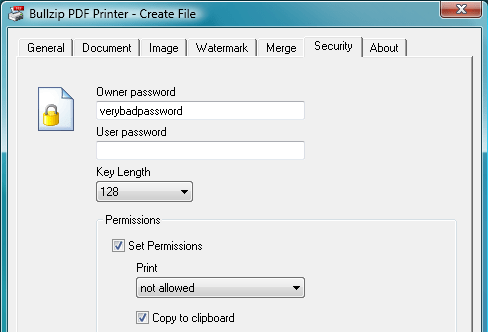
- Security: PDFs can be password-protected for added security.
Best Pdf Printers For Windows
- Microsoft Print to Pdf: Comes pre-installed with Windows 10 and later versions, making it a convenient choice.
- Dopdf: A popular free PDF printer that allows you to create high-quality PDFs from various sources.
- Cutepdf Writer: Another widely used PDF printer that supports multiple formats and settings.
Best Pdf Printers For Mac
- Built-in Pdf Printer: MacOS includes a built-in PDF printer, making it easy to convert documents into PDF format.
- Pdfcreator: A user-friendly PDF printer that offers customizable settings and password protection.
Best Pdf Printers For Android
- Adobe Acrobat: A powerful PDF editor and creator that allows you to create high-quality PDFs from various sources.
- Pdf Printer by Foxit: A simple yet effective PDF printer that supports multiple formats and settings.
Best Pdf Printers For Iphone/ipad
- Built-in Pdf Printer: IOS and iPadOS include a built-in PDF printer, making it easy to convert documents into PDF format.
- Adobe Acrobat: Also available on mobile devices, Adobe Acrobat offers advanced features and customization options.
How to Use a Pdf Printer on Windows
- Open the file you want to convert into a PDF.
- Click on the “Print” option in the menu bar.
- Select the PDF printer from the list of available printers.
- Choose the desired settings, such as paper size and quality.
- Save the PDF file to your desired location.
How to Use a Pdf Printer on Mac
- Open the file you want to convert into a PDF.
- Click on the “File” menu and select “Print”.
- Select the built-in PDF printer from the list of available printers.
- Choose the desired settings, such as paper size and quality.
- Save the PDF file to your desired location.
How to Use a Pdf Printer on Android
- Open the page or document you want to convert into a PDF.
- Tap on the sharing icon (usually a square with an arrow).
- Select the “Save as PDF” option from the menu.
- Choose the desired settings, such as paper size and quality.
- Save the PDF file to your desired location.
How to Use a Pdf Printer on Iphone/ipad
- Open the page or document you want to convert into a PDF.
- Tap on the sharing icon (usually a square with an arrow).
- Select the “Save as PDF” option from the menu.
- Choose the desired settings, such as paper size and quality.
- Save the PDF file to your desired location.
Conclusion
In conclusion, using a PDF printer is an essential tool for anyone who needs to share documents frequently. With various options available for different operating systems and devices, you can choose the best PDF printer that suits your needs. By following these simple steps, you can unlock seamless document sharing and take advantage of the many benefits that come with it.
Frequently Asked Questions
Q: What is a PDF printer?
A: A PDF printer is a software tool that allows you to create a PDF file from any printable content.
Q: Which operating systems support PDF printers?
A: Most devices, including Windows, macOS, Android, and iOS, support PDF printers.
Q: How do I use a PDF printer on my device?
A: The steps for using a PDF printer vary depending on the device and operating system. Please refer to the specific instructions provided above.
Q: Can I password-protect my PDF files?
A: Yes, most PDF printers allow you to password-protect your PDF files for added security.
Q: How do I convert a document into a PDF file?
A: To convert a document into a PDF file, simply select the “Print” option and choose the PDF printer from the list of available printers.


