
How to See If a Photo Has Been Taken From The Internet
Are you ever curious about whether a photo has been taken from the internet? With the rise of social media, it’s becoming increasingly common to come across photos that have been shared multiple times online. But how can you determine if a photo is original or has been copied from someone else?
In this article, we’ll explore various ways to see if a photo has been taken from the internet using different tools and techniques.
Understanding Reverse Image Search
Reverse image search is a technique used to find identical images on the web. It’s like searching for a needle in a haystack, but instead of looking for a specific phrase or keyword, you’re looking for an exact match of an image.
There are several tools available that allow you to perform reverse image searches. Let’s dive into some of them!
Using Google Images
One of the most popular and effective ways to see if a photo has been taken from the internet is by using Google Images. Here’s how:
- Accessing Google Images: You can access Google Images directly through the search engine or via the dedicated app.
- Uploading an Image: Once you’re on the Google Images page, click on the “Upload” button and select the image you want to search for.
- Performing a Search: After uploading the image, Google will search its vast database of images for identical matches.
- Analyzing Results: If the image has been taken from the internet, Google will display similar images along with their sources.
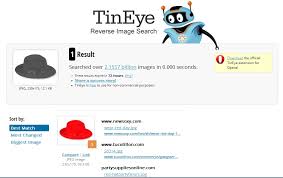
Using Tineye
Another powerful tool for reverse image searches is TinEye. Here’s how to use it:
- Accessing Tineye: You can access TinEye directly through its website or via a mobile app.
- Uploading an Image: Click on the “Upload” button and select the image you want to search for.
- Performing a Search: After uploading the image, TinEye will search its database of images for identical matches.
- Analyzing Results: If the image has been taken from the internet, TinEye will display similar images along with their sources.
Using Google Lens on Smartphones
If you have a smartphone, you can use Google Lens to see if a photo has been taken from the internet. Here’s how:
- Accessing Google Lens: Download and install the Google Photos app on your smartphone.
- Uploading an Image: Open the app and select the image you want to search for.
- Performing a Search: After selecting the image, click on the “Lens” icon to initiate a reverse image search.
- Analyzing Results: If the image has been taken from the internet, Google Lens will display similar images along with their sources.
Other Solutions
If the services mentioned above don’t meet your needs, there are other tools available that can help you perform reverse image searches. Some of these include:
- Bing Images
- PimEye
Conclusion
In conclusion, seeing if a photo has been taken from the internet is now easier than ever with the various tools and techniques available. Whether you use Google Images, TinEye, or Google Lens on your smartphone, these services can help you determine whether an image is original or has been copied from someone else.
By understanding how to perform reverse image searches, you’ll be better equipped to navigate the complex world of social media and online content sharing.
Faqs
- Q: What is a Reverse Image Search?
A: A reverse image search is a technique used to find identical images on the web. - Q: How do I Perform a Reverse Image Search Using Google Images?
A: To perform a reverse image search using Google Images, upload an image and click on the “Upload” button to initiate a search. - Q: Can I Use Tineye For Reverse Image Searches?
A: Yes, you can use TinEye to perform reverse image searches by uploading an image and initiating a search. - Q: How do I Access Google Lens on my Smartphone?
A: To access Google Lens on your smartphone, download and install the Google Photos app. - Q: Can I Use Other Services For Reverse Image Searches?
A: Yes, there are other services available that can help you perform reverse image searches, such as Bing Images and PimEye. - Q: Is Reverse Image Searching Free?
A: Most services mentioned above offer free access to their features, but some may require subscription or have limitations on the number of searches. - Q: Can I Use These Services For Commercial Purposes?
A: Check the terms of service for each platform to determine if they allow commercial use. - Q: How Accurate Are Reverse Image Searches?
A: The accuracy of reverse image searches depends on various factors, including the quality and uniqueness of the image being searched.


