
How to Block Unwanted Calls on Your Smartphone
Are you tired of receiving unwanted calls from strangers? Do you wish there was a way to block these pesky phone numbers automatically? Look no further! In this article, we will guide you through the process of blocking unwanted calls on various smartphone brands, including Android, Samsung, Xiaomi, Huawei, and iPhone.
Understanding Unwanted Calls
Before we dive into the solutions, let’s understand what constitutes an unwanted call. These are calls from numbers that are not in your contact list or have been identified as spam by your phone’s operating system. They can be calls from telemarketers, scammers, or even wrong numbers.
Blocking Unwanted Calls on Android
If you’re using an Android smartphone, you can block unwanted calls using the built-in features of your phone. Here’s how:
- Open Phone App: Go to your phone app and look for the three dots in the top right corner.
- Settings: Tap on “Settings” and then scroll down to “Blocked numbers.”
- Add Number: Tap on “Add number” and enter the number you want to block.
- Block Unknown Numbers: Enable the option to block unknown numbers, including those from call centers and spammers.
Blocking Unwanted Calls on Samsung
If you’re using a Samsung smartphone, follow these steps:
- Open Phone App: Go to your phone app and look for the three dots in the top right corner.
- Settings: Tap on “Settings” and then scroll down to “Blocked numbers.”
- Add Number: Tap on “Add number” and enter the number you want to block.
- Block Spam Calls: Enable the option to block spam calls, including those from call centers and spammers.
Blocking Unwanted Calls on Xiaomi
If you’re using a Xiaomi smartphone, follow these steps:
- Open Phone App: Go to your phone app and look for the three dots in the top right corner.
- Settings: Tap on “Settings” and then scroll down to “Blocked numbers.”
- Add Number: Tap on “Add number” and enter the number you want to block.
- Block Unknown Numbers: Enable the option to block unknown numbers, including those from call centers and spammers.
Blocking Unwanted Calls on Huawei
If you’re using a Huawei smartphone, follow these steps:
- Open Phone App: Go to your phone app and look for the four dots in the top right corner.
- Settings: Tap on “Settings” and then scroll down to “Filtering”.
- Block Molestation Calls: Enable the option to block molestation calls, including those from call centers and spammers.
Blocking Unwanted Calls on Iphone
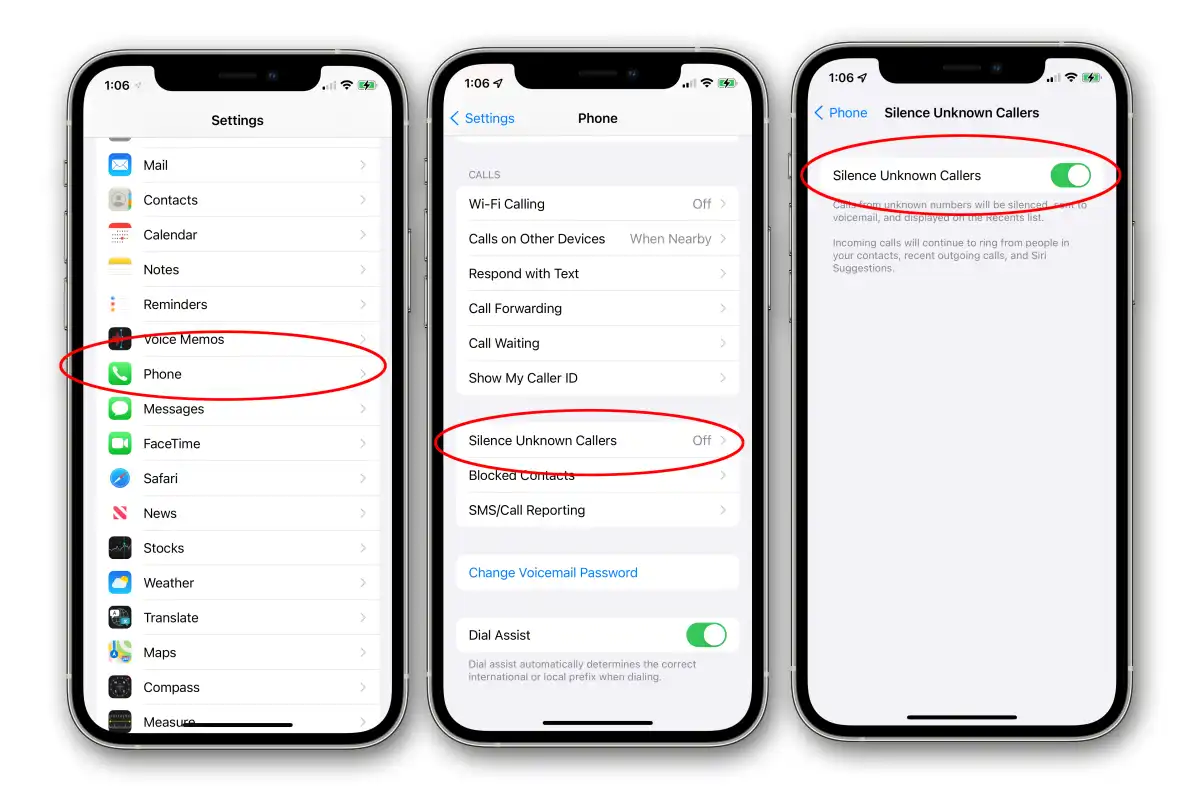
If you’re using an iPhone, follow these steps:
- Open Settings App: Go to your settings app.
- Phone: Tap on “Phone” and then scroll down to “Silence Unknown Callers.”
- Enable Feature: Enable the feature to silence unknown callers.
Additional Tips
In addition to blocking unwanted calls, you can also use other methods to avoid receiving these calls:
- Register With The National Do Not Call Registry: This registry is a database of phone numbers that are not to be called by telemarketers.
- Use a Call-blocking App: There are several apps available that can block unwanted calls and identify spam numbers.
- Check Your Phone’s Settings: Your phone may have built-in features to block unwanted calls or identify spam numbers.
Conclusion
Blocking unwanted calls on your smartphone is a simple process that can be done using the built-in features of your device. By following these steps, you can reduce the number of unwanted calls you receive and enjoy a more peaceful mobile experience. Remember to also use other methods such as registering with the National Do Not Call Registry or using call-blocking apps to further protect yourself from unwanted calls.
Frequently Asked Questions
- What is The Best Way to Block Unwanted Calls?
The best way to block unwanted calls is to use a combination of methods, including blocking specific numbers, enabling features to silence unknown callers, and using call-blocking apps. - Can I Block All Unwanted Calls?
While you can block most unwanted calls, it’s impossible to block every single one. However, by using the methods mentioned above, you can reduce the number of unwanted calls you receive significantly. - How do I Report Unwanted Calls?
If you’re receiving unwanted calls from a specific company or telemarketer, you can report them to the National Do Not Call Registry or your local authorities.


