
How to Play Fortnite on PC With a Controller: A Comprehensive Guide
Are you tired of playing Fortnite with a mouse and keyboard? Do you want to experience the thrill of gaming with a controller on your PC? Look no further! In this article, we will guide you through the process of playing Fortnite on PC with a controller, including tips and tricks for the most common controllers.
What Controllers Are Compatible With Fortnite?
Before we dive into the nitty-gritty, let’s talk about which controllers are compatible with Fortnite. Epic Games, the creators of Fortnite, have officially supported the following controllers:
- DualSense (PS5)
- DualShock 4 (PS4)
- Xbox Wireless Controller (Xbox Series X/S and One)
However, other third-party controllers may also work, but you’ll need to check their compatibility with Fortnite.
Playing Fortnite on PC With a Ps4 Controller
If you’re using a PS4 controller, you’re in luck! The DualShock 4 is one of the most widely used controllers for gaming on PC. To connect your PS4 controller to your PC:
- Connect the controller to your PC via USB.
- Wait for your operating system to recognize and install the controller drivers.
- Launch Fortnite and start playing with your controller!
Playing Fortnite on PC With a Ps5 Controller
If you’re using a PS5 controller, you’re also in luck! The DualSense is another popular choice for gaming on PC. To connect your PS5 controller to your PC:
- Connect the controller to your PC via USB or wirelessly via Bluetooth.
- Wait for your operating system to recognize and install the controller drivers.
- Launch Fortnite and start playing with your controller!
Playing Fortnite on PC With an Xbox Controller
If you’re using an Xbox controller, you can also play Fortnite on PC with it! To connect your Xbox controller to your PC:
- Connect the controller to your PC via USB or wirelessly via Bluetooth.
- Wait for your operating system to recognize and install the controller drivers.
- Launch Fortnite and start playing with your controller!
Tips And Tricks
Here are some tips and tricks for using a controller on Fortnite:
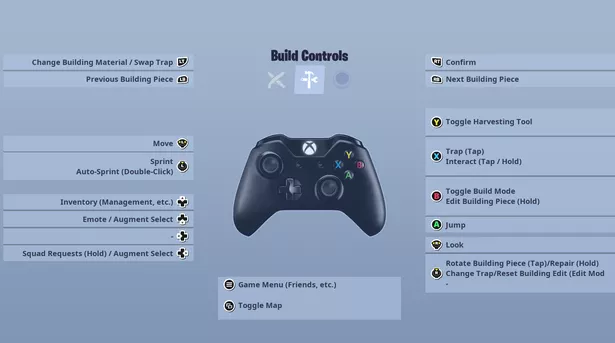
- Use The Default Controls: To avoid any confusion, use the default controls that come with your controller. These are usually the most intuitive way to play the game.
- Get Familiar With The Layout: Take some time to get familiar with the layout of your controller. This will help you navigate the game more smoothly.
- Experiment With Different Controllers: If you have multiple controllers, try them out to see which one works best for you.
Other Controllers And Emulators
What if you want to use a different controller or emulator? While it’s possible to use other controllers and emulators, we don’t recommend it. Here’s why:
- Compatibility Issues: Other controllers may not be compatible with Fortnite, which can lead to frustrating gameplay experiences.
- Emulators Can be Tricky: Using an emulator can be tricky, and you might encounter compatibility issues or glitches.
Playing Fortnite on Cloud With a Controller
Finally, let’s talk about playing Fortnite on cloud with a controller! While it’s possible to play Fortnite on cloud without installing anything on your PC, we don’t recommend it. Here’s why:
- Internet Connection Required: To play Fortnite on cloud, you’ll need a stable internet connection.
- Cloud Gaming Can be Laggy: Cloud gaming can be laggy, which can lead to frustrating gameplay experiences.
Conclusion
In conclusion, playing Fortnite on PC with a controller is a great way to experience the game in a whole new way. Whether you’re using a PS4, PS5, or Xbox controller, we’ve got you covered! Just remember to use the default controls and get familiar with the layout of your controller.
Faqs
Here are some frequently asked questions about playing Fortnite on PC with a controller:
Q: Which controllers are compatible with Fortnite?
A: The DualSense (PS5), DualShock 4 (PS4), and Xbox Wireless Controller (Xbox Series X/S and One) are officially supported by Epic Games.
Q: Can I use other controllers or emulators to play Fortnite on PC?
A: While it’s possible, we don’t recommend using other controllers or emulators due to compatibility issues and potential glitches.
Q: How do I connect my PS4 controller to my PC?
A: Connect the controller to your PC via USB. Wait for your operating system to recognize and install the controller drivers.
Q: Can I play Fortnite on cloud with a controller?
A: Yes, but we don’t recommend it due to internet connection requirements and potential laggy gameplay experiences.
Q: Which controllers are compatible with Xbox Cloud Gaming?
A: The Xbox Wireless Controller (Xbox Series X/S and One) is officially supported by Microsoft.
Q: Can I use my PS5 controller on Xbox Cloud Gaming?
A: Unfortunately, no. The PS5 controller is not compatible with Xbox Cloud Gaming.
Q: How do I get started with playing Fortnite on cloud with a controller?
A: Connect your Xbox Wireless Controller to your PC via USB or wirelessly via Bluetooth. Wait for your operating system to recognize and install the controller drivers. Then, launch Fortnite and start playing!


