
The Ultimate Guide to Seeing Whatsapp Status Updates
Are you tired of missing out on the latest updates from your friends on WhatsApp? Do you want to know what’s new with them without having to ask or wait for a reply? Look no further! In this article, we’ll show you how to see WhatsApp status updates like a pro.
Why Can’t I See My Friend’s Status Update?
Before we dive into the nitty-gritty of seeing WhatsApp status updates, let’s talk about why you might not be able to see your friend’s update in the first place. There are a few reasons for this:
- Your friend has blocked you on WhatsApp.
- You’ve been de-activated from seeing status updates due to a previous incident or misunderstanding.
How to See Whatsapp Status Updates
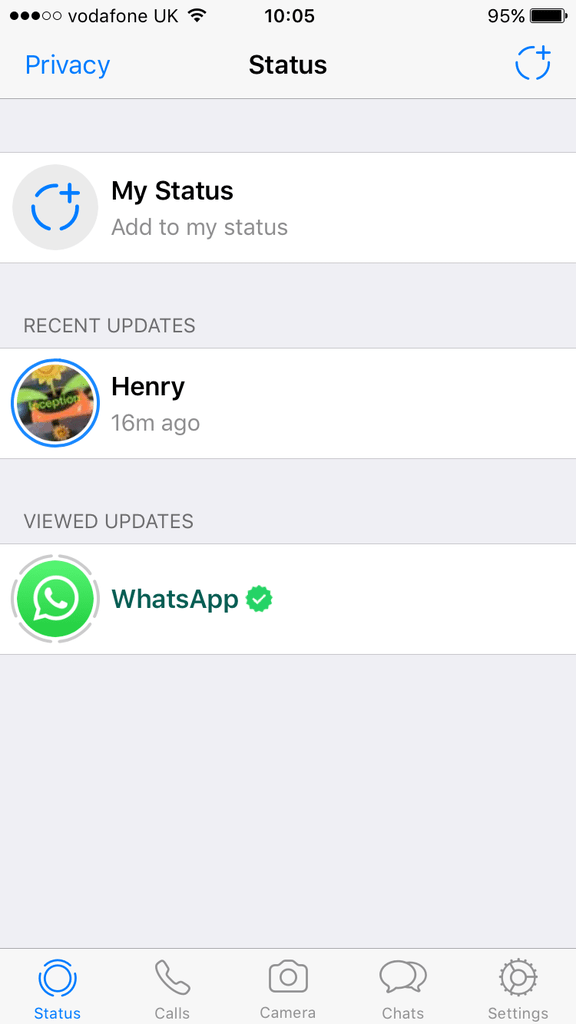
So, how can you see WhatsApp status updates? The process is relatively straightforward and similar across all platforms (Android, iOS, PC). Here’s what you need to do:
- Open Whatsapp: First, open the WhatsApp app on your device.
- Go to Chats: Tap on the “Chats” tab at the bottom of the screen to view all your conversations.
- Select a Contact: Choose the contact whose status update you want to see.
- Tap on Their Name: Tap on their name to open the chat window.
- See Status Update: You should now be able to see their status update at the top of the screen.
How to See Whatsapp Status Updates Without Being Seen
What if you want to see someone’s WhatsApp status updates but don’t want them to know that you’ve seen it? There is a way to do this, but keep in mind that it might not work in all cases. Here’s how:
- De-activate Read Receipts: Go to the Settings app on your device and select “Account” or “Privacy.” Find the option for read receipts (this might be called something else depending on your platform).
- Turn Off Read Receipts: Slide the switch next to “Read Receipts” to turn it off.
This will prevent anyone from seeing that you’ve viewed their status update. However, keep in mind that this feature is reciprocal; if they have also turned off read receipts, you won’t be able to see their updates either.
How to See Whatsapp Status Updates of Blocked Contacts
What if a friend has blocked you on WhatsApp but you still want to see their status update? Unfortunately, there’s no way to see someone’s status update if they’ve blocked you. The best thing you can do is try to resolve the issue and unblock them.
Tips And Tricks
Here are some additional tips and tricks for seeing WhatsApp status updates:
- Keep Your App Up-to-date: Make sure your WhatsApp app is updated to the latest version, as newer versions often include new features and improvements.
- Use a Reliable Internet Connection: Ensure you have a stable internet connection to avoid any disruptions or delays in receiving updates.
By following these steps and tips, you should be able to see WhatsApp status updates with ease.


