
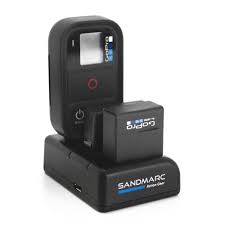
How to Properly Charge Your Gopro Camera: A Step-by-step Guide
Are you tired of dealing with a dead battery on your GoPro camera? Do you want to know the best way to charge your device? Look no further! In this article, we will guide you through the process of properly charging your GoPro camera using various methods.
Why Proper Charging Matters
Charging your GoPro camera is not just about plugging it into a power source and waiting for it to turn on. Improper charging can damage the battery and affect the overall performance of your device. In this article, we will show you how to charge your GoPro safely and efficiently.
Method 1: Charging Via Computer
One of the most convenient ways to charge your GoPro is by connecting it to a computer using a USB cable. Here’s what you need to do:
- Step 1: Connect the provided USB cable to the charging port on your GoPro camera.
- Step 2: Plug the other end of the cable into a USB port on your computer.
- Step 3: Make sure that the camera is turned off before connecting it to the computer. This will help prevent any potential issues with the battery or the device’s electronics.
Method 2: Charging Via Wall Adapter
If you don’t have access to a computer, you can also charge your GoPro using a wall adapter. Here’s what you need to do:
- Step 1: Get a wall charger that is specifically designed for GoPro cameras.
- Step 2: Connect the provided USB cable to the charging port on your GoPro camera.
- Step 3: Plug the other end of the cable into the wall adapter.
Method 3: Charging Via Power Bank
Another great way to charge your GoPro is by using a power bank. Here’s what you need to do:
- Step 1: Get a power bank that has a capacity of at least 5000mAh.
- Step 2: Connect the provided USB cable to the charging port on your GoPro camera.
- Step 3: Plug the other end of the cable into the power bank.
Method 4: Charging Via Battery
If you have a GoPro with a removable battery, you can also charge it separately. Here’s what you need to do:
- Step 1: Get a charger specifically designed for your GoPro camera.
- Step 2: Connect the provided USB cable to the charging port on the battery.
- Step 3: Plug the other end of the cable into a power source.
Tips And Precautions
When charging your GoPro, keep in mind the following tips and precautions:
- Make sure that the camera is turned off before connecting it to a power source.
- Avoid overcharging your GoPro as this can damage the battery.
- Use high-quality chargers and cables to ensure safe and efficient charging.
Conclusion
In conclusion, charging your GoPro camera is not just about plugging it into a power source and waiting for it to turn on. Improper charging can damage the battery and affect the overall performance of your device. By following the methods outlined in this article, you can charge your GoPro safely and efficiently.
Frequently Asked Questions
Here are some frequently asked questions related to charging your GoPro:
- Q: Can I Charge my Gopro Using a Generic Charger?
A: No, it’s recommended to use a charger specifically designed for GoPro cameras. - Q: How Long Does it Take to Fully Charge my Gopro?
A: The time it takes to fully charge your GoPro depends on the method used and the capacity of the battery. - Q: Can I Overcharge my Gopro?
A: Yes, overcharging can damage the battery and affect the overall performance of your device.
Additional Resources
If you’re looking for more information on how to properly charge your GoPro camera, check out these additional resources:
I hope this article has provided you with the information and guidance you need to properly charge your GoPro camera. If you have any further questions or concerns, feel free to ask!


