
How to Connect a TV to an Antenna Without Cable: A Comprehensive Guide
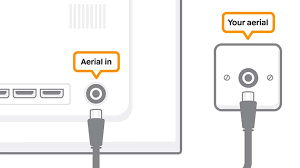
Are you tired of dealing with the hassle of cables when connecting your TV to an antenna? Look no further! In this article, we will explore the various options available for connecting a TV to an antenna without cable.
The Problem With Cables
Cables can be frustrating to deal with, especially if you have limited space or prefer a more minimalist setup. Moreover, cables can be prone to damage and can make your home look cluttered.
Solution 1: Repeater of Sign And Telecomando 5.8 Ghz
One solution is to use a repeater of sign and telecomando 5.8 GHz. This device allows you to extend the signal of a TV antenna to another location, making it possible to connect multiple TVs without the need for cables.
Solution 2: Portable Antenna
Another option is to use a portable antenna. These antennas are designed to be compact and lightweight, making them easy to place anywhere in your home. They also come with amplifiers that can improve signal strength.
Meliconi Antenna TV Amplified of Inner At55
One example of a portable antenna is the Meliconi Antenna TV Amplified of Inner AT55. This antenna has an amplifier that can boost signal strength, making it ideal for areas with weak signals.
Bqeel Antenna Inner TV For Digital Terrestrial
Another option is the Bqeel Antenna Inner TV for digital terrestrial. This antenna is designed to work with digital TVs and comes with a built-in amplifier.
Solution 3: App And Devices of Streaming
If you don’t have an antenna or prefer not to use one, you can consider using streaming devices. These devices allow you to access a wide range of streaming services directly on your TV.
Chromecast
One popular option is Chromecast. This device allows you to stream content from your phone or tablet to your TV, making it easy to access your favorite streaming services.
Fire TV Stick/fire TV Cube
Another option is the Fire TV Stick or Fire TV Cube. These devices allow you to access a wide range of streaming services directly on your TV and come with voice control features.
Apple TV
If you’re an Apple fan, you can consider using an Apple TV. This device allows you to access a wide range of streaming services and comes with a user-friendly interface.
Now Smart Stick/sky Q Without Parabola
If you’re interested in watching Sky content but don’t have a parabola, you can consider using the NOW Smart Stick or Sky Q without parabola. These devices allow you to access Sky content directly on your TV and come with voice control features.
Other Devices of Streaming
There are also other devices available that can help you stream content from your phone or tablet to your TV. Some examples include:
- TV Box Android: A device that allows you to stream content from your phone or tablet to your TV.
- Set-top Box: A device that connects to your TV and allows you to access streaming services directly on your screen.
- Blue Reader Ray: A device that can connect to the internet and allow you to stream content directly to your TV.
Linking PC to TV
Finally, if you want to share a video from your computer to your TV, you can consider using a cable or Wi-Fi connection. This will allow you to easily share files between devices and make it easier to collaborate with others.
In conclusion, there are many options available for connecting a TV to an antenna without cable. Whether you choose to use a repeater of sign and telecomando 5.8 GHz, a portable antenna, or a streaming device, there’s sure to be something that suits your needs.


