
How to Use Igtv on Instagram: A Step-by-step Guide
Are you looking to take your social media presence to the next level? Do you want to showcase your creativity, share your passions, or simply connect with your audience in a more engaging way? Look no further than IGTV, the latest feature from Instagram that allows you to share longer-form videos up to 60 minutes!
In this article, we’ll take you through everything you need to know about using IGTV on Instagram, from the basics to advanced tips and tricks. So, whether you’re a seasoned creator or just starting out, keep reading to learn how to make the most of this powerful feature.
What is Igtv?
IGTV (Instagram TV) is a special section within the Instagram app where you can share videos up to 60 minutes in length. This is a significant departure from the standard one-minute video limit on Instagram feeds, allowing creators to produce more comprehensive and engaging content.
Benefits of Using Igtv
So, why should you use IGTV? Here are just a few benefits:
- Increased Engagement: By sharing longer-form videos, you can encourage viewers to spend more time interacting with your content.
- Improved Storytelling: IGTV allows you to tell more detailed stories and share your passions in a way that resonates with your audience.
- Enhanced Brand Awareness: Using IGTV can help you build your personal or business brand by showcasing your unique perspective and style.
Getting Started With Igtv
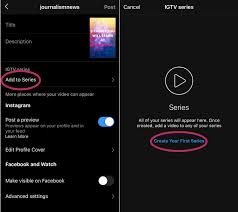
Now that we’ve covered the basics, let’s dive into how to use IGTV on Instagram. Here are the step-by-step instructions:
Step 1: Accessing Igtv
To access IGTV, follow these steps:
- Open the Instagram app and navigate to your profile.
- Tap on the three horizontal lines (≡) in the top-right corner.
- Scroll down and select “IGTV” from the menu.
Step 2: Uploading a Video
Once you’re in the IGTV section, follow these steps to upload a video:
- Tap on the “+” icon at the bottom of the screen.
- Select the video you want to upload from your device’s gallery or camera roll.
- Trim and edit your video as needed using Instagram’s built-in editing tools.
- Add captions, tags, and location information if desired.
Step 3: Publishing Your Video
To publish your IGTV video, follow these steps:
- Tap on the “Next” button.
- Add a title, description, and tags to your video.
- Choose whether to share your video on your Instagram feed or keep it private.
- Select whether to share your video with Facebook or not.
Tips For Using Igtv Effectively
Now that you know how to use IGTV, here are some tips to help you get the most out of this feature:
Tip 1: Keep It Engaging
Keep your IGTV videos engaging by using eye-catching thumbnails, clear and concise captions, and relevant hashtags.
Tip 2: Be Consistent
Regularly posting high-quality content will keep your audience engaged and coming back for more.
Tip 3: Utilize End Screens
End screens are a great way to encourage viewers to watch more videos or visit your website. Use them strategically to drive engagement and boost your online presence.
Conclusion
IGTV is an exciting new feature that allows you to showcase your creativity, share your passions, and connect with your audience in a more engaging way. By following these step-by-step instructions and tips for using IGTV effectively, you’ll be well on your way to creating high-quality content that resonates with your viewers.
So, what are you waiting for? Start exploring the world of IGTV today and take your social media presence to new heights!
Common Questions
Here are some frequently asked questions about IGTV:
- Q: Can I Share Videos Longer Than 60 Minutes on Igtv?
A: No, unfortunately not. IGTV has a maximum video length of 60 minutes. - Q: Can I Use Igtv on my Business Account?
A: Yes! IGTV is available for both personal and business accounts on Instagram. - Q: How do I Monetize my Igtv Videos?
A: While there are no direct monetization options within the IGTV feature, you can earn money through sponsored content, affiliate marketing, or by promoting your own products or services.
Common Issues
Here are some common issues users experience when using IGTV:
- Issue 1: Video Not Uploading Successfully
Solution: Check that your video meets the minimum requirements (60 minutes or less), and ensure you have a stable internet connection. - Issue 2: Unable to Access Igtv Feature
Solution: Try restarting the Instagram app, checking for updates, or clearing cache and data.
Conclusion
Using IGTV on Instagram can be an incredible way to engage with your audience, share your passions, and grow your online presence. By following these step-by-step instructions and tips, you’ll be well-equipped to create high-quality content that resonates with viewers. Happy creating!
Table of Contents
- What is IGTV?
- Benefits of Using IGTV
- Getting Started with IGTV
- Tips for Using IGTV Effectively
- Conclusion
- Common Questions
- Common Issues
References
- Instagram, IGTV Help Center
- TechCrunch, Instagram Launches IGTV, a Feature to Host Long-Form Videos


