
Best Apps For Technical Cartoonists: A Guide to Unlocking Your Creativity
Are you a technical cartoonist looking to take your skills to the next level? Do you want to create stunning 2D and 3D designs without breaking the bank? Look no further! In this article, we’ll explore the best apps for technical cartoonists on both Android and iOS devices.
Introduction
As a technical cartoonist, you understand the importance of having the right tools at your disposal. With so many apps available in the market, it can be overwhelming to choose the best one for your needs. That’s why we’ve curated this list of top-notch apps that will help you unlock your creativity and bring your designs to life.
Top Apps For Technical Cartoonists on Android
- Autocad
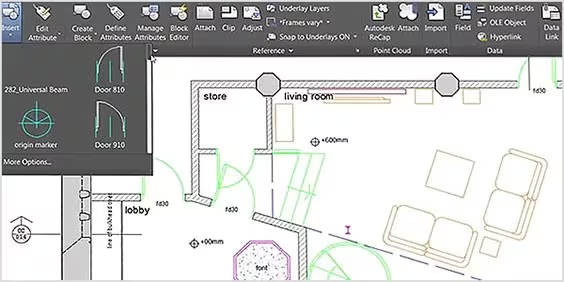
AutoCAD is a powerful app developed by Autodesk that allows you to create, modify, and manage technical drawings in 2D and 3D. With its intuitive interface and robust features, AutoCAD is an ideal choice for professionals and hobbyists alike.- Cost: $3.99/Month (Premium) or free with ads
- Features: Create and edit DWG files, use advanced editing tools, access cloud storage
- Dwg Fastview-cad Viewer
This app allows you to view, create, and modify DWG and DXF files without the need for a computer. With its user-friendly interface, you can easily design, navigate, and export your creations.- Cost: Free with ads or $5.49/Month (Premium)
- Features: View and edit DWG and DXF files, use advanced editing tools, access cloud storage
- Gnacad
GnaCAD is a free app that offers a range of CAD-related features, including drawing, editing, and viewing. While it’s not as robust as some other apps on this list, it’s a great option for those on a tight budget.- Cost: Free with ads
- Features: Draw and edit 2D and 3D designs, use advanced editing tools, access cloud storage
Other Noteworthy Apps
- Cad Pockets
This app is designed specifically for tablet devices and offers a range of features, including viewing, modifying, and creating DWG and DWF files.- Cost: Free with ads or $7.99 (Premium)
- Features: View and edit DWG and DWF files, use advanced editing tools, access cloud storage
- Concepts
This app allows you to create 3D designs in a range of formats, including STL, OBJ, and others.- Cost: Free with ads or $2.09 (Premium)
- Features: Create 3D models, use advanced editing tools, access cloud storage
Top Apps For Technical Cartoonists on Ios
- Autocad
The iOS version of AutoCAD is identical to its Android counterpart and offers the same features and functionality.- Cost: $3.99/Month (Premium) or free with ads
- Features: Create and edit DWG files, use advanced editing tools, access cloud storage
- Umake
This app allows you to create 2D designs that can be rotated to view in 3D, making it ideal for architects, designers, and artists.- Cost: Free with ads or $16.99/Month (Premium)
- Features: Create 2D designs, rotate to view in 3D, use advanced editing tools
- 3DC.Io
This app allows you to create 3D models in a range of formats, including OBJ and STL.- Cost: Free with ads or $1.09 (Premium)
- Features: Create 3D models, use advanced editing tools, access cloud storage
Other Noteworthy Apps
- Morpholio Trace
This app is designed specifically for architects, designers, and artists and offers a range of features, including layout design and project management.- Cost: Free with ads or $7.99/Month (Premium)
- Features: Create layouts, manage projects, use advanced editing tools
- Shapr
This app allows you to create 3D models in a range of formats, including OBJ and STL.- Cost: Free with ads or $32.99 (Premium)
- Features: Create 3D models, use advanced editing tools, access cloud storage
Conclusion
As a technical cartoonist, having the right tools at your disposal is crucial to bringing your designs to life. Whether you’re on Android or iOS, these apps will help you unlock your creativity and take your skills to the next level.
Frequently Asked Questions (FAQs)
- Q: What Are The Best Apps For Technical Cartoonists?
A: The top apps for technical cartoonists include AutoCAD, DWG FastView-CAD Viewer, GnaCAD, CAD Pockets, Concepts, and uMake. - Q: Can I Use These Apps on my Ipad or Iphone?
A: Yes, many of the apps listed above are available on both Android and iOS devices. - Q: Do I Need to Create an Account to Use These Apps?
A: Some apps may require you to create an account to access premium features or cloud storage. - Q: Can I Export my Designs From These Apps?
A: Yes, most of the apps listed above allow you to export your designs in a range of formats. - Q: Are These Apps Free or do They Cost Money?
A: Some apps are free with ads, while others require a subscription or one-time payment. - Q: Can I Use These Apps For Personal or Commercial Projects?
A: Check the terms and conditions of each app to determine their usage policies. - Q: Are These Apps Available in my Region?
A: Most of the apps listed above are available globally, but it’s always best to check your regional store for availability.
Bonus Tips
- Practice Makes Perfect: The more you use these apps, the better you’ll become at creating stunning designs.
- Experiment With Different Formats: Try exporting your designs in different formats to see which one works best for your needs.
- Join Online Communities: Connect with other technical cartoonists and designers to learn from their experiences and share your own.
Happy designing!


