
How to Forward Messages on Whatsapp to Numbers Not in Your Contacts
Are you struggling to find a way to send messages to people who aren’t saved in your contacts on WhatsApp? You’re not alone! Many users face this issue, but don’t worry, we’ve got the solution for you. In this article, we’ll guide you through the steps of forwarding messages on WhatsApp to numbers that are not in your contact list.
Why Can’t I Add People to My Contacts?
There could be several reasons why you can’t add someone’s number to your contacts. Maybe they’re avoiding you, or perhaps they’re just not interested in adding you as a contact. Whatever the reason, we’ve got a workaround for you.
Forwarding Messages on Whatsapp: A Step-by-step Guide
To forward messages on WhatsApp to numbers that aren’t in your contacts, follow these simple steps:
Sending Messages on Whatsapp With Android
On Android devices, follow these steps:
- Open Whatsapp: Launch the WhatsApp app on your Android device.
- Tap The New Chat Button: Tap the new chat button, usually represented by a pencil icon or a green dot.
- Enter The Phone Number: Enter the phone number of the person you want to contact in the search bar.
- Tap Chatta: Tap the “Chatta” button next to the phone number.
And that’s it! You’ve successfully forwarded a message on WhatsApp to someone who wasn’t in your contacts.
Sending Messages on Whatsapp With Iphone
On iPhones, follow these steps:
- Open Whatsapp: Launch the WhatsApp app on your iPhone.
- Tap The New Chat Button: Tap the new chat button, usually represented by a pencil icon or a green dot.
- Enter The Phone Number: Enter the phone number of the person you want to contact in the search bar.
- Tap Chatta: Tap the “Chatta” button next to the phone number.
Easy peasy!
Sending Messages on Whatsapp With Pc
On PCs, follow these steps:
- Open Whatsapp Web: Open WhatsApp Web on your computer.
- Enter The Phone Number: Enter the phone number of the person you want to contact in the search bar.
- Tap Chatta: Tap the “Chatta” button next to the phone number.
It’s just as easy on PC!
What If I Want to Forward a Message From My Browser?
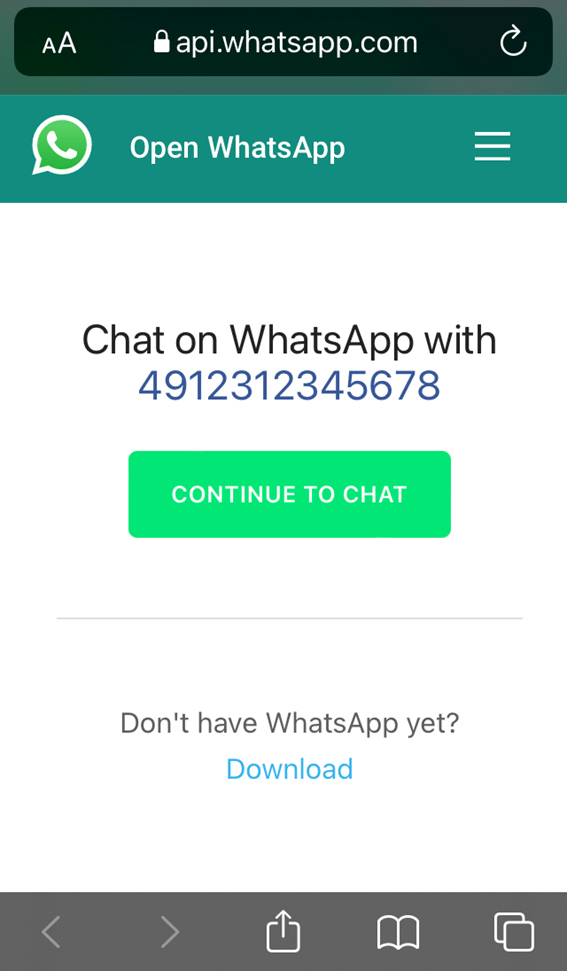
You can also forward messages on WhatsApp from your browser by using a specific URL format. For example, if you want to contact someone with the international prefix +39 and phone number 333000000, you would use the following URL:
Https://Wa.Me/39333000000
Just enter this URL in your browser, tap “Chatta,” and follow the prompts.
Troubleshooting: What If My Messages Don’t Forward?
If your messages aren’t forwarding as expected, try resetting the associations for the WhatsApp app on your Android device. This might resolve any issues you’re experiencing.
Conclusion
Forwarding messages on WhatsApp to numbers not in your contacts is a breeze once you know the trick! Whether you’re using an Android or iPhone device, or even your PC, these simple steps will get you up and running in no time. So go ahead, give it a try, and enjoy chatting with friends and family who aren’t in your contacts!
Frequently Asked Questions (FAQs)
- Q: Can I Forward Messages on Whatsapp to Numbers Not in my Contacts?
A: Yes, you can! Just follow the steps outlined above. - Q: Why Can’t I Add People to my Contacts?
A: There could be several reasons why you can’t add someone’s number to your contacts. Maybe they’re avoiding you, or perhaps they’re just not interested in adding you as a contact. - Q: Can I Use Whatsapp Web to Forward Messages?
A: Yes! You can also forward messages on WhatsApp from your browser using the specific URL format. - Q: What if my Messages Don’t Forward?
A: Try resetting the associations for the WhatsApp app on your Android device. This might resolve any issues you’re experiencing.


