
How to Get Spotify Premium Free: A Step-by-step Guide
Are you tired of listening to music on Spotify with ads and limited features? Do you want to enjoy your favorite tunes without any interruptions? Look no further! In this article, we’ll show you how to get Spotify Premium free for a month or even longer.
What is Spotify Premium?
Spotify Premium is the paid version of the popular music streaming service. It offers ad-free listening, offline playback, and high-quality audio streams up to 320kbps. With Premium, you can also access exclusive features like cross-device playback and improved sound quality.
How to Get Spotify Premium Free on PC And Mac
Getting Spotify Premium free on your PC or Mac is relatively easy. Here’s what you need to do:
- Go to The Spotify Website: Open your web browser and navigate to www.Spotify.Com.
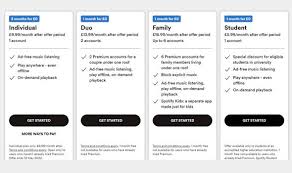
- Choose Your Subscription Plan: Select the individual, duo, family, or student plan that suits your needs.
- Click on “Start”: Click on the “Start” button next to your chosen plan.
- Sign In: If you already have a Spotify account, sign in with your username and password. Otherwise, create a new account by filling out the registration form.
- Select Your Payment Method: Choose your preferred payment method, such as credit/debit card or PayPal.
- Activate Your Free Trial: Click on the “Activate my Spotify Premium” button to start your free trial.
How to Get Spotify Premium Free on Android
Getting Spotify Premium free on your Android device is also easy:
- Open The Spotify App: Open the Spotify app on your Android device.
- Tap on “Access”: Tap on the “Access” button at the top right corner of the screen.
- Sign In: Sign in with your Spotify account or create a new one.
- Tap on “Premium”: Tap on the “Premium” option in the menu.
- Select Your Plan: Choose your preferred subscription plan, such as individual, duo, family, or student.
- Click on “Get Started”: Click on the “Get started” button to start your free trial.
How to Get Spotify Premium Free on Iphone
Unfortunately, it’s not possible to get Spotify Premium free directly from the iOS app. However, you can follow these steps:
- Open Safari: Open Safari or any other browser on your iPhone.
- Go to The Spotify Website: Navigate to www.Spotify.Com.
- Sign In: Sign in with your Spotify account or create a new one.
- Follow The Same Steps: Follow the same steps as described above for PC and Mac.
How to Get Spotify Premium Free Forever
While it’s not possible to get Spotify Premium free forever, you can consider the following alternatives:
- Convince Friends to Gift You a Subscription: Ask your friends or family members to gift you a Spotify subscription.
- Use The Student Plan: If you’re a student, you can use the student plan to get Spotify Premium at a discounted price.
- Share With Family Members: Share your Spotify account with family members to reduce the costs of subscription.
Conclusion
Getting Spotify Premium free is a straightforward process that requires minimal effort. By following these steps, you can enjoy ad-free listening, offline playback, and high-quality audio streams on your PC, Mac, Android device, or iPhone. Remember to take advantage of the free trial period and consider alternative solutions if you want to keep using Spotify without ads.
Frequently Asked Questions
- Q: How Long Does The Free Trial Last?
A: The free trial lasts for 1 month, but it can vary depending on the subscription plan. - Q: Can I Get Spotify Premium Free Forever?
A: No, it’s not possible to get Spotify Premium free forever. However, you can consider alternative solutions like sharing with family members or using the student plan. - Q: How do I Cancel my Subscription?
A: To cancel your subscription, go to the Spotify website, sign in with your account, and follow the cancellation process. - Q: Can I Use Spotify Premium on Multiple Devices?
A: Yes, you can use Spotify Premium on up to 5 devices simultaneously depending on the subscription plan. - Q: Is Spotify Premium Worth It?
A: Yes, Spotify Premium is definitely worth it if you’re a music enthusiast and want to enjoy ad-free listening, offline playback, and high-quality audio streams. - Q: Can I Get a Refund For my Subscription?
A: No, Spotify does not offer refunds for subscriptions. - Q: How do I Contact Spotify Support?
A: You can contact Spotify support through their website or by visiting the Spotify Help Center.


