
How to Forward a Heavy Video on Whatsapp
Are you tired of not being able to forward heavy videos on WhatsApp? Do you want to share your favorite concert moments with friends, but the file is too big? Don’t worry, we’ve got you covered! In this article, we’ll show you how to compress and forward heavy videos on WhatsApp.
Informazioni Preliminari
Before we dive into the tutorial, let’s make a few things clear. WhatsApp has limitations on the maximum size of files that can be forwarded in chats. The limit is 16 MB for all types of multimedia files, including videos. However, if you want to forward a video as an email attachment or document, the limit is 2 GB.
Compressing a Heavy Video on Android
If you’re using an Android smartphone and want to compress a heavy video before forwarding it on WhatsApp, we recommend using the Video Compressor Panda app. This free app allows you to reduce the size of your video by selecting the final quality and format. You can also use other apps like Compress Video – Reduce or Video Editor.
To compress a video on Android:
- Download and install the Video Compressor Panda app from the Google Play Store.
- Open the app and select the video you want to compress.
- Choose the desired output format and quality.
- Wait for the compression process to complete.
- Save the compressed video in your gallery.
Compressing a Heavy Video on Iphone
If you’re using an iPhone, you can also use the Compressor Video – Reduce app to compress heavy videos before forwarding them on WhatsApp. This app allows you to adjust the resolution, bitrate, and frame rate of your video.
To compress a video on iPhone:
- Download and install the Compressor Video – Reduce app from the App Store.
- Open the app and select the video you want to compress.
- Choose the desired output format and quality.
- Adjust the compression settings as needed.
- Wait for the compression process to complete.
- Save the compressed video in your camera roll.
Forwarding a Heavy Video on Whatsapp
Once you’ve compressed your heavy video, you can forward it on WhatsApp using the following steps:
- Open WhatsApp and select the chat where you want to send the video.
- Tap the paperclip icon to attach media.
- Select the compressed video from your gallery or camera roll.
- Wait for the upload process to complete.
- Forward the video by tapping the forward button.
Forwarding a Heavy Video on Whatsapp Computer
If you’re using WhatsApp on your computer, you can compress and forward heavy videos using the following steps:
- Download and install the Adapter software from the official website.
- Open the software and select the video you want to compress.
- Choose the desired output format and quality.
- Wait for the compression process to complete.
- Save the compressed video on your computer.
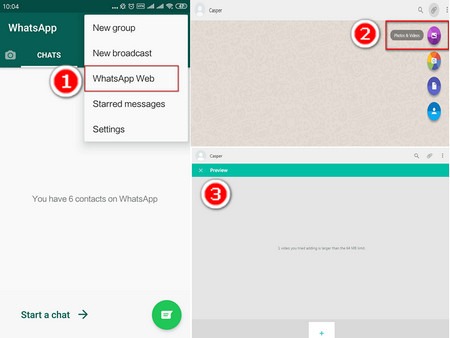
- Launch WhatsApp on your computer and select the chat where you want to send the video.
- Drag and drop the compressed video into the chat window.
- Forward the video by clicking the forward button.
Services For Forwarding Heavy Files
If you’re unable to compress your heavy video using the methods above, there are other services that allow you to upload and share large files. Some popular options include:
- WeTransfer: A service that allows you to upload and share files up to 2 GB.
- SwissTransfer: A free service that allows you to upload and share files up to 50 GB.
- JUMBOMail: A service that allows you to upload and share files up to 2 GB.
Services of Cloud Storage
You can also use cloud storage services like Google Drive, Dropbox, OneDrive, or iCloud Drive to upload your heavy video and share a link with others. This method is useful if you need to share large files frequently.
Conclusion
Forwarding heavy videos on WhatsApp can be a challenge, but by compressing them using the methods above, you can share them with friends and family without any issues. Remember to choose the right service or app for your needs, and always follow the instructions carefully to avoid any problems. Happy sharing!
Frequently Asked Questions
- Q: Can I Forward a Video That is Over 16 MB on Whatsapp?
A: No, WhatsApp has a limit of 16 MB for all types of multimedia files, including videos. - Q: How do I Compress a Heavy Video on Android?
A: You can use the Video Compressor Panda app or other apps like Compress Video – Reduce or Video Editor. - Q: Can I Forward a Video That is Over 2 GB on Whatsapp?
A: No, the limit for forwarding documents and email attachments is 2 GB. - Q: What Services Can I Use to Forward Heavy Files?
A: You can use services like WeTransfer, SwissTransfer, JUMBOMail, or cloud storage services like Google Drive, Dropbox, OneDrive, or iCloud Drive. - Q: How do I Compress a Video on Iphone?
A: You can use the Compressor Video – Reduce app or other apps like iMovie or Adobe Premiere Rush. - Q: Can I Forward a Video That is Over 16 MB on Whatsapp Computer?
A: Yes, you can compress and forward heavy videos using Adapter software or cloud storage services like Google Drive or Dropbox.
I hope this article has been helpful in explaining how to forward heavy videos on WhatsApp! If you have any further questions or need more assistance, feel free to ask.


