
Unlocking The Power of Algobuild: A Comprehensive Guide
Are you an aspiring programmer or a seasoned developer looking to enhance your skills? Look no further than AlgoBuild, a revolutionary software that simplifies the programming process and makes it accessible to everyone.
What is Algobuild?
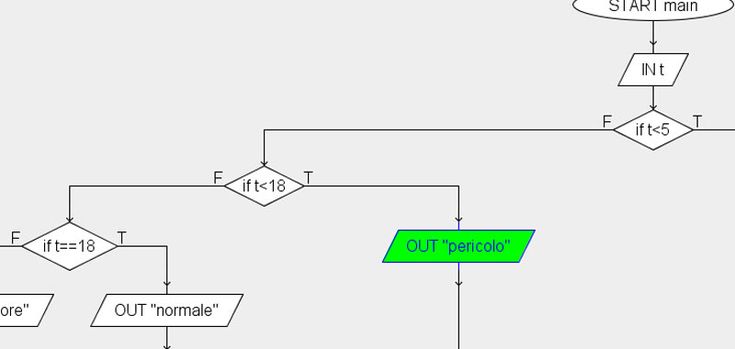
AlgoBuild is a didactic software that enables users to create diagrammi of flow and block diagrams, making it easier to visualize and understand complex algorithms. This innovative tool is designed to help beginners learn programming concepts in a fun and interactive way, while also providing experienced developers with a powerful platform for creating and testing algorithms.
Why Choose Algobuild?
AlgoBuild offers several benefits that make it an ideal choice for programmers of all levels:
- Free Download: AlgoBuild can be downloaded for free on Windows, macOS, and Linux platforms.
- User-friendly Interface: The software features a simple and intuitive interface that makes it easy to use, even for those with no prior programming experience.
- No Installation Required: Unlike other software applications, AlgoBuild does not require installation, making it a convenient option for users who value simplicity.
System Requirements
Before downloading AlgoBuild, ensure that your system meets the following requirements:
- Operating System: Windows 10 or macOS High Sierra (or later versions)
- Java Runtime Environment (JRE): Java 6 or later version must be installed on your computer.
- Processor: Intel Core i3 or AMD equivalent
- Ram: 4 GB or more
How to Download Algobuild
To download AlgoBuild, follow these simple steps:
- Visit the official website of AlgoBuild and click on the “Download” button.
- Select your operating system (Windows or macOS) and click on the corresponding link.
- Wait for the download process to complete. The file will be saved in your downloads folder.
- Extract the contents of the ZIP file using a utility compression tool like WinZip or 7-Zip.
- Run the AlgoBuild executable file to launch the software.
How to Use Algobuild
Once you have downloaded and installed AlgoBuild, follow these steps to get started:
- Launch AlgoBuild by double-clicking on the executable file.
- The first time you run AlgoBuild, a configuration window will appear. Click “Yes” to proceed with the automatic configuration.
- If you have purchased a code activation key, click on the “User” menu and select “Record user” to register your account.
Benefits of Using Algobuild
Using AlgoBuild offers several benefits, including:
- Improved Understanding: AlgoBuild’s diagrammi of flow and block diagrams make it easier to visualize and understand complex algorithms.
- Increased Productivity: The software enables developers to create and test algorithms quickly and efficiently.
- Access to Advanced Features: AlgoBuild provides access to advanced features, such as algorithm testing and debugging tools.
Conclusion
AlgoBuild is a powerful software that simplifies the programming process and makes it accessible to everyone. With its user-friendly interface, free download option, and no installation required, AlgoBuild is an ideal choice for programmers of all levels. By following the simple steps outlined in this guide, you can unlock the full potential of AlgoBuild and take your programming skills to the next level.
Frequently Asked Questions (FAQs)
- Q: Is Algobuild Free?
A: Yes, AlgoBuild can be downloaded for free on Windows, macOS, and Linux platforms. - Q: Do I Need to Install Algobuild?
A: No, AlgoBuild does not require installation, making it a convenient option for users who value simplicity. - Q: What Are The System Requirements For Algobuild?
A: AlgoBuild requires Windows 10 or macOS High Sierra (or later versions), Java Runtime Environment (JRE) 6 or later version, and Intel Core i3 or AMD equivalent processor. - Q: Can I Use Algobuild on Linux Platforms?
A: Yes, AlgoBuild can be downloaded and used on Linux platforms. - Q: What Are The Benefits of Using Algobuild?
A: Using AlgoBuild offers improved understanding, increased productivity, and access to advanced features.


