
Connecting Your Home Theatre to Tv: A Step-by-step Guide
As a homeowner, you want to enhance your entertainment experience by connecting your home theatre system to your TV. This guide will walk you through the process of setting up your home theatre, from choosing the right components to configuring them for optimal performance.
Why Connect Your Home Theatre to Tv?
Connecting your home theatre to your TV offers several benefits:
- Improved audio quality: With a separate amplifier and speakers, you can enjoy high-quality sound that’s tailored to your space.
- Enhanced cinematic experience: By connecting your home theatre to your TV, you can immerse yourself in movies and shows with immersive audio and stunning visuals.
- Flexibility and convenience: A home theatre system gives you the freedom to create a customised entertainment setup that suits your preferences.
Understanding Home Theatre Components
Before we dive into the setup process, let’s understand the key components involved:
- Speakers (diffusori): These are the devices responsible for producing sound. They come in various configurations, such as 2.1, 5.1, Or 7.1.
- Amplifier: This device amplifies audio signals from your TV or other sources to drive your speakers.
- Subwoofer (sub): A dedicated speaker that produces low-frequency sounds, enhancing the overall audio experience.
Choosing The Right Components
To ensure seamless connectivity between your home theatre and TV, select components that are compatible with each other. Consider the following:
- Speakers: Choose speakers that fit your room’s dimensions and budget.
- Amplifier: Select an amplifier that matches your speaker configuration (e.G., 2.1 Or 5.1).
- Subwoofer: If you opt for a subwoofer, ensure it’s compatible with your amplifier.
Setting Up Your Home Theatre
Now that you’ve chosen the right components, follow these steps to set up your home theatre:
Step 1: Connect Speakers to Amplifier
Connect speaker cables from each speaker to the corresponding input on the amplifier. Make sure to use the correct colour-coded cables (usually red and white).
Step 2: Connect Subwoofer to Amplifier
If you have a subwoofer, connect its cable to the amplifier’s dedicated subwoofer input.
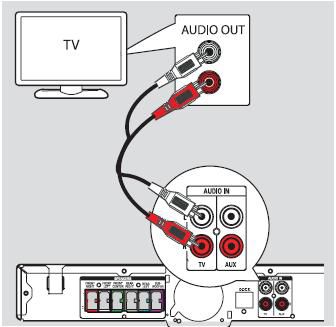
Step 3: Connect TV to Amplifier
Connect your TV’s audio output (usually RCA or HDMI) to the amplifier’s corresponding input.
Configuring Your Home Theatre
Once all components are connected, configure your home theatre for optimal performance:
- Adjust speaker settings on your TV to match your home theatre configuration.
- Set up any additional features, such as Dolby Digital 5.1 Or DTS:X surround sound.
Tips And Variations
Consider the following variations and tips when setting up your home theatre:
- Use an optical cable for high-quality audio transmission.
- If you have a separate amplifier for your TV, connect it directly to the amplifier for improved audio quality.
- Experiment with different speaker configurations to find the perfect setup for your space.
By following these steps and considering variations, you’ll be able to set up an immersive home theatre system that enhances your entertainment experience.


