
How to Uninstall Avg Antivirus
If you’ve had AVG antivirus installed on your computer for a week, and you’ve decided it’s not the best fit for your needs, but you’re having trouble uninstalling it, don’t worry! I’m here to help.
Uninstalling AVG antivirus can be a bit tricky, especially if you’re not familiar with the process. But fear not, my friend, as I’ll guide you through each step of the way.
Why Uninstall Avg Antivirus?
Before we dive into the uninstallation process, let’s take a moment to reflect on why you might want to uninstall AVG antivirus in the first place.
Perhaps you’ve discovered another antivirus program that better suits your needs. Maybe you’re experiencing compatibility issues with AVG and other software on your computer. Whatever the reason, I’m here to help you safely remove AVG antivirus from your system.
Uninstalling Avg Antivirus From Windows
The process of uninstalling AVG antivirus is relatively straightforward on Windows. Here’s a step-by-step guide:
- Click Start, then click Settings (or press the Windows key + I).
- In the Settings window, click Apps.
- Click Avg Antivirus or Avg Internet Security in the list of installed apps.
- Click Uninstall.
- Follow the prompts to complete the uninstallation process.
If you encounter any issues during this process, don’t worry! We’ll explore alternative methods below.
Alternative Method: Using Avg Antivirus Cleaner
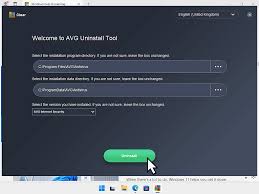
If the standard uninstallation method doesn’t work for you, you can try using the AVG Antivirus Cleaner tool. This utility is designed specifically to remove AVG antivirus from your system without leaving any residue behind.
Here’s how to use it:
- Download the AVG Antivirus Cleaner tool from the official AVG website.
- Run the installer and follow the prompts to complete the installation process.
- Launch the AVG Antivirus Cleaner tool and follow the on-screen instructions to remove AVG antivirus from your system.
Uninstalling Avg Antivirus From Mac
The process of uninstalling AVG antivirus is slightly different on a Mac. Here’s what you need to do:
- Quit all AVG-related applications, including the AVG icon in the dock.
- Click Applications in the Finder window.
- Locate and click Avg Antivirus or Avg Internet Security in the list of installed apps.
- Drag the app to the Trash icon.
- Empty the Trash to complete the uninstallation process.
Uninstalling Avg Secure Browser
If you’re experiencing issues with AVG Secure Browser, don’t worry! Uninstalling it is just as easy as uninstalling the antivirus program itself.
Here’s how to do it:
- Quit all AVG-related applications, including the AVG icon in the dock.
- Click Start, then click Settings (or press the Windows key + I).
- In the Settings window, click Apps.
- Click Avg Secure Browser in the list of installed apps.
- Click Uninstall.
Uninstalling Avg From Smartphone And Tablet
If you’re using a smartphone or tablet, uninstalling AVG is just as easy as on a computer!
Here’s how to do it:
- Locate the AVG app icon on your device.
- Long press on the icon until the context menu appears.
- Click Uninstall.
Conclusion
In this article, we’ve explored the process of uninstalling AVG antivirus from Windows, Mac, and mobile devices. Whether you’re experiencing compatibility issues or simply want to switch to a different antivirus program, I hope this guide has been helpful.
Remember, if you encounter any issues during the uninstallation process, don’t hesitate to reach out for assistance.
Frequently Asked Questions (FAQs)
- Q: How do I Know if Avg Antivirus is Causing Problems on my Computer?
A: If you’re experiencing slow performance or compatibility issues with other software, it’s possible that AVG antivirus is the culprit. - Q: Can I Uninstall Avg Antivirus Without Reinstalling Windows?
A: Yes! Uninstalling AVG antivirus won’t affect your operating system. - Q: Will Uninstalling Avg Antivirus Remove All my Saved Data?
A: No, uninstalling AVG antivirus will not delete any of your saved files or settings. - Q: Can I Reinstall Avg Antivirus After Uninstalling It?
A: Yes! If you change your mind about using AVG antivirus again, simply download and install the program from the official AVG website. - Q: What Are Some Alternative Antivirus Programs to Use Instead of Avg?
A: There are many great antivirus programs available on the market, such as Norton Antivirus, McAfee Antivirus, or Kaspersky Antivirus.
I hope this article has been informative and helpful! If you have any further questions or concerns, please don’t hesitate to reach out.


