
How to Download Disney+ Movies on Your Device
Are you a fan of Disney movies? Do you want to watch your favorite films offline, without relying on an internet connection? Look no further! In this article, we’ll guide you through the process of downloading Disney+ movies on your smartphone, tablet, PC, or Mac.
What You Need to Know Before Starting
Before we dive into the steps, there are a few things you should know:
- To download Disney+ movies, you need to have a subscription to the service.
- Not all Disney+ movies can be downloaded. Some content may not be available for offline viewing.
- The quality of the downloaded movie will depend on your device’s storage capacity and internet connection speed.
Downloading Disney+ Movies on Your Smartphone or Tablet
To download Disney+ movies on your smartphone or tablet, follow these steps:
- Open The Disney+ App: Launch the Disney+ app on your device. If you haven’t installed it yet, you can do so from the App Store (for iOS devices) or Google Play Store (for Android devices).
- Sign in to Your Account: Tap on the “Sign In” button and enter your login credentials.
- Access The Settings Menu: Tap on the profile icon at the top right corner of the screen, then tap on “Settings.”
- Choose The Quality Video Option: Select the desired video quality for downloaded content (Standard, Medium, or High).
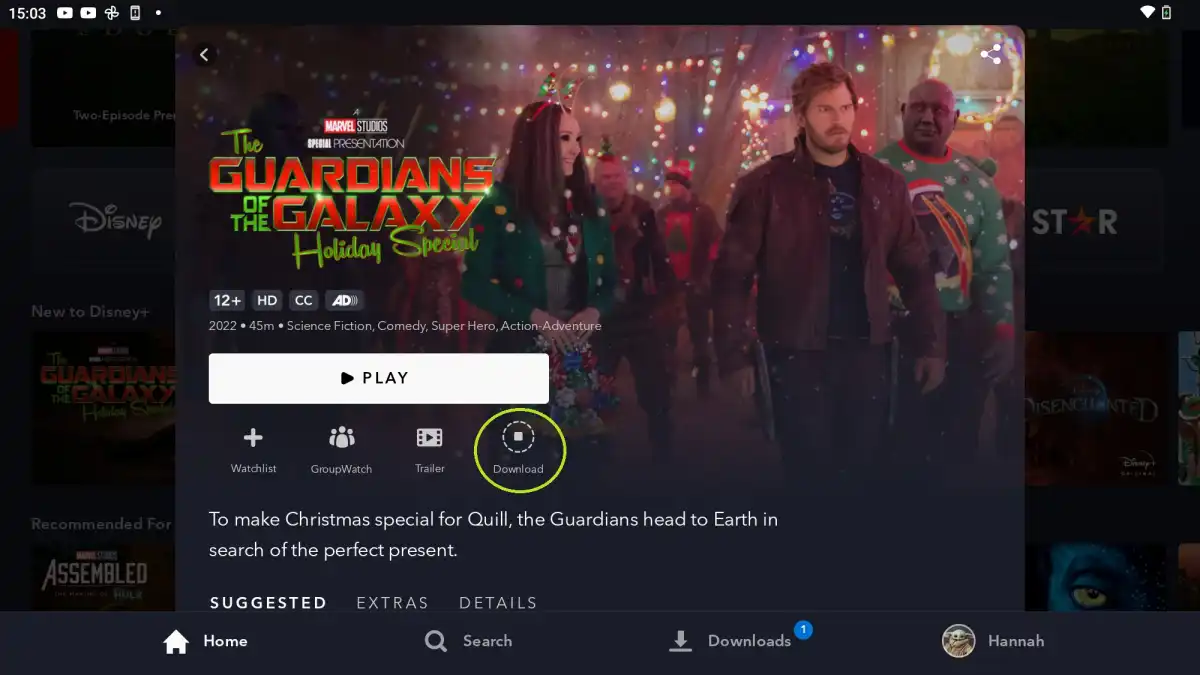
- Find The Movie You Want to Download: Browse through the Disney+ library and find the movie you’d like to download.
- Tap on The Download Button: Tap on the “Download” button next to the movie title.
- Wait For The Download to Complete: The movie will start downloading, depending on your device’s storage capacity and internet connection speed.
How to Download Disney+ Movies on Your PC or Mac
Unfortunately, it’s not currently possible to download Disney+ movies directly on your PC or Mac. However, you can still watch Disney+ content on these devices by streaming it through the web browser.
If you want to watch Disney+ movies on your PC or Mac, follow these steps:
- Open a Web Browser: Launch a web browser (such as Google Chrome, Safari, or Firefox) on your device.
- Go to The Disney+ Website: Visit the official Disney+ website and sign in to your account.
- Browse Through The Content Library: Find the movie you’d like to watch and click on it.
How to Manage Your Downloaded Movies
Once you’ve downloaded a Disney+ movie, you can manage it from within the app:
- Access The Download Section: Tap on the menu icon at the bottom left corner of the screen, then tap on “Downloads.”
- View Your Downloaded Movies: You’ll see a list of all the movies you’ve downloaded.
- Delete a Movie: Swipe right on the movie you want to delete and tap on the “Trash” icon.
Conclusion
Downloading Disney+ movies is a convenient way to enjoy your favorite films offline, without relying on an internet connection. By following these simple steps, you can download Disney+ movies on your smartphone or tablet and manage them from within the app.
Frequently Asked Questions (FAQs)
- Q: Can I Download Disney+ Movies on my PC or Mac?
A: Unfortunately, it’s not currently possible to download Disney+ movies directly on your PC or Mac. - Q: How do I Choose The Quality Video Option For Downloaded Content?
A: You can select the desired video quality (Standard, Medium, or High) from within the app settings menu. - Q: Can I Delete a Movie That’s Already Been Downloaded?
A: Yes, you can delete a movie by swiping right on it and tapping on the “Trash” icon. - Q: How Long do Downloaded Movies Remain Available?
A: Downloaded movies will remain available for as long as you maintain an active Disney+ subscription. - Q: Can I Transfer Downloaded Movies to Another Device?
A: Yes, you can transfer downloaded movies to a maximum of 10 different devices. - Q: What Happens if I Delete my Account?
A: If you delete your account, all downloaded movies will be deleted from your device. - Q: Can I Download Disney+ Movies on Multiple Devices at Once?
A: Yes, you can download Disney+ movies on multiple devices simultaneously.
Additional Tips
- Make sure you have enough storage space on your device to download and store movies.
- The quality of the downloaded movie will depend on your device’s internet connection speed.
- You may encounter some limitations when trying to download content from certain countries or regions.


