
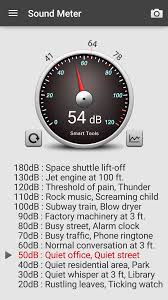
The Decibel Rumble: Measuring Sound Levels With Your Smartphone
Are you curious about the decibel levels in your living or working space? Have you ever wondered if there’s a way to measure the sound levels without investing in professional equipment? The answer is yes! With the right smartphone app, you can get an indication of the decibel levels in your surroundings. In this article, we’ll explore the best apps for measuring decibels and provide you with a step-by-step guide on how to use them.
Why Measure Decibels?
Measuring decibels is essential for various reasons. It helps you understand the level of noise pollution in your environment, which can affect your hearing health. Additionally, it’s crucial for industries like construction, manufacturing, and healthcare where sound levels are critical for worker safety and patient comfort.
The Limitations of Smartphone Apps
While smartphone apps can provide a rough estimate of decibel levels, they have limitations. The built-in microphones in smartphones are not designed to pick up low-frequency sounds or high-intensity noises. This means that the readings may not be accurate, especially in environments with complex sound patterns.
The Best Apps For Measuring Decibels
Here are some of the top apps for measuring decibels on Android and iOS devices:
1. Openoise (Android/iOS/iPadOS)
OpeNoise is a free app developed by HARP Piemonte, a regional environmental protection agency in Italy. This app provides a simple and user-friendly interface to measure sound levels. It’s available for both Android and iOS devices.
How to Use Openoise:
- Download and install the app on your device.
- Tap on the icon to launch the app.
- Follow the tutorial to configure the app.
- Authorize the use of the microphone.
- Choose from various visualization options, such as charts or sonograms.
- Restart the measurement by tapping on the circular arrow symbol.
- Save the data by tapping on the diskette symbol.
2. Niosh Sound Level Meter (iOS)
This app is developed by EA LAB for the National Institute for Occupational Safety and Health (NIOSH). It’s available only on iOS devices and provides a precise measurement of sound levels.
How to Use Niosh Sound Level Meter:
- Download and install the app.
- Authorize the use of the microphone.
- Choose from various visualization options, such as charts or sonograms.
- Restart the measurement by tapping on the circular arrow symbol.
- Save the data by tapping on the diskette symbol.
3. Fonometro (Android)
Fonometro is a free app developed by ABC Apps to measure sound pressure levels. It’s available for Android devices and provides a simple interface to measure decibels.
How to Use Fonometro:
- Download and install the app.
- Authorize the use of the microphone.
- Choose from various visualization options, such as charts or sonograms.
- Restart the measurement by tapping on the circular arrow symbol.
- Save the data by tapping on the diskette symbol.
Calibrating Your App
To get accurate readings, it’s essential to calibrate your app. Here’s how to do it:
- Choose a source with a known sound level (e.G., A fan or a music player).
- Place your device 20 cm away from the source.
- Light the source and adjust the intensity until it matches the reference level.
- Tap on the calibration option in the app’s menu.
Conclusion
Measuring decibels with your smartphone can be a helpful tool for understanding noise pollution levels in your environment. While the apps mentioned above have limitations, they can provide a rough estimate of sound levels. Remember to calibrate your app and use it responsibly to ensure accurate readings. If you’re unsure about the accuracy of your measurements or need precise results, consider investing in professional equipment.
Frequently Asked Questions (FAQs)
- What is The Difference Between Decibel And Sound Level?
Decibels are a unit of measurement for sound levels, while sound levels refer to the actual noise intensity.
- How Accurate Are Smartphone Apps For Measuring Decibels?
Smartphone apps have limitations due to the built-in microphones’ design, which may not pick up low-frequency sounds or high-intensity noises.
- What is The Purpose of Calibrating an App?
Calibration ensures that your device accurately measures sound levels by matching a reference level with the actual intensity.
- Can I Use a Smartphone App to Measure Decibels in a Noisy Environment?
While apps can provide a rough estimate, they may not be accurate in environments with complex sound patterns or high noise levels.
- Are There Any Professional Instruments For Measuring Decibels?
Yes, dedicated instruments like sound level meters (Class 1) are available for precise measurements.
- Can I Enhance The Quality of Measurements Using External Microphones?
Yes, some apps allow you to connect external microphones for improved accuracy.
- Are There Any Free Apps For Measuring Decibels?
Yes, several free apps, like OpeNoise and Fonometro, are available for Android and iOS devices.
- Can I Use a Smartphone App to Measure Decibels in a Quiet Environment?
Yes, smartphone apps can provide accurate readings in quiet environments or when measuring low-frequency sounds.


